 8% OFF
E-Learning Management System Using Python and AI Chatbot
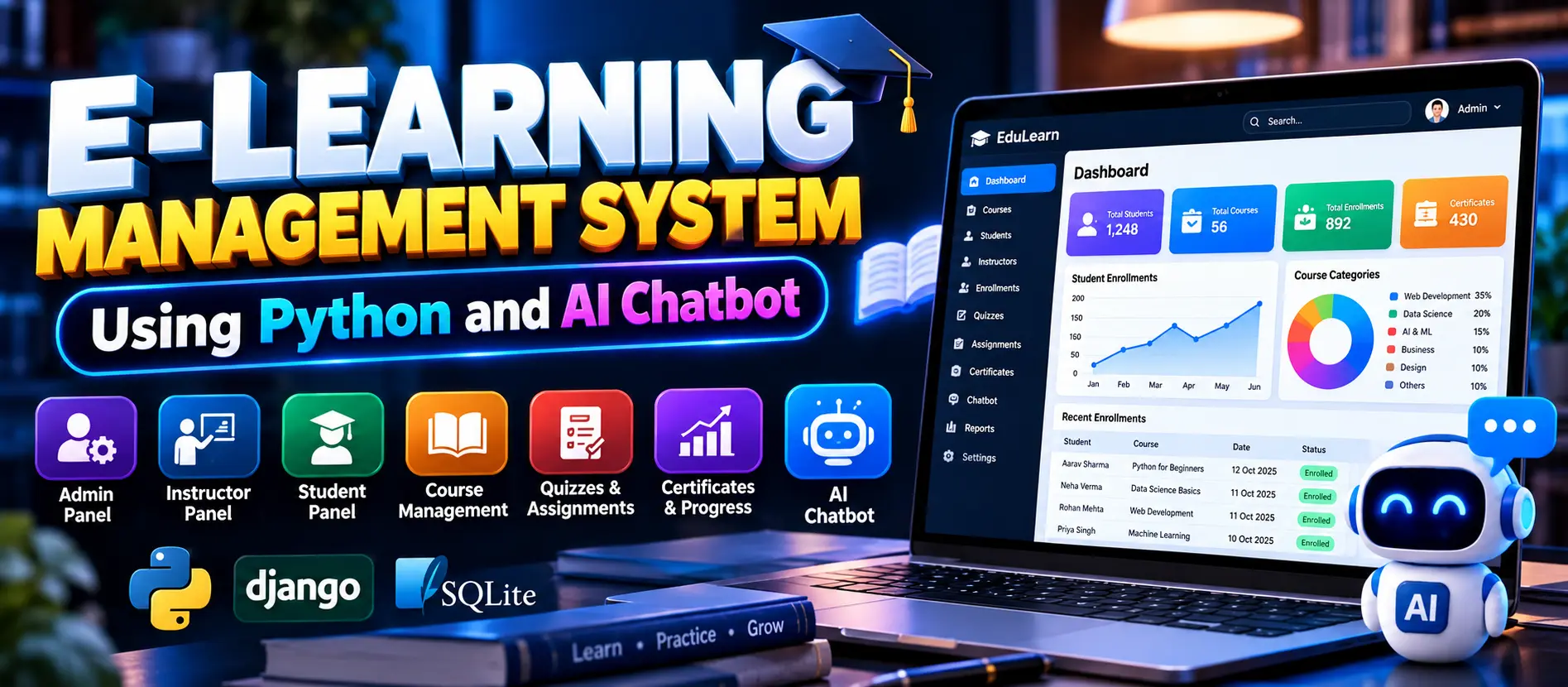
The E-Learning Management System Using Python and AI Chatbot is a Django-based web application that enables administrators, instructors, and students to manage courses, lessons, quizzes, assignments, enrollments, and learning progress. It includes certificate generation, course reviews, notifications, interactive dashboards, profile management, and a machine-learning chatbot using SQLite, Scikit-learn, TF-IDF, Logistic Regression, and NLTK.
Read more- Built with
- PythonDjangoMachine LearningBootstrapHTML/CSSJavaScript
- You get
- Source codeDatabaseProject reportPPTSetup guide
- Delivery
- Instant download after payment
Project Overview
The E-Learning Management System Using Python and AI Chatbot is a web-based educational platform developed using Python, Django, and SQLite. It provides separate Admin, Instructor, and Student panels to manage courses, lessons, quizzes, assignments, enrollments, and learning progress.
The application combines educational management features with a machine-learning chatbot, interactive Chart.js dashboards, profile management, and dark and light display modes. It demonstrates how web development and machine learning can work together in an online learning environment.
Available Features
- Custom Admin Panel: Manage users, course categories, courses, lessons, enrollments, quizzes, questions, assignments, submissions, reviews, certificates, notifications, and chatbot records.
- Instructor Panel: Manage assigned courses, lessons, quizzes, assignments, student submissions, grades, and feedback.
- Student Panel: Browse and search published courses, enroll in courses, access lessons, complete quizzes, submit assignments, and monitor learning progress.
- Course Management: Organize educational content into courses and lessons.
- Quiz Management: Create multiple-choice assessments and calculate quiz scores.
- Assignment Management: Submit assignments, review submissions, manage grades, and provide instructor feedback.
- Learning Progress Tracking: Record completed lessons and display course progress.
- Certificate Generation: Generate certificates when students complete all lessons in a course.
- Course Reviews: Allow students to submit ratings and comments.
- Notifications and Announcements: Display notifications and course announcements.
- Profile Management: Manage user profile information.
- AI Chatbot: Classify supported queries using TF-IDF, Logistic Regression, and NLTK-based text processing, with database-backed responses for supported questions.
- Chatbot Analytics: Monitor chatbot activity and retrain the machine-learning model.
- Interactive Dashboards: Display application statistics and visualizations using Chart.js.
- Dark and Light Mode: Switch between available interface themes.
Which Technologies Are Used in This Project?
- Programming Language: Python
- Backend Framework: Django
- Database: SQLite
- Frontend: HTML, CSS, JavaScript
- Machine Learning: Scikit-learn, TF-IDF, Logistic Regression
- Natural Language Processing: NLTK
- Dashboard Visualizations: Chart.js
More Details and Full Documentation
Explore the official UPDATEGADH project page for project information, screenshots, source package details, and installation instructions.
- Admin Dashboard
- User and Profile Management
- Course Category Management
- Course Management
- Lesson Management
- Student Enrollment Management
- Quiz and Question Management
- Assignment Management
- Assignment Submission Management
- Grading and Feedback Management
- Learning Progress Tracking
- Certificate Management
- Course Reviews and Ratings
- Notifications and Announcements
- AI Chatbot
- Chatbot Analytics and Model Retraining
- Interactive Dashboard and Charts
- Role-Based Access Control
- Dark and Light Mode
Step 1: Install Python and Visual Studio Code.
Step 2: Extract the project ZIP file and open the elearning folder in VS Code.
Step 3: Open the integrated terminal and create a virtual environment
python -m venv venv
Step 4: Activate the virtual environment in Windows PowerShell
.\venv\Scripts\Activate.ps1
If PowerShell blocks activation, run
Set-ExecutionPolicy -Scope Process Bypass
Then activate the environment again
.\venv\Scripts\Activate.ps1
Step 5: Upgrade pip and install dependencies
python -m pip install --upgrade pip
pip install -r requirements.txt
Step 6: Generate migrations if the lms/migrations directory does not contain an initial migration file, then apply migrations
python manage.py makemigrations lms
python manage.py migrate
Step 7: Create demo data
python manage.py seed_demo
Step 8: Train the AI chatbot
python manage.py train_chatbot
Step 9: Run the project tests
python manage.py test
Step 10: Start the development server
python manage.py runserver
Step 11: Open the application
http://127.0.0.1:8000/
Stuck while running it? Chat with us on WhatsApp for free installation help.
No reviews yet. Be the first to review this project.