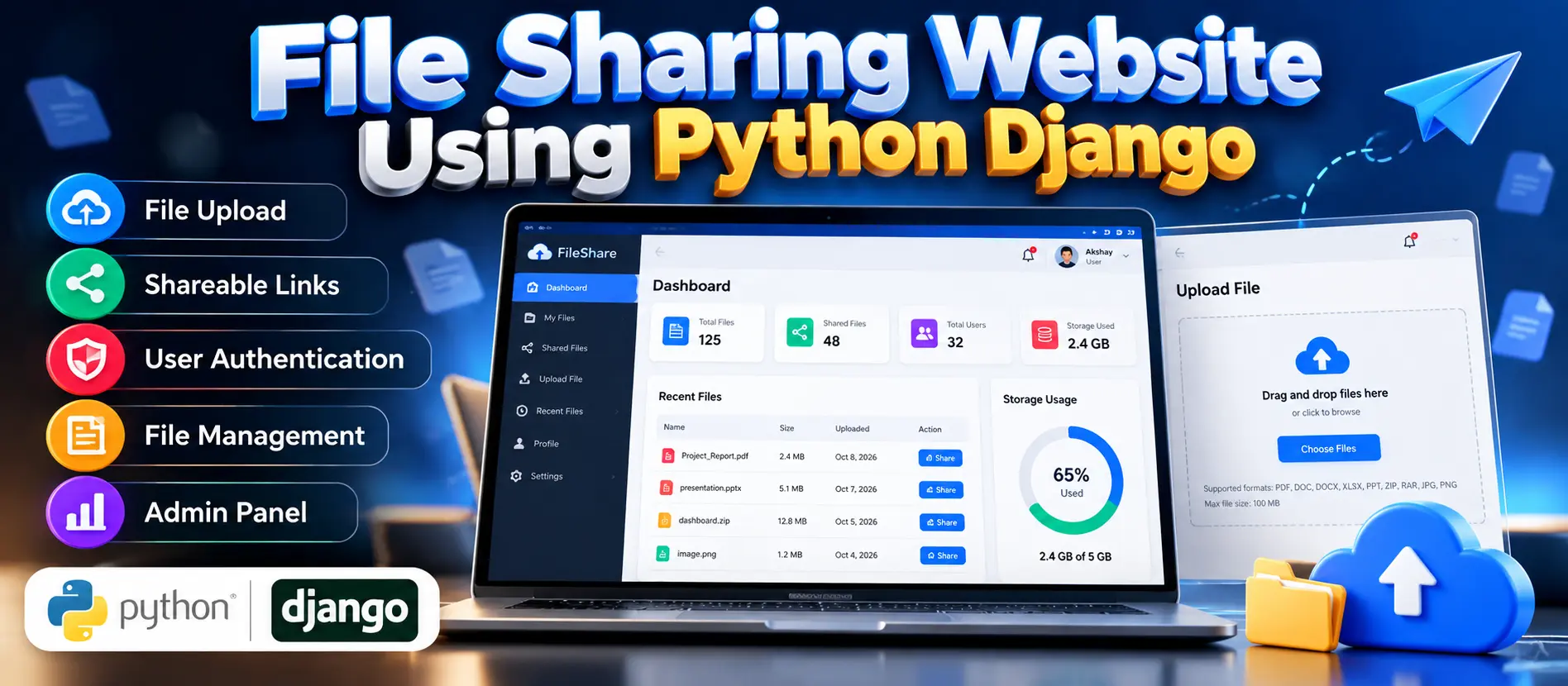
Demo Video
File Sharing Website Using Python and Django
File Sharing Website Using Python and Django is a web application that allows registered users to upload, manage and share files through links. Built with Python, Django, Django REST Framework and SQLite, it includes file privacy options, user account management and administrative reporting features.
What You Will Get
Project Overview
The File Sharing Website Using Python and Django is a web-based application designed to simplify file uploading, storage and sharing. It provides a centralized platform where registered users can upload supported files, manage their content and generate shareable links instead of transferring files individually.
Developed using Python and Django, the project demonstrates file handling, authentication, database operations and web application development. Its privacy options help manage file visibility according to the functionality implemented in the application.
The project uses SQLite to store structured application information and Django REST Framework to support API development where implemented. It is suitable for students who want practical experience building a file-sharing application with Python.
Available Features
File Uploading
Registered users can upload supported files through the website. File upload validation and size restrictions can be configured according to the application's requirements.
File Management
Users can manage their uploaded content through the available file-management functionality, helping keep shared documents and other supported files organized.
Shareable File Links
The application supports generating links for sharing uploaded files. This makes it convenient to provide access to selected content without manually transferring each file.
File Privacy Options
Privacy controls help manage file visibility and access according to the application's implemented settings. Actual access restrictions depend on the project's configuration.
User Account Management
The system uses Django authentication to support user login and access to protected functionality. Registered users can access the features available to their accounts.
Administrative Workspace
The administrative interface allows authorized administrators to manage user accounts, oversee uploaded files and review available file-related information.
Report Management
The project includes report-management functionality for reviewing system usage and file statistics, depending on the available reporting implementation.
User Roles
Administrator
- Manage user accounts.
- Oversee uploaded files and related information.
- Review available reports and usage statistics.
- Manage administrative operations.
Registered User
- Log in to the website.
- Upload supported files.
- Manage uploaded content where supported.
- Generate and share file links.
- Use available file privacy options.
Technology Stack
- Programming Language: Python
- Backend Framework: Django
- API Framework: Django REST Framework
- Database: SQLite
- Frontend: HTML and CSS
- Client-Side Interactivity: JavaScript
- Development Environment: Visual Studio Code
Software Requirements
- Python version compatible with the project's dependencies
- Django and the packages specified in requirements.txt
- Django REST Framework, if required by the project
- SQLite database
- Visual Studio Code or another Python-compatible editor
- A modern web browser
Installation and Execution
Extract the project files and open the project folder in Visual Studio Code. Create and activate a Python virtual environment, install the dependencies from requirements.txt, and apply the database migrations using Django's management commands.
Start the application with python manage.py runserver and open http://127.0.0.1:8000/ in your browser. Additional configuration may be required depending on the supplied project files.
Learning Outcomes
- Understanding Django application development.
- Implementing file uploads and file-management workflows.
- Working with authentication and access-control concepts.
- Connecting a web application to an SQLite database.
- Exploring API development with Django REST Framework.
Watch Project Demo
Watch File Sharing Website Using Python and Django Demo
More Details and Full Documentation
Project Modules
2. File Upload Module
3. Uploaded File Management Module
4. Shareable File Link Module
5. File Privacy Management Module
6. Registered User Module
7. Administrator Workspace
8. User Account Management Module
9. File Information Management Module
10. Report Management Module
11. Django REST Framework API Module
12. SQLite Database Integration Module
Installation Guide
1. Install Python and Visual Studio Code on your computer.
2. Extract the project ZIP file and open the project folder in VS Code.
3. Open the integrated terminal.
4. Check your Python installation using: python --version
5. Create a virtual environment using: python -m venv venv
6. Activate the environment on Windows using: venv\Scripts\activate
7. Install dependencies using: python -m pip install -r requirements.txt
8. Verify that the required Django and Django REST Framework packages are installed.
9. Apply database migrations using: python manage.py migrate
10. If the project requires a superuser account, create one using: python manage.py createsuperuser
11. Start the development server using: python manage.py runserver
12. Open http://127.0.0.1:8000/ in your browser.
13. Register or log in using the application's available account workflow.
14. Test file uploading, file management, sharing links and privacy options.
15. Verify the administrative features using an authorized administrator account.
16. If the project includes additional setup instructions or environment variables, follow the supplied project documentation.
FAQ for this project coming soon.
No reviews yet. Be the first to review!
Write a Review
Related Projects
 50% OFF
Featured
50% OFF
Featured
 70% OFF
Featured
70% OFF
Featured
 44% OFF
Featured
44% OFF
Featured
 33% OFF
Featured
33% OFF
Featured