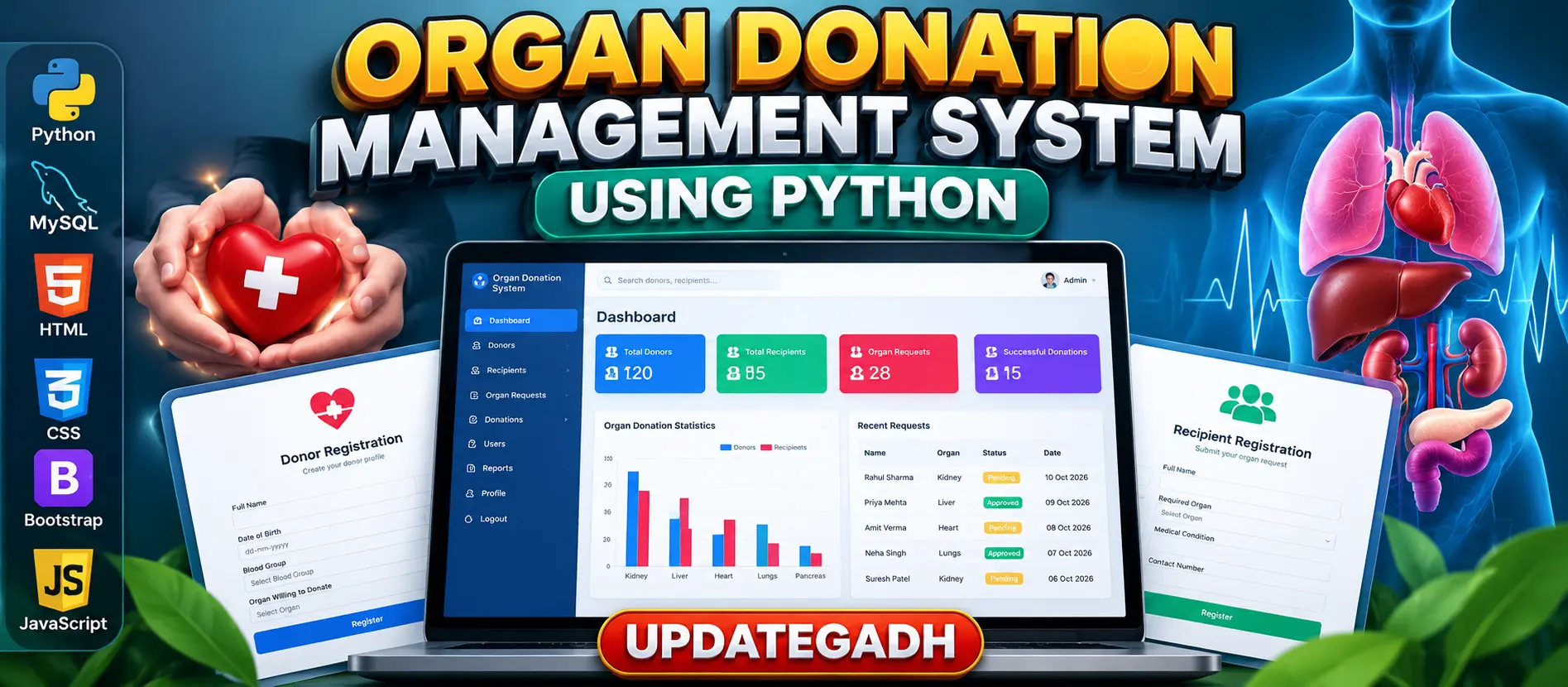
Organ Donation Management System Using Python and MySQL
Organ Donation Management System Using Python and MySQL is a web application for managing donor registration, recipient information, organ requests and donation-related records. It provides user authentication, donor and recipient record management, organ matching information and an administrator dashboard for organizing healthcare information.
What You Will Get
Project Overview
The Organ Donation Management System Using Python and MySQL is a web-based application designed to organize donor information, recipient registrations and organ donation requests. It provides a centralized platform where donors can submit their details, recipients can request required organs, and administrators can manage records through an administrative interface.
The project uses Python, MySQL, HTML, CSS, Bootstrap and JavaScript. Depending on the supplied implementation, Flask or Django may be used as the backend framework. The application demonstrates how database-driven web development can support the organization of healthcare information.
Available Features
User Authentication
The system provides a login facility for authorized users. Access can be organized according to the roles supported by the implementation, helping restrict access to relevant information and operations.
Donor Registration
Donors can submit personal information and details about the organs they are willing to donate. The submitted information is maintained in the database for administrative review.
Recipient Registration
Recipients can register their information and specify the organ they require. Their submitted details can then be reviewed by the administrator through the available management interface.
Donor and Recipient Record Management
The application stores donor and recipient information in a centralized MySQL database. This helps administrators organize, retrieve and maintain records more conveniently than relying entirely on manual records.
Organ Matching Information
The system organizes donor availability information alongside recipient requirements to support the identification of potential matches. This functionality is intended for information management and does not replace clinical compatibility assessments or professional organ allocation decisions.
Administrator Dashboard
The administrative interface provides access to donor records, recipient information and donation-related data. Administrators can review submitted information and manage records according to the functions available in the supplied implementation.
Database Management
MySQL stores and retrieves the application's donor, recipient and related records. The database supports centralized information management and helps maintain consistency across the application.
User Roles
Donor
- Register personal information.
- Submit organ donation details.
- Manage or update donor information where supported.
Recipient
- Register personal information.
- Specify the required organ.
- Submit organ requests for review.
Administrator
- Review donor and recipient records.
- Manage donation-related information.
- Access the administrative interface.
- Organize submitted records for further review.
Technology Stack
- Programming Language: Python
- Database: MySQL
- Frontend: HTML, CSS and JavaScript
- UI Framework: Bootstrap
- Backend Framework: Flask or Django, depending on the supplied implementation
- Development Environment: Visual Studio Code
Software and Tools Required
- Python
- MySQL Server
- Visual Studio Code
- pip package manager
- A web browser
- Framework and libraries required by the project source code
Project Applications
- Organizing donor registration information.
- Maintaining recipient records and organ requests.
- Managing organ availability information.
- Supporting administrative review of donation records.
- Demonstrating Python and MySQL integration in a healthcare application.
Installation and Execution
Extract the project files and open the folder in Visual Studio Code. Create a Python virtual environment, activate it and install the dependencies listed in requirements.txt, if provided. Configure MySQL using the database name and connection settings expected by the supplied source code.
Apply the database setup required by the project, then launch the application using the entry-point command that matches its framework. For a Flask implementation, the command may be python app.py. For a Django implementation, use the supplied manage.py commands and the configured Django development server.
Important Medical and Legal Considerations
This project is an educational information-management application. It does not independently establish medical compatibility or authorize organ allocation. Real-world deployment requires appropriate medical oversight, informed consent, privacy safeguards and compliance with applicable organ transplantation laws.
More Details and Full Documentation
View Organ Donation Management System Using Python and MySQL Details
Project Modules
2. Donor Registration Module
3. Recipient Registration Module
4. Donor Information Management Module
5. Recipient Information Management Module
6. Organ Availability Management Module
7. Organ Request Management Module
8. Organ Matching Information Module
9. Administrator Dashboard Module
10. Donation Record Management Module
11. MySQL Database Integration Module
12. Frontend Interface Module
Installation Guide
1. Install Python, MySQL Server and Visual Studio Code.
2. Extract the project ZIP file and open the project folder in VS Code.
3. Open the integrated terminal.
4. Check the Python installation using: python --version
5. Create a virtual environment using: python -m venv venv
6. Activate the environment on Windows using: venv\Scripts\activate
7. Install dependencies using: pip install -r requirements.txt, if the file is provided.
8. If requirements.txt is unavailable, install the packages required by the actual project source code.
9. Start the MySQL Server service.
10. Open phpMyAdmin or a MySQL client and create the database expected by the application.
11. If the source uses the example database name, create it using: CREATE DATABASE organ_donation_db;
12. Update the database connection settings with your local MySQL host, database name, username and password.
13. Import the supplied SQL file if one is included with the project.
14. Identify whether the supplied implementation uses Flask or Django.
15. For a Flask project with app.py as its entry point, run: python app.py
16. For a Django project, apply the required migrations and run: python manage.py runserver
17. Open the local URL displayed in the terminal.
18. Test donor registration, recipient registration, record management and administrative functions.
19. Verify that submitted records are stored correctly in MySQL.
20. Follow the supplied source documentation if its database name, entry point or configuration differs from these examples.
FAQ for this project coming soon.
No reviews yet. Be the first to review!
Write a Review
Related Projects
 23% OFF
Featured
23% OFF
Featured
 11% OFF
 Featured
 38% OFF
Featured
38% OFF
Featured