 17% OFF
 Hospital Management System Python
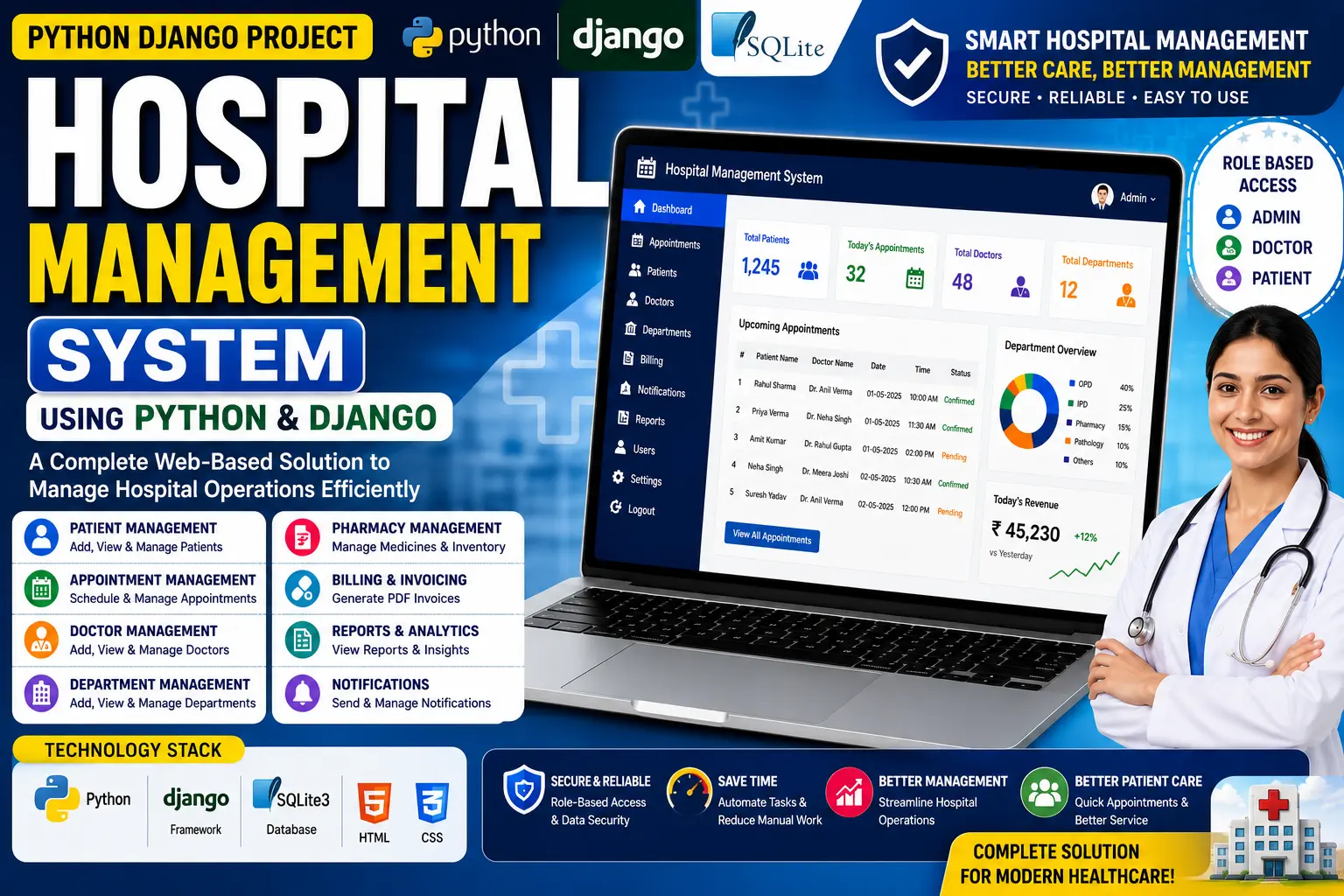
Hospital Management System Using Python and Django is a web-based healthcare application for managing doctors, patients, appointments and hospital billing with separate Admin, Doctor and Patient roles.
Read more- Built with
- PythonDjangoHTML/CSS
- You get
- Source codeDatabaseProject reportPPTSetup guide
- Delivery
- Instant download after payment
Hospital Management System Using Python and Django is a web-based healthcare application designed to digitally manage important hospital activities. Developed using Python, Django, HTML and CSS with an SQLite3 database, the system provides separate roles for Admin, Doctor and Patient to manage hospital operations, appointments, patient records and billing.
The application centralizes hospital management tasks such as doctor management, patient admission, appointment scheduling and invoice generation. Built using Django's MVT architecture, the project demonstrates role-based access control, CRUD operations, database management and PDF invoice generation in a practical healthcare application.
Key Features
- Admin Authentication: Admin users can create an account and securely log in to access hospital management functionality.
- Doctor Management: Administrators can review doctor job applications, approve or reject applications and manage doctor profiles.
- Patient Management: Admins can manage patient admissions, approve or reject admission requests, assign doctors and discharge patients after treatment.
- Appointment Management: Administrators can view patient appointment requests and approve, reject or manage appointments.
- PDF Invoice Generation: Admins can generate and download detailed PDF invoices containing medicine costs, room charges, doctor fees and other hospital expenses.
- Doctor Job Applications: Doctors can apply for employment through the system, with their accounts becoming active after administrator approval.
- Assigned Patient Records: Doctors can view information about patients assigned to them, including symptoms, names and contact information.
- Discharged Patient Records: Doctors can access a list of discharged patients to review completed treatments and medical history.
- Doctor Appointment Management: Doctors can view appointments booked by the administrator and manage completed consultations.
- Patient Account Creation: Patients can create accounts for hospital admission, with login access activated after administrator approval.
- Doctor Information: Patients can view details about their assigned doctor, including specialization, contact number and address.
- Online Appointment Booking: Patients can request appointments with doctors through the system.
- Appointment Status: Patients can check whether their appointment request is pending or confirmed.
- Patient Invoice Access: After discharge, patients can view and download their hospital invoice in PDF format with a complete breakdown of charges.
Technology Stack
| Component | Technology |
|---|---|
| Programming Language | Python |
| Backend Framework | Django |
| Frontend | HTML, CSS |
| Database | SQLite3 |
| Architecture | Django MVT |
| PDF Generation | xhtml2pdf |
System Requirements
- Python 3.7.6 or compatible Python environment
- Django
- SQLite3
- Visual Studio Code or another Python-compatible IDE
- Modern web browser such as Chrome, Firefox or Edge
- Required Python packages listed in requirements.txt
How It Works
The Hospital Management System is divided into three main roles: Admin, Doctor and Patient.
The Admin manages the overall hospital operations. Administrators can manage doctor applications, patient admissions, appointments and billing. After a patient is discharged, the administrator can generate a PDF invoice containing medical and service charges.
The Doctor can apply for a job and access the system after administrator approval. Doctors can view their assigned patients, review patient information, access discharged patient records and manage their scheduled appointments.
The Patient can create an account, access the system after approval, view assigned doctor information, request appointments and check appointment status. After discharge, patients can also view and download their PDF invoices.
Perfect For
This project is suitable for BCA, MCA, B.Tech CS/IT students, Python learners, Django developers and educators who want to learn how to develop a full-stack healthcare management application using Python and Django.
It can be used for academic submissions, final-year projects, portfolio development and learning practical concepts such as role-based access control, CRUD operations, database migrations, appointment management and PDF invoice generation.
Why This Project is Useful for Students
- Demonstrates full-stack web development using Python and Django.
- Covers real-world healthcare management use cases.
- Provides experience with role-based functionality for Admin, Doctor and Patient.
- Demonstrates database management and Django migrations.
- Includes PDF invoice generation for professional billing records.
- Provides practical experience with appointment scheduling and patient management.
Watch Project Demo
Watch the project walkthrough and setup tutorial on our YouTube channel.
▶ Watch on YouTube – Decode It
More Details & Full Documentation
For complete project details, source code and setup information, visit the official project page.
Admin Module
- Admin signup and login
- Doctor management
- Approve or reject doctor applications
- Patient admission management
- Approve or reject patient admissions
- Assign doctors
- Discharge patients
- Appointment management
- Generate PDF invoices
- Download billing invoices
Doctor Module
- Apply for job
- View assigned patients
- View patient symptoms and contact details
- View discharged patients
- View appointments
- Manage completed appointments
Patient Module
- Create account
- Login after admin approval
- View assigned doctor details
- Book appointments
- Check appointment status
- View PDF invoice
- Download invoice
- Install Python 3.7.6 and add Python to PATH
- Install Visual Studio Code and the Python extension
- Extract the project ZIP file
- Open the project folder in VS Code
- Open the terminal and move to the project directory
- Run: pip install -r requirements.txt
- Apply migrations using:
python manage.py makemigrations
python manage.py migrate
- Create an admin using:
python manage.py createsuperuser
- Run the project using:
python manage.py runserver
- Open the local Django server in your browser
Stuck while running it? Chat with us on WhatsApp for free installation help.
No reviews yet. Be the first to review this project.