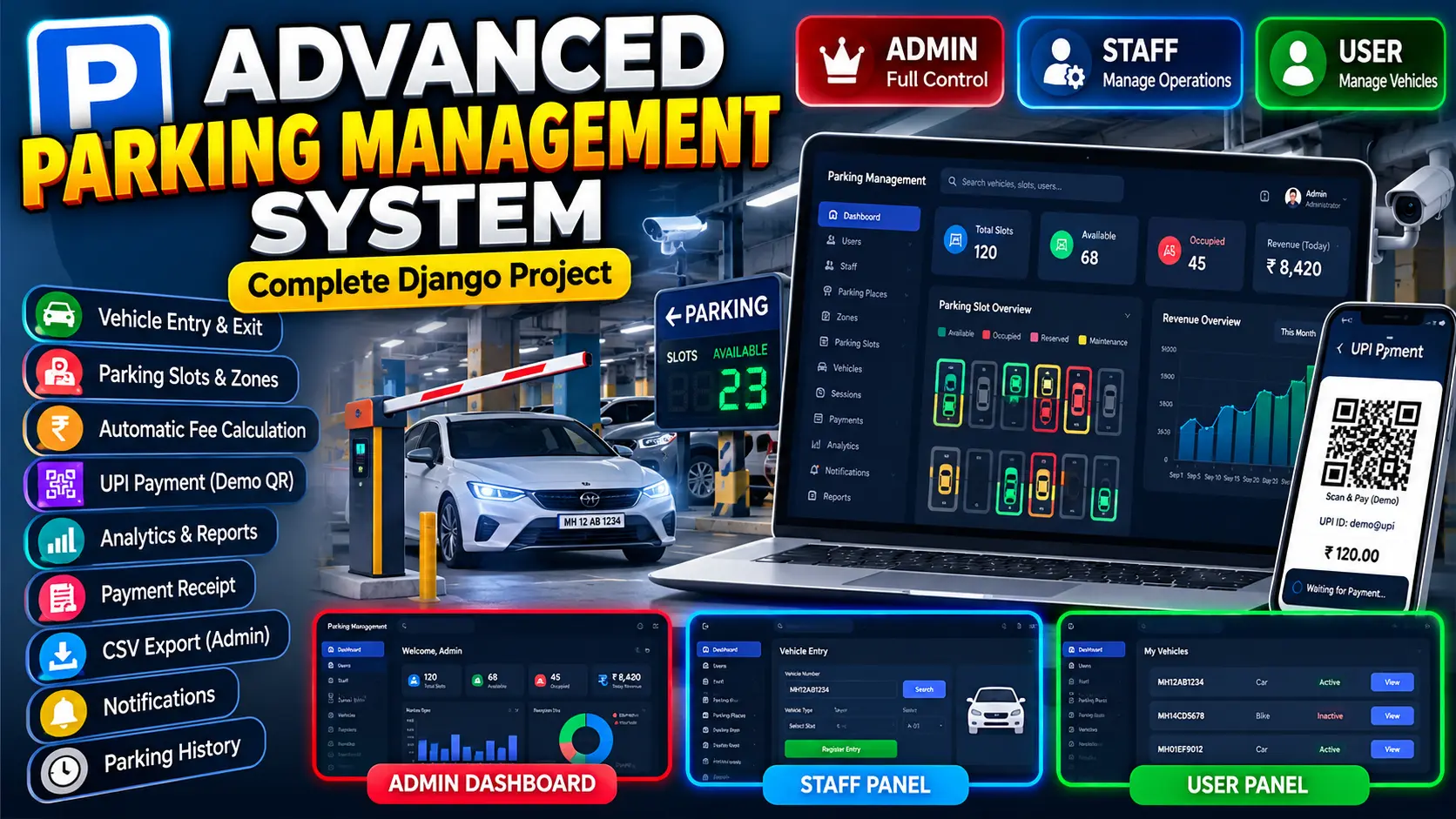
Parking Management System Using Python Django
Advanced Parking Management System Using Python Django is a professional web-based parking platform with Admin, Staff, and User workspaces. It manages parking places, zones, slots, vehicles, parking sessions, automatic fee calculation, payments, receipts, notifications, activity logs, CSV exports, and real-time parking analytics using Django, Bootstrap, JavaScript, Chart.js, and SQLite or MySQL.
What You Will Get
Project Overview
Advanced Parking Management System Using Python Django is a professional web-based smart parking application designed to manage complete parking operations from a centralized platform. The system provides dedicated Admin, Staff, and User workspaces with role-based permissions and realistic parking workflows.
The application manages parking places, zones, slots, vehicles, parking sessions, pricing, payments, receipts, notifications, activity records, and parking analytics. It also provides a modern responsive interface with visual parking slot availability, dashboard statistics, charts, search, filtering, and operational reports.
Key Features
- Role-based Admin, Staff, and User workspaces
- Profile management
- Parking place management
- Parking zone management
- Parking slot management
- Visual parking slot availability
- Available, Occupied, Reserved, and Maintenance slot statuses
- Vehicle type management
- Vehicle registration and search
- Vehicle entry and exit management
- Parking session management
- Automatic entry and exit time tracking
- Automatic parking duration calculation
- Vehicle-type-based pricing
- Hourly, daily, and custom pricing
- Automatic parking fee calculation
- Payment management
- Payment status tracking
- Transaction reference tracking
- Demo UPI payment workflow
- Parking payment history
- Parking receipt generation
- CSV payment export
- Active parking tracking
- Completed parking history
- Advanced search and filtering
- Notifications
- Activity logs
- Revenue analytics
- Parking occupancy analytics
- Database-driven dashboard statistics
Technology Stack
- Python
- Django
- HTML5
- CSS3
- JavaScript
- Bootstrap
- Chart.js
- SQLite or MySQL
- Django Authentication
Software and Tools Required
- Python
- Visual Studio Code
- pip
- Web Browser
- SQLite or MySQL
- Git (Optional)
More Details and Full Documentation
View Advanced Parking Management System Using Python Django Details
Project Modules
2. Administrator Workspace
3. Staff Workspace
4. User Workspace
5. Profile Management Module
6. Parking Place Management
7. Parking Zone Management
8. Parking Slot Management
9. Vehicle Type Management
10. Vehicle Management
11. Vehicle Entry Module
12. Vehicle Exit Module
13. Parking Session Module
14. Pricing Management
15. Automatic Fee Calculation
16. Payment Management
17. Demo UPI Payment
18. Parking Receipt Module
19. Payment History Module
20. CSV Payment Export
21. Active Parking Module
22. Parking History Module
23. Notification Module
24. Activity Log Module
25. Dashboard and KPI Module
26. Revenue Analytics Module
27. Occupancy Analytics Module
28. Search and Filtering Module
29. Reports Module
30. Responsive UI Module
SQLite3 Database
Installation Guide
1. Install Python on your computer.
2. Install Visual Studio Code.
3. Extract the project fo1. Install Python and Visual Studio Code.
2. Extract the project ZIP file into your preferred development folder.
3. Open the project folder in Visual Studio Code.
4. Open the VS Code terminal.
5. Create a virtual environment using: python -m venv venv
6. Activate the virtual environment on Windows using: venv\Scripts\activate
7. Install the required dependencies using: pip install -r requirements.txt
8. Run database migrations using: python manage.py migrate
9. Create sample parking data using: python manage.py seed_parking
10. Start the Django development server using: python manage.py runserver
11. Open http://127.0.0.1:8000/ in your browser.
12. Login using the required demo account.
13. Admin Username: admin
14. Admin Password: Admin@123
15. Staff Username: staff
16. Staff Password: Staff@123
17. User Username: user
18. User Password: User@123
19. Change the demo passwords before using the system in a production environment.lder.
FAQ for this project coming soon.
No reviews yet. Be the first to review!
Write a Review
Related Projects
 13% OFF
Hot
13% OFF
Hot
 Featured
 13% OFF
Featured
13% OFF
Featured
 38% OFF
Hot
38% OFF
Hot