College Management System Using Python and Django
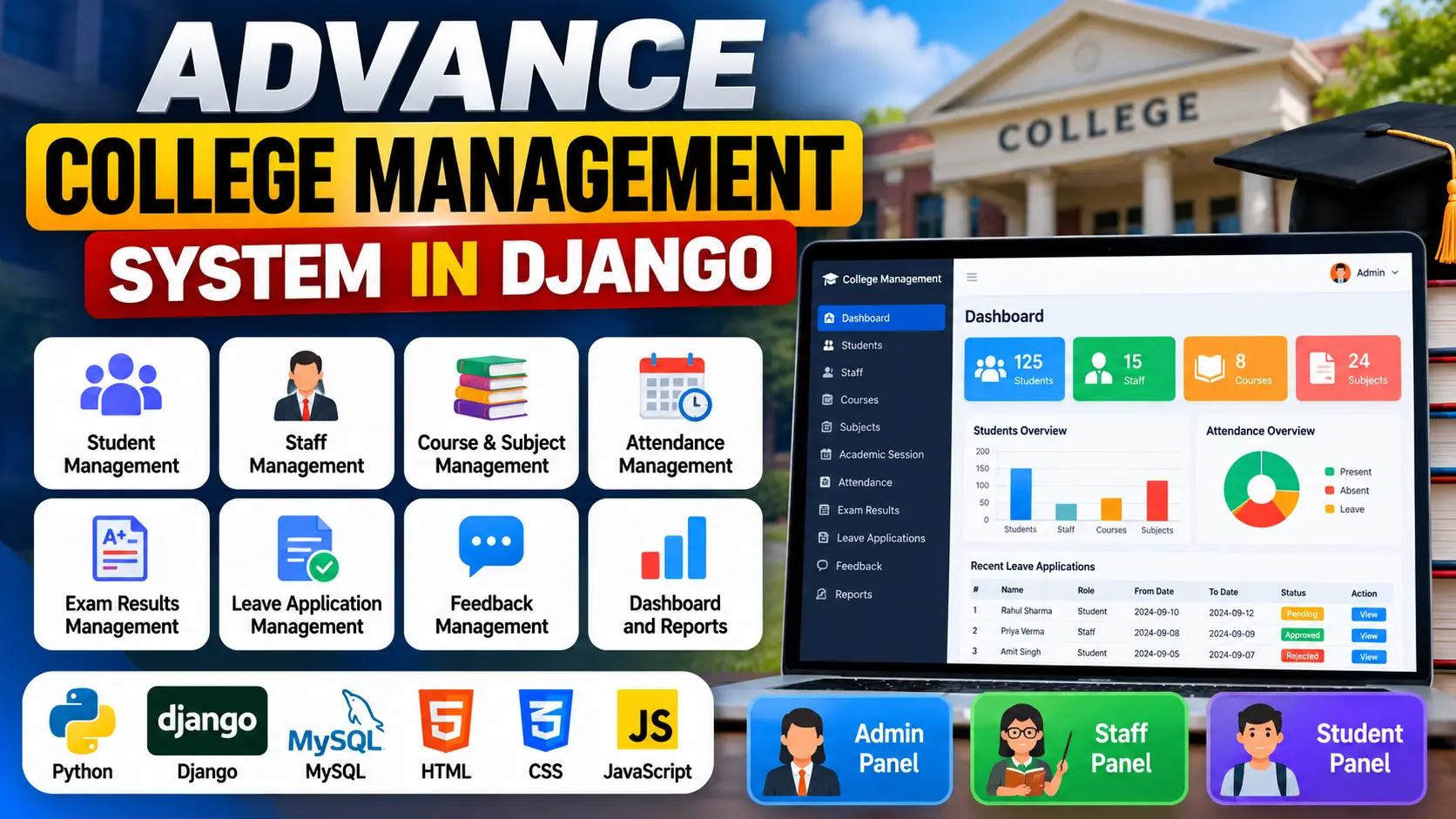
College Management System Using Python and Django is a web-based academic management application for handling student records, staff information, courses, subjects, attendance, examination results, leave applications and feedback. It provides separate dashboards and features for administrators, staff and students, using MySQL for academic record management.
What You Will Get
Project Overview
The College Management System Using Python and Django is a web-based application designed to organize academic and administrative activities within a college. It brings student information, staff records, courses, subjects, attendance, examination results, leave applications and feedback into a centralized platform.
Developed using Python and Django with a MySQL database, the system provides separate workspaces for administrators, teachers and students. Each role can access the features related to its responsibilities, making academic record management more organized and convenient.
This project is suitable for BCA, MCA, B.Tech and other computer science students who want practical experience with Django web development, database connectivity, CRUD operations and role-based application functionality.
Available Features
Administrator Workspace
- Dashboard charts and summaries for students, staff, courses, subjects, attendance and leave requests.
- Add, update and delete student records.
- Manage staff and teacher information.
- Create, update and delete courses and subjects.
- Manage academic sessions.
- View and monitor student attendance records.
- Review and respond to feedback submitted by students and staff.
- Approve or reject student and staff leave applications.
Staff and Teacher Workspace
- Dashboard summaries for assigned students, subjects and leave status.
- Record and update student attendance.
- Add and update examination results.
- Submit leave applications.
- Send feedback to the Head of Department (HOD).
Student Workspace
- View academic summaries, subjects, attendance and leave status.
- Check attendance records.
- View examination results.
- Submit leave applications.
- Send feedback to the Head of Department.
Academic Record Management
The application brings important academic information together in one place. Administrators can maintain student and staff records, organize courses and subjects, and manage academic sessions. Teachers can update attendance and examination results, while students can access their academic information through their dedicated workspace.
Attendance and Examination Results
The attendance module allows staff to record and update student attendance. Administrators can review attendance information, while students can check their own attendance records. The examination result module enables staff to add and update results that students can view through the student workspace.
Leave Applications and Feedback
Students and staff can submit leave applications through their respective modules. Administrators can review these requests and approve or reject them. The feedback functionality allows students and staff to communicate with the administration, including sending feedback to the Head of Department.
Dashboard Charts and Summaries
The administrator dashboard provides charts and summaries related to students, staff, courses, subjects, attendance and leave requests. Staff and student dashboards present information relevant to their assigned responsibilities and academic activities.
Technology Stack
- Programming Language: Python
- Backend Framework: Django
- Database: MySQL
- Frontend: HTML, CSS and JavaScript
- Development Environment: Visual Studio Code
- Database Connectivity: Django database configuration and the required MySQL driver
Software Requirements
- Python compatible with the project's dependencies
- Django and the packages listed in requirements.txt
- MySQL Server
- Visual Studio Code
- Required MySQL database driver
- A modern web browser
Project Applications
- Maintaining college student and staff records
- Organizing courses, subjects and academic sessions
- Recording and reviewing student attendance
- Managing examination results
- Processing student and staff leave requests
- Handling academic feedback
- Providing role-specific academic dashboards
More Details and Full Documentation
View College Management System Using Python and Django Details
Project Modules
2. Student Record Management Module
3. Staff and Teacher Management Module
4. Course Management Module
5. Subject Management Module
6. Academic Session Management Module
7. Student Attendance Module
8. Examination Result Management Module
9. Student Leave Application Module
10. Staff Leave Application Module
11. Leave Approval and Rejection Module
12. Feedback Management Module
13. Student Dashboard Module
14. Staff Dashboard Module
15. Academic Summary and Charts Module
Installation Guide
1. Install Python, MySQL Server and Visual Studio Code on your computer.
2. Extract the project files and open the project folder in VS Code.
3. Open the VS Code terminal.
4. Create a virtual environment using: python -m venv venv
5. Activate it on Windows using: venv\Scripts\activate
6. Install the project dependencies using: python -m pip install -r requirements.txt
7. Start MySQL Server.
8. Create the database using: CREATE DATABASE college_management;
9. Open settings.py and configure the Django DATABASES section with your MySQL database name, username, password and MySQL engine.
10. Install the MySQL database driver required by the project if it is not already installed.
11. Create database migrations using: python manage.py makemigrations
12. Apply migrations using: python manage.py migrate
13. Create an administrator account using: python manage.py createsuperuser
14. Start the Django development server using: python manage.py runserver
15. Open http://127.0.0.1:8000/ in your browser.
16. Sign in using the appropriate account and explore the available administrator, staff and student functionality.
17. If any command or configuration differs from the instructions above, follow the actual project files and requirements.
FAQ for this project coming soon.
No reviews yet. Be the first to review!
Write a Review
Related Projects
 25% OFF
Featured
25% OFF
Featured
 33% OFF
Featured
33% OFF
Featured
 35% OFF
Featured
35% OFF
Featured
 Hot
Hot