Gesture Mouse Using Python – Hand Gesture Recognition and Control
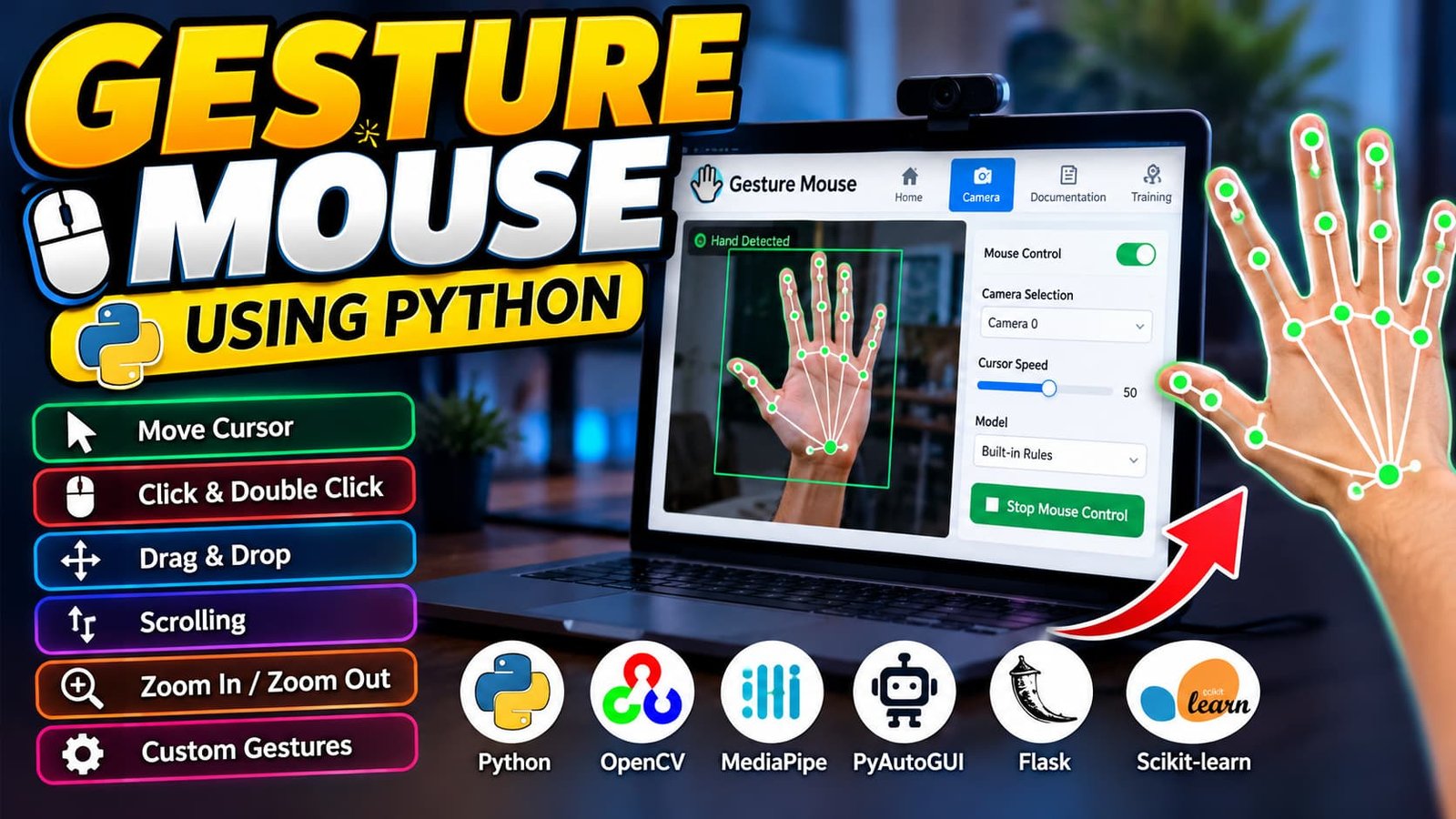
Gesture Mouse Using Python is a computer vision application that controls mouse operations through webcam-based hand gestures. Built with Python, OpenCV, MediaPipe, PyAutoGUI, Flask and Scikit-learn, it supports cursor movement, clicking, dragging, scrolling, zoom controls, custom gesture training and a standalone desktop application.
What You Will Get
Project Overview
Gesture Mouse Using Python is a computer vision application that allows users to control their computer mouse through hand gestures detected by a webcam. It combines real-time hand tracking, gesture recognition, machine learning and mouse automation to provide an alternative way to interact with a computer.
The application includes a Flask-based web interface and a standalone desktop application. Users can move the cursor, perform mouse clicks, drag and drop items, scroll pages, zoom in and out, and train custom gesture recognition models.
The project is developed using Python, OpenCV, MediaPipe, PyAutoGUI, Flask and Scikit-learn. It uses local CSV, JSON and Joblib files for gesture samples, settings and trained model storage rather than requiring a traditional database.
Available Features
Hand Gesture Recognition
Uses MediaPipe to detect hand landmarks from webcam frames. The detected finger positions are processed to identify supported gestures and translate them into mouse operations.
Cursor Movement
Moves the mouse cursor according to hand movements detected by the webcam. Cursor speed controls are available to adjust movement behavior.
Mouse Click Controls
- Left-click using supported finger gestures.
- Right-click using predefined hand movements.
- Double-click using supported gestures.
- Freeze the cursor using a specific gesture.
Drag and Drop
Supports dragging items by holding the mouse button while making the configured fist gesture.
Scrolling and Zoom Controls
Allows users to scroll pages upward and downward and trigger zoom-in or zoom-out actions using predefined hand gestures.
Live Camera Interface
Displays the webcam feed and detected hand landmarks. Users can select an available camera and manage mouse control from the web interface.
Custom Gesture Training
The training module collects hand landmark samples and trains a gesture classifier using Scikit-learn. Joblib saves the trained model for later use.
Custom Gesture Actions
Supports associating trained gestures with configured keyboard shortcuts, allowing users to extend the available gesture controls.
Documentation Page
Provides illustrated instructions describing supported gestures and how to perform them correctly.
Standalone Desktop Application
The desktop version enables webcam-based mouse control outside the browser using the application's Python interface.
Project Modules
- Home Module: Introduces the application's capabilities.
- Camera Module: Handles live tracking, camera selection, cursor speed and mouse control.
- Gesture Recognition Module: Identifies hand positions and maps them to mouse actions.
- Training Module: Collects gesture samples and trains the classifier.
- Documentation Module: Explains supported gestures and usage instructions.
- Desktop Module: Provides standalone webcam-based mouse control.
Technology Stack
- Programming Language: Python
- Computer Vision: OpenCV
- Hand Tracking: MediaPipe
- Mouse and Keyboard Automation: PyAutoGUI
- Web Framework: Flask
- Machine Learning: Scikit-learn
- Model Storage: Joblib
- Frontend: HTML, CSS and JavaScript
- Local Data Storage: CSV and JSON files
Software and Tools Required
- Python 3.11 recommended for the supplied dependency versions.
- Visual Studio Code.
- A working webcam.
- A modern web browser.
- Python virtual environment.
- Required packages listed in requirements.txt.
How to Use the Project
- Start the Flask web application and open its local URL.
- Navigate to the Camera page.
- Select an available webcam.
- Choose built-in gesture rules or the trained model mode.
- Enable mouse control and keep your hand visible in the camera frame.
- Use the documented gestures to move the cursor, click, drag, scroll and zoom.
- Open the Training page to collect samples and train a custom gesture model.
- Disable mouse control when finished to prevent unintended desktop actions.
Installation Guide
Extract the project ZIP file and open the Gesture folder in Visual Studio Code. Create a Python 3.11 virtual environment, activate it and install the dependencies from requirements.txt.
py -3.11 -m venv venv
venv\Scripts\activate
python -m pip install --upgrade pip
pip install -r requirements.txt
To launch the web application, run:
python web.pyTo launch the standalone desktop application, run:
python app.pyOpen the local URL displayed in the terminal when running the web application. Make sure the webcam is connected and available. Press Esc in the camera window to exit the desktop application.
Project Applications
- Hands-free computer interaction demonstrations.
- Human-computer interaction projects.
- Computer vision and hand-tracking experiments.
- Machine learning gesture classification.
- Python desktop automation projects.
- Academic demonstrations of real-time webcam processing.
Important Usage Note
The application can control actual mouse and keyboard actions on the computer. Use it carefully, test gestures before regular use and disable mouse control whenever it is not required.
More Details and Full Documentation
Project Modules
2. Live Camera Module
3. Camera Selection Module
4. Hand Landmark Detection Module
5. Gesture Recognition Module
6. Cursor Movement Module
7. Left and Right Click Module
8. Double-Click Module
9. Cursor Freeze Module
10. Drag and Drop Module
11. Scrolling Module
12. Zoom Control Module
13. Cursor Speed Control Module
14. Custom Gesture Training Module
15. Gesture Classification Module
16. Custom Gesture Action Module
17. Documentation Module
18. Standalone Desktop Application Module
19. CSV, JSON and Joblib Storage Module
Installation Guide
1. Install Python 3.11 and Visual Studio Code.
2. Extract the project ZIP file and open the Gesture folder in VS Code.
3. Confirm that app.py, web.py and requirements.txt are present.
4. Open the integrated terminal.
5. Create a virtual environment using: py -3.11 -m venv venv
6. Activate the environment using: venv\Scripts\activate
7. Upgrade pip using: python -m pip install --upgrade pip
8. Install the project dependencies using: pip install -r requirements.txt
9. Ensure the webcam is connected and available.
10. Run the web application using: python web.py
11. Open the local URL displayed in the terminal.
12. Navigate to the Camera page and select your webcam.
13. Enable mouse control and test the supported gestures.
14. Open the Training page to collect samples and train a custom gesture classifier.
15. To run the standalone desktop version, stop the web application and execute: python app.py
16. Press Esc in the desktop camera window to exit.
17. If dependency installation fails, verify that the active Python interpreter is Python 3.11 and check the project's requirements.txt.
FAQ for this project coming soon.
No reviews yet. Be the first to review!
Write a Review
Related Projects
 50% OFF
Featured
50% OFF
Featured
 33% OFF
Featured
33% OFF
Featured
 55% OFF
Featured
55% OFF
Featured
 20% OFF
Featured
20% OFF
Featured