Demo Video
AI Travel Chatbot in Python
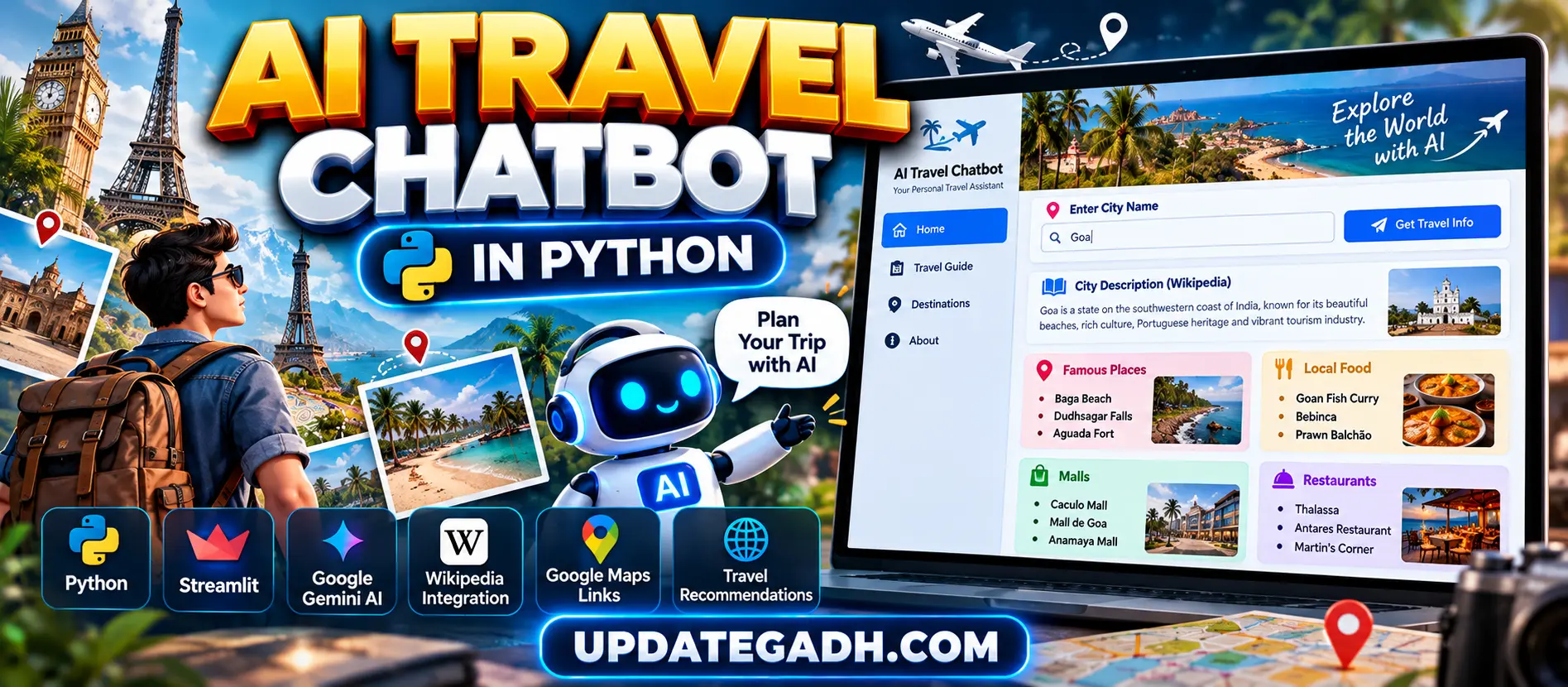
AI Travel Chatbot in Python is a Streamlit-based AI travel assistant that combines Google Gemini Generative AI, Wikipedia and Google Maps to provide city information and travel recommendations. Users can search for a city and receive famous places, local foods, malls and restaurants with direct Google Maps links.
What You Will Get
Project Overview
AI Travel Chatbot in Python is an interactive travel assistant developed using Python and Streamlit. The application combines Google Gemini Generative AI, Wikipedia and Google Maps search links to help users explore information about different cities from a single interface.
Users simply enter a city name and request travel information. The application retrieves a short city description from Wikipedia and uses Google Gemini to generate recommendations for famous places, local foods, malls and restaurants.
Available Features
- City search
- Wikipedia city description
- Google Gemini AI travel recommendations
- Famous place recommendations
- Local food recommendations
- Mall recommendations
- Restaurant recommendations
- Google Maps integration
- Complete city exploration link
- Custom Streamlit interface
- Error handling
City Search
Users can enter the name of any city into the Streamlit search field. The selected city becomes the basis for retrieving the city description and generating travel recommendations.
Wikipedia City Description
The application uses the Wikipedia Python library to retrieve a short description of the selected city. The system attempts to generate a four-sentence summary and includes handling for Wikipedia disambiguation results.
Gemini AI Travel Recommendations
Google Gemini Generative AI generates travel recommendations based on the selected city. The application requests three famous places, three popular local foods, three known malls and three recommended restaurants.
Famous Places
The chatbot displays up to three famous places to visit in the selected city. Each recommendation can be opened directly through a Google Maps search link.
Local Food Recommendations
The application displays up to three popular local foods associated with the selected destination, helping users discover regional food options.
Mall Recommendations
Users can view up to three known malls recommended for the selected city. Each recommendation includes a Google Maps search option.
Restaurant Recommendations
The chatbot displays up to three recommended restaurants generated by Gemini AI for the selected destination.
Google Maps Integration
The application automatically creates Google Maps search URLs for recommended places, malls and restaurants. Users can open these links to continue exploring the selected location on Google Maps.
Explore the Complete City
In addition to individual recommendations, the application provides a Google Maps link for exploring the complete city.
Custom Streamlit Design
The project includes custom HTML and CSS styling to improve the default Streamlit interface. Styled headings, travel sections, recommendation items, descriptions and map links create a cleaner travel-oriented experience.
Error Handling
The application handles situations where a city description cannot be retrieved, Gemini returns an error or the generated AI response cannot be parsed correctly.
How the AI Travel Chatbot Works
- Enter the name of a city.
- The application retrieves a city description from Wikipedia.
- The city name is sent to Google Gemini through a travel recommendation prompt.
- Gemini generates famous places, local foods, malls and restaurants.
- The application parses the Gemini response into separate categories.
- Google Maps search links are generated for recommended locations.
- The travel information is displayed through Streamlit sections.
Google Maps Link Generation
The project uses Python URL parsing functionality to safely create Google Maps search links based on the recommended location and city.
Technology Stack
- Python
- Streamlit
- Google Gemini Generative AI
- Wikipedia Python Library
- urllib.parse
- HTML
- CSS
Software and Tools Required
- Python 3.x
- Visual Studio Code
- Google Gemini API Key
- Internet Connection
- Required Python Libraries
Database
The project does not require a database. Travel information is retrieved through Wikipedia and Gemini, while Google Maps search URLs are generated dynamically.
Future Enhancements
- Live weather information
- Hotel recommendations
- Flight information
- Travel budget planning
- Automatic itinerary generation
- User travel preferences
- Destination images
- Travel history storage
- User authentication
- Advanced conversational chatbot functionality
Watch Project Demo
Watch AI Travel Chatbot in Python Demo
More Details and Full Documentation
Project Modules
2. Wikipedia City Information Module
3. Gemini AI Integration Module
4. AI Travel Recommendation Module
5. Famous Places Recommendation Module
6. Local Food Recommendation Module
7. Mall Recommendation Module
8. Restaurant Recommendation Module
9. Gemini Response Parsing Module
10. Google Maps Link Generation Module
11. Complete City Exploration Module
12. Streamlit User Interface
13. Custom HTML and CSS Design Module
14. Error Handling Module
15. Travel Information Display Module
Installation Guide
1. Install Python 3.x and Visual Studio Code.
2. Extract the AI Travel Chatbot project ZIP file.
3. Open the project folder in Visual Studio Code.
4. Open the VS Code terminal.
5. Create a virtual environment using: python -m venv venv
6. Activate the virtual environment on Windows using: venv\Scripts\activate
7. Install the required packages using: pip install streamlit wikipedia google-generativeai
8. Configure your Google Gemini API key in the project.
9. Set the Gemini API key using the project's configuration: genai.configure(api_key="YOUR_GEMINI_API_KEY")
10. Save the API key configuration.
11. Start the application using: streamlit run app.py
12. Open the Streamlit URL displayed in the terminal.
13. Enter the name of a city in the city search field.
14. Click the Get Travel Info button.
15. Review the Wikipedia city description.
16. Review AI-generated famous places, local foods, malls and restaurants.
17. Click the Google Maps links to explore recommended locations.
18. Use the complete city Google Maps link to explore the destination.
FAQ for this project coming soon.
No reviews yet. Be the first to review!
Write a Review
Related Projects
 38% OFF
Featured
38% OFF
Featured
 40% OFF
Featured
40% OFF
Featured
Advanced Real-Time Personal Finance Management System Using Djan…
 20% OFF
Featured
20% OFF
Featured
 50% OFF
Featured
50% OFF
Featured