Demo Video
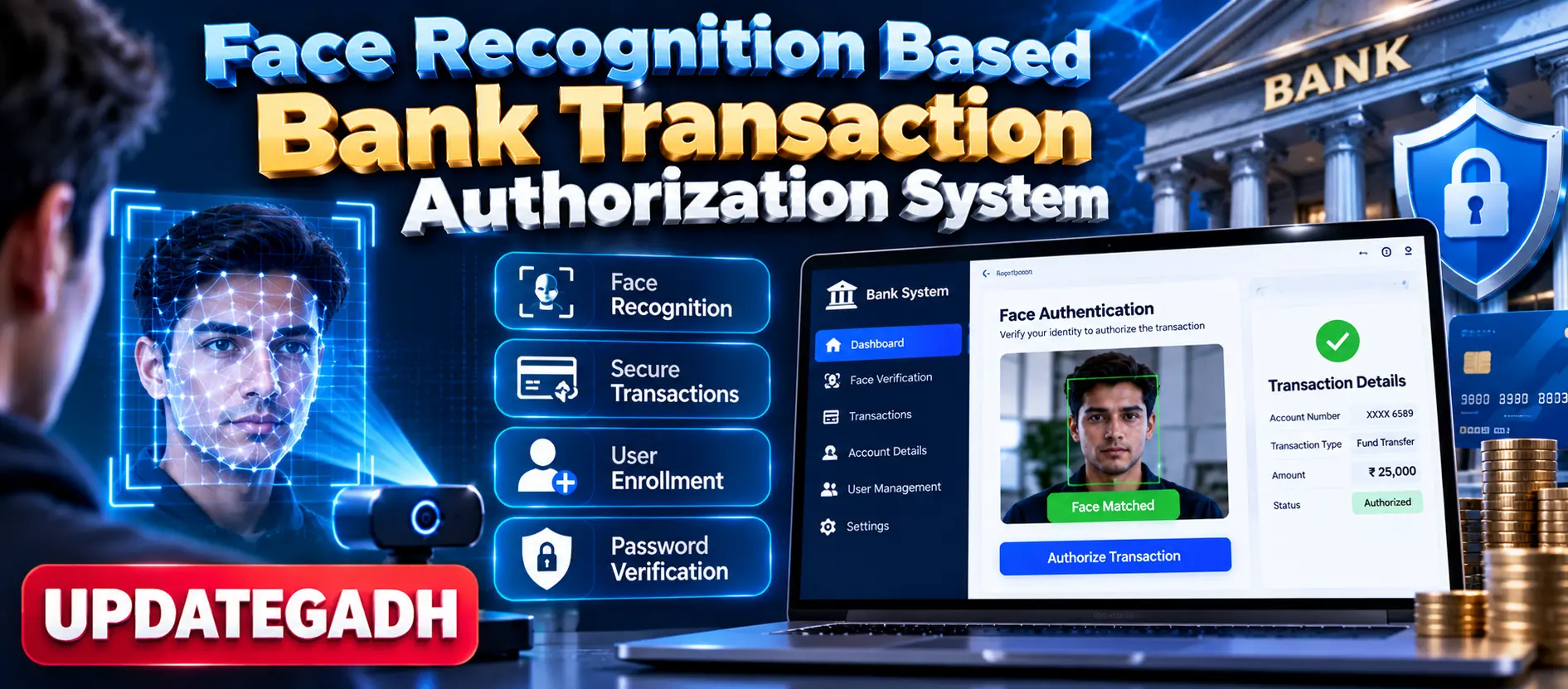
Face Recognition Based Bank Transaction Authorization System
Face Recognition Based Bank Transaction Authorization System is a Python-based secure banking prototype that combines real-time facial recognition with password verification to authorize banking transactions. Built with Tkinter, OpenCV and SQLite3, the system supports face enrollment, biometric login, secure withdrawal authorization, account management, adaptive recognition and three-attempt verification lockout.
What You Will Get
Project Overview
Face Recognition Based Bank Transaction Authorization System is a Python-based banking security application that uses facial recognition as an additional layer of transaction authorization. The system verifies a user's face in real time before allowing protected banking operations.
The application combines facial recognition with password verification to create a multi-factor authentication workflow. If the detected face matches the registered user, the requested transaction can proceed. If verification fails, access to the protected banking operation is denied.
Available Features
- Facial recognition login
- Real-time webcam face detection
- Face-based transaction authorization
- Secure withdrawal authorization
- New user enrollment
- Face data registration
- Password verification
- Adaptive recognition models
- Three-attempt verification lockout
- Account data loading and management
- Face-based access to banking services
- Local SQLite3 data storage
- Privacy-focused local processing
- Tkinter graphical interface
- Interactive transaction panels
- Error messages and verification feedback
Facial Recognition Authentication
The system uses a webcam to detect and verify the registered user's face. Facial recognition is used as the primary biometric verification mechanism before protected banking transactions are authorized.
New User Enrollment
New users can register their banking identity by providing account information, password credentials and facial data. The registered face information is then used during subsequent authentication attempts.
Multi-Factor Verification
The authorization workflow combines facial recognition with password verification. This provides an additional security layer instead of relying only on a password or PIN.
Secure Withdrawal Authorization
Withdrawal transactions require successful user verification. The system checks the registered facial identity and password before allowing the protected transaction workflow to continue.
Verification Failure Lockout
The system provides a three-tier verification failure mechanism. After three unsuccessful verification attempts, unauthorized access is blocked to help prevent repeated authentication attempts.
Account Data Management
Users can load and manage their account information through the banking interface. The application maintains local account-related information using SQLite3.
Local Data Storage
The application uses SQLite3 for local storage of account and face-related information. According to the source, the application is designed to operate locally without requiring external servers, supporting a privacy-focused architecture.
Adaptive Recognition
The project includes adaptive learning models intended to improve facial recognition accuracy over time as additional recognition data becomes available.
Professional Tkinter Interface
The application provides a Tkinter-based graphical interface with separate registration, authentication and transaction screens. The interface includes interactive panels, responsive controls, clear instructions and error messages to guide users through the banking workflow.
Transaction Authorization Workflow
- Register a new banking user.
- Capture and register facial data.
- Create the user's password credentials.
- Start the authentication process.
- Detect the user's face through the webcam.
- Compare the detected face with registered face data.
- Verify the user's password.
- Authorize the protected banking operation when verification succeeds.
- Deny access when verification fails.
- Lock verification after three failed attempts.
Security Features
- Multi-factor authentication
- Facial biometric verification
- Password verification
- Three-attempt failure lockout
- Local data storage
- No external server requirement
- Face-based transaction authorization
Technology Stack
- Python
- Tkinter
- OpenCV
- Scikit-learn
- imutils
- Pandas
- PIL
- SQLite3
Software and Tools Required
- Python 3.8 or higher
- Visual Studio Code or PyCharm
- Webcam
- SQLite3
- Modern Windows environment
Important Security Note
This project is an academic banking-security prototype. Its local biometric authentication workflow demonstrates the concept of face-based transaction authorization and should not be treated as production banking infrastructure without comprehensive security, biometric protection, compliance and financial-system validation.
Watch Project Demo
Watch Face Recognition Based Bank Transaction Authorization System Demo
More Details and Full Documentation
View Face Recognition Based Bank Transaction Authorization System Details
Project Modules
2. Facial Data Registration Module
3. Facial Recognition Login Module
4. Real-Time Face Detection Module
5. Password Verification Module
6. Multi-Factor Authentication Module
7. Transaction Authorization Module
8. Secure Withdrawal Module
9. Account Data Management Module
10. Verification Failure Lockout Module
11. Adaptive Recognition Module
12. Banking Services Access Module
13. Tkinter GUI Module
14. SQLite3 Database Module
15. OpenCV Face Processing Module
16. Machine Learning Support Module
17. Error Handling and Notifications Module
18. Local Security Module
Installation Guide
1. Install Python 3.8 or higher.
2. Install Visual Studio Code or PyCharm.
3. Extract the project ZIP file.
4. Open the project folder in Visual Studio Code.
5. Open the terminal in the project directory.
6. Create a virtual environment using: python -m venv venv
7. Activate the virtual environment on Windows using: venv\Scripts\activate
8. Install the required packages using: pip install -r requirements.txt
9. Connect a working webcam to the computer.
10. Make sure the webcam is available to Python and OpenCV.
11. Verify that the SQLite3 database and required project files are present.
12. Run the application's main Python file according to the project structure.
13. Complete the new user enrollment process.
14. Register the required facial data and password.
15. Start the facial recognition login workflow.
16. Complete face and password verification.
17. Test the protected withdrawal authorization workflow.
18. Test the three-attempt verification lockout functionality.
FAQ for this project coming soon.
No reviews yet. Be the first to review!
Write a Review
Related Projects
 13% OFF
Featured
13% OFF
Featured
 20% OFF
Featured
20% OFF
Featured
 35% OFF
Featured
35% OFF
Featured
 38% OFF
Featured
38% OFF
Featured