 17% OFF
Advanced School Management System Using Python Django
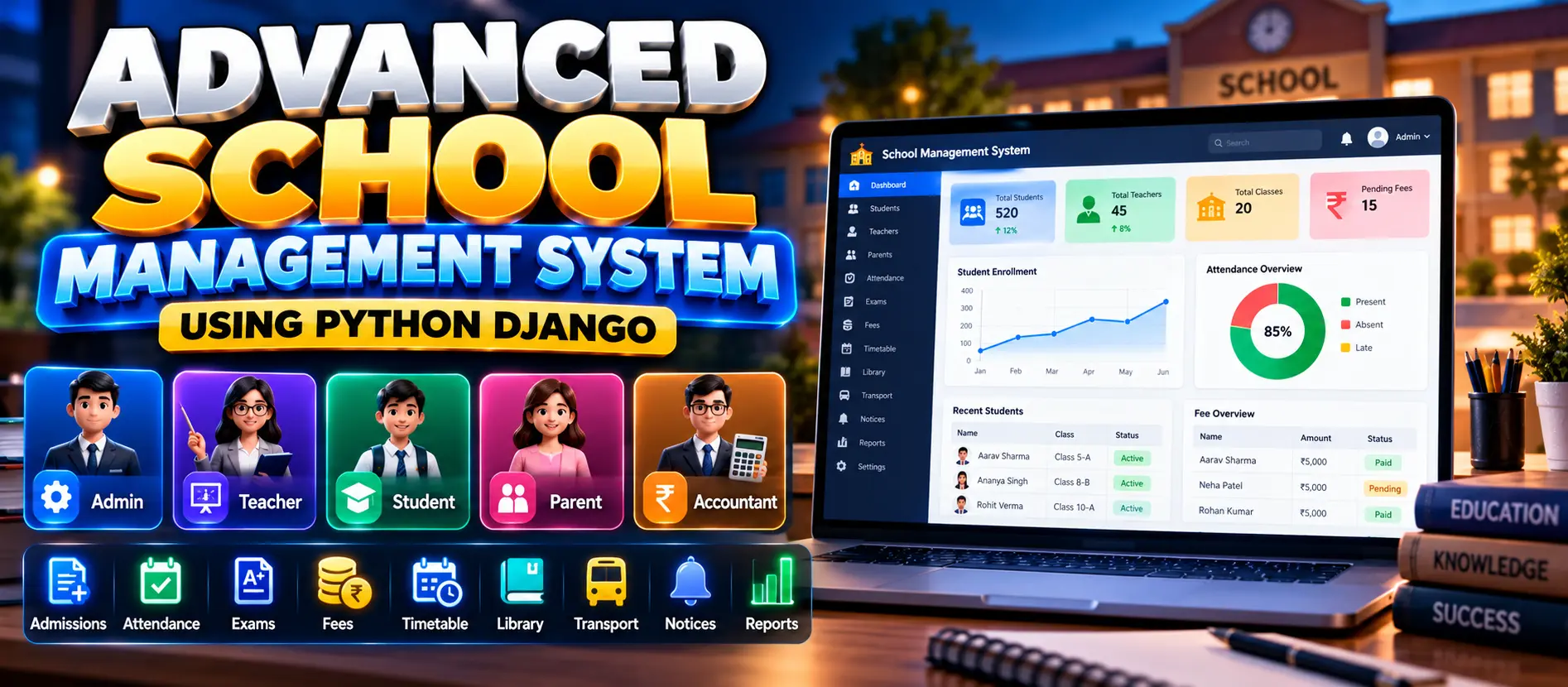
Advanced School Management System using Python Django, SQLite, and Bootstrap 5 with role-based dashboards for Admin, Teacher, Student, Parent, and Accountant. Includes student management, admissions, attendance, examinations, fee management, library, transport, PDF report cards, CSV import and export, and an ML-powered AI chatbot.
Read more- Built with
- PythonDjangoMachine LearningBootstrapHTML/CSS
- You get
- Source codeDatabaseProject reportPPTSetup guide
- Delivery
- Instant download after payment
Project Overview
The Advanced School Management System Using Python Django is a web-based application designed to manage school administration, academic activities, student records, attendance, examinations, fees, and campus operations. Developed using Python, Django 5, SQLite, HTML, CSS, JavaScript, and Bootstrap 5, it provides five role-based panels for Admin, Teacher, Student, Parent, and Accountant.
Available Features
- Role-Based Dashboard Management
- School Settings Management
- User Accounts and Profile Management
- Admission Management
- Student Management
- Teacher Management
- Parent Management
- Academic Year, Class, and Section Management
- Subject Management
- Timetable Management
- Attendance Management and Reports
- Parent Absence Notifications
- Examination Management and Grade Calculation
- Result Publication and Correction Requests
- Fee Structure Management
- Invoice Management and Fee Payments
- Discounts, Scholarships, and Concessions
- Refund Management and Fee Reports
- Homework Management
- Library Management
- Transport Management
- Leave Management
- Internal Messaging
- Notices and Notifications Management
- Email Notification Configuration
- Audit Logs
- CSV Import and Export
- PDF Report Cards
- Role-Based Data Security
- Secure Password Handling
- ML-Powered AI Chatbot
Technology Stack
- Programming Language: Python
- Framework: Django 5
- Database: SQLite
- Frontend: HTML, CSS, JavaScript
- UI Framework: Bootstrap 5
- Icons: Bootstrap Icons
- Charts: Chart.js
More Details and Full Documentation
For complete project details, features, screenshots, and installation instructions, visit the project page.
- Role-Based Dashboard Management
- School Settings Management
- User Accounts and Profile Management
- Admission Management
- Student Management
- Teacher Management
- Parent Management
- Academic Year, Class, and Section Management
- Subject Management
- Timetable Management
- Attendance Management
- Attendance Reports and Percentage Calculation
- Parent Absence Notifications
- Examination Management
- Grade Calculation
- Result Publication and Correction Requests
- Fee Structure Management
- Invoice Management
- Fee Payments
- Discounts, Scholarships, and Concessions
- Refund Management
- Fee Reports
- Homework Management
- Library Management
- Transport Management
- Leave Management
- Internal Messaging
- Notices Management
- Notifications Management
- Email Notification Configuration
- Audit Logs
- CSV Import and Export
- PDF Report Cards
- Role-Based Data Security
- Secure Password Handling
- ML-Powered AI Chatbot
- Install Python 3.10 or higher and Visual Studio Code.
- Extract the project ZIP file.
- Open the extracted updategadh_school folder in Visual Studio Code.
- Open the terminal and run:
cd updategadh_school
- Create a virtual environment:
python -m venv venv
- Activate the environment in Windows PowerShell:
venv\Scripts\Activate.ps1
- Install the required dependencies:
pip install -r requirements.txt
- Create the environment configuration file:
copy .env.example .env
- Configure the required Django settings in the .env file.
- Generate database migrations:
python manage.py makemigrations accounts core academics people attendance exams fees campus
- Apply the migrations:
python manage.py migrate
- Create an administrator account:
python manage.py createsuperuser
- Initialize the school data:
python manage.py setup_initial
- Run the project:
python manage.py runserver
- Open the following address in your browser:
http://127.0.0.1:8000/
Optional: Load demonstration data for local testing
python manage.py seed_demo
Stuck while running it? Chat with us on WhatsApp for free installation help.
No reviews yet. Be the first to review this project.