 23% OFF
 Advanced E-Commerce Management System Using Django
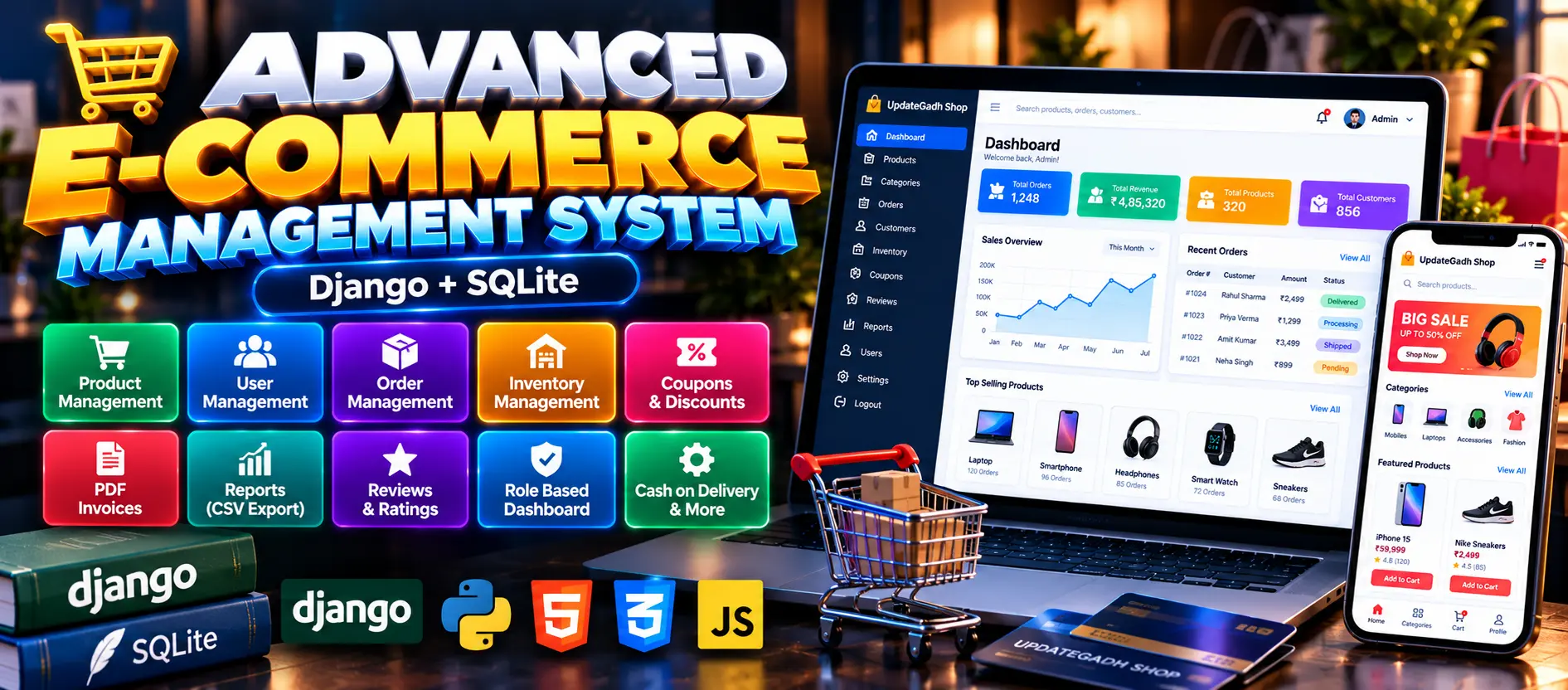
Advanced E-Commerce Management System using Python, Django, SQLite, HTML, CSS, and JavaScript. Includes customer shopping, product and inventory management, order tracking, coupons, wishlists, sandbox payments, PDF invoices, CSV reports, and role-based dashboards.
Read more- Built with
- PythonDjangoBootstrapHTML/CSSJavaScript
- You get
- Source codeDatabaseProject reportPPTSetup guide
- Delivery
- Instant download after payment
Project Overview
The Advanced E-Commerce Management System Using Django is a web-based shopping application developed by UPDATEGADH to manage online shopping, products, customers, orders, inventory, and sales reports. Built using Python, Django, SQLite, HTML, CSS, and JavaScript, it provides a customer storefront and a role-based management dashboard.
Available Features
- Customer Registration, Login, and Logout
- Profile and Delivery Address Management
- Product Catalog, Search, and Filtering
- Product Details and Related Products
- Shopping Cart
- Wishlist Management
- Coupon Application
- Checkout and Sandbox Payment Options
- Order History and Tracking
- Order Cancellation
- PDF Invoice Generation
- Product Reviews and Ratings
- In-App Notifications
- Contact and Feedback Forms
- Admin Dashboard and Revenue Analytics
- Product and Category Management
- Order and Inventory Management
- Coupon Management
- User and Customer Management
- Review Moderation
- Stock Alerts
- Order Status History
- CSV Order, Sales, Inventory, and Customer Reports
- Role-Based Permissions
- Authentication and Password Hashing
- Email Notifications for Order Status Changes
- Environment-Based Configuration
- Automated Testing
- Demo Data Seeding and Reset
Technology Stack
- Programming Language: Python
- Framework: Django 4.2–5.x
- Database: SQLite by default, with configuration for PostgreSQL and MySQL
- Frontend: HTML, CSS, JavaScript
- Image Validation: Pillow
- PDF Generation: ReportLab
More Details and Full Documentation
For complete project details, screenshots, features, and installation instructions, visit the project page.
- Customer Registration and Authentication
- Profile and Address Management
- Product Catalog Management
- Product Search and Filtering
- Shopping Cart Management
- Wishlist Management
- Coupon Management
- Checkout and Sandbox Payments
- Order Management
- Order Tracking and Cancellation
- PDF Invoice Generation
- Product Reviews and Ratings
- Notifications Management
- Contact and Feedback Management
- Admin Dashboard
- Revenue Analytics
- Product and Category Management
- Staff Management
- Customer Management
- Inventory Management
- Stock Alerts
- Order Status History
- CSV Reports and Exports
- Email Notifications
- Security and Role-Based Permissions
- Install Python, Visual Studio Code, and a web browser.
- Extract the project ZIP file.
- Open the project folder in Visual Studio Code.
- Open the terminal in the project directory:
cd ecommerce_project
- Create a virtual environment:
python -m venv .venv
- Activate the environment on Windows:
.venv\Scripts\activate
- Install the required dependencies:
pip install -r requirements.txt
- Generate migrations:
python manage.py makemigrations accounts store
- Apply database migrations:
python manage.py migrate
- Populate demonstration data:
python manage.py seed_demo
- Start the development server:
python manage.py runserver
- Open the application in your browser:
http://127.0.0.1:8000/
- To run automated tests:
python manage.py test
Stuck while running it? Chat with us on WhatsApp for free installation help.
No reviews yet. Be the first to review this project.