Demo Video
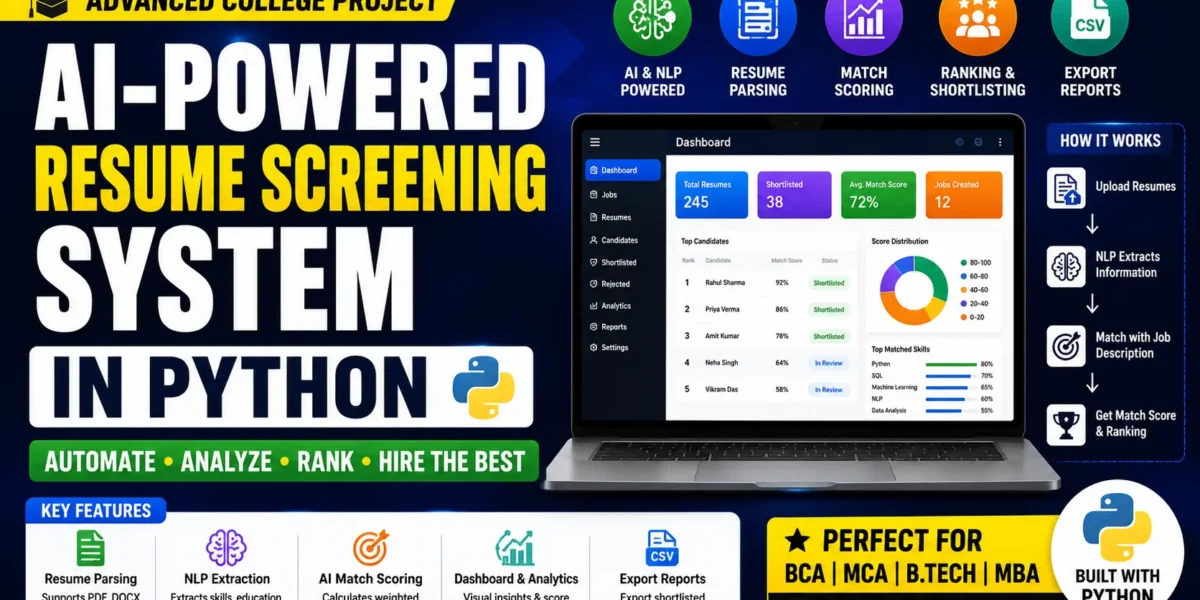
AI-Powered Resume Screening System
The AI Powered Resume Screening System is a Python and Flask HR automation tool that screens multiple resumes against a job description and ranks every candidate by a weighted Job-Match Score. It parses PDF and DOCX resumes, extracts candidate details with spaCy NLP, and scores applicants using TF-IDF cosine similarity with optional BERT matching. Key features include automatic skill extraction, a Chart.js analytics dashboard, skill-gap analysis, one-click shortlist or reject, CSV and Excel export, and switchable SQLite or MySQL database support. Ideal for MCA, BCA, B.Tech and MBA final year students. Includes source code, report, synopsis and PPT.
What You Will Get
The AI Powered Resume Screening System is a full-stack HR automation project built with Python, Flask, spaCy, and scikit-learn that solves a genuine business problem: manually reviewing hundreds of resumes for a single job opening. Recruiters upload resumes in PDF or DOCX format, define a job description with required skills, minimum experience, and education level, and the system parses every file, extracts structured candidate information, and ranks applicants by a weighted Job-Match Score percentage. Unlike a basic keyword tool, it uses TF-IDF and cosine similarity for semantic matching, with an optional BERT engine for deeper contextual understanding. The result is an enterprise-grade HR-Tech application combining NLP, machine learning, document parsing, REST APIs, and data visualisation.
Key Features
- The resume parser extracts clean text from messy multi-column PDF and DOCX files using PyMuPDF and python-docx.
- The NLP extractor pulls candidate name, email, phone, skills, education, and experience using spaCy Named Entity Recognition combined with regex patterns.
- The job description module lets you define required skills, minimum years of experience, and education level, with skills auto-detected from the JD text.
- The weighted match engine scores each candidate across skills, experience, education, and semantic similarity using TF-IDF or optional BERT.
- An interactive analytics dashboard built with Chart.js shows ranking bar graphs, score distribution doughnut charts, and per-candidate skill-gap analysis.
- One-click shortlist and reject actions update candidate status over AJAX with live filtering.
- Ranked or shortlisted candidates can be exported as CSV or Excel files using openpyxl.
- The database is pluggable: SQLite works out of the box and MySQL is enabled with a single environment variable change.
- Score weights are fully configurable in the config file, and pytest test cases are included for the core matching engine.
Technology Stack
| Component | Technology |
| Backend | Python 3, Flask (application-factory pattern) |
| ORM | SQLAlchemy with Flask-Migrate |
| NLP | spaCy (en_core_web_sm) with NER |
| Machine Learning | scikit-learn TF-IDF, optional sentence-transformers BERT |
| Document Parsing | PyMuPDF (fitz), python-docx |
| Frontend | HTML5, custom CSS design system, JavaScript, Chart.js |
| Export | openpyxl for Excel, built-in csv module |
| Database | SQLite (default), MySQL (production-ready) |
| Testing | pytest |
System Requirements
- Python 3.x with pip installed.
- Flask and SQLAlchemy for the web application and ORM layer.
- spaCy with the en_core_web_sm English model (the app falls back to regex extraction without it).
- scikit-learn for TF-IDF vectorization and cosine similarity.
- PyMuPDF and python-docx for reading PDF and Word resumes.
- openpyxl for Excel export and pytest for running the test suite.
- SQLite by default, or MySQL with pymysql for production setups.
- Optional sentence-transformers package if you want to enable the BERT match engine.
How It Works
A recruiter creates a job description, and the system auto-detects the required skills from the text along with the minimum experience and education level. Uploaded resumes are converted to plain text by PyMuPDF or python-docx, then passed to the spaCy NER pipeline which extracts the candidate's name, contact details, skills, education, and years of experience. The match engine blends four signals into one score: skills overlap at 50 percent, experience at 20 percent, education at 15 percent, and TF-IDF or BERT semantic similarity at 15 percent. Every candidate is ranked by this percentage on the dashboard, where the recruiter can review skill gaps, shortlist or reject with one click, and export the final list.
Perfect For
This is an advanced-level project suited to MCA, BCA, B.Tech CS/IT, M.Tech, and MBA IT or HR students who want a final year submission that stands out. It covers artificial intelligence, natural language processing, machine learning, and full-stack web development in a single codebase, giving you plenty of material for viva questions on NER, TF-IDF, cosine similarity, and transformer models. It also doubles as a strong portfolio and interview project for AI, Data Science, and HR-Tech roles.
Future Enhancements
The project can be extended with recruiter and admin login with role-based access, automated email notifications to shortlisted candidates, resume ranking across multiple jobs at once, an interview scheduling module, bulk ZIP upload of resumes, cloud deployment on Render or Railway, and a fine-tuned transformer model for domain-specific skill extraction.
Watch Project Demo
Watch the full project walkthrough and setup tutorial on our YouTube channel.
▶ Watch on YouTube – Decode It
More Details & Full Documentation
For complete project details, source code, and setup guide, visit the official project page.
Project Modules
- Extract clean text from PDF resumes using PyMuPDF
- Extract text from DOCX resumes using python-docx
- Handle multi-column and messy real-world resume layouts
- Support bulk upload of multiple resumes
NLP Extraction Module:
- spaCy Named Entity Recognition for candidate name
- Regex extraction for email and phone number
- Skill extraction and normalisation
- Education level detection
- Years of experience calculation
- Automatic regex fallback if the spaCy model is not installed
Job Description Module:
- Create and manage job postings
- Define required skills, minimum experience and education level
- Auto-detect skills directly from the JD text
Match Engine Module:
- Skills overlap scoring (50% weight)
- Experience scoring against the minimum required (20% weight)
- Education level ranking (15% weight)
- TF-IDF cosine similarity of resume text vs JD text (15% weight)
- Optional BERT semantic engine via sentence-transformers
- Configurable weights in app/config.py
Dashboard & Analytics Module:
- Candidate ranking by Job-Match Score percentage
- Chart.js bar graphs for candidate comparison
- Score distribution doughnut chart
- Per-candidate skill-gap analysis
- Live filtering by candidate status
Candidate Action Module:
- One-click shortlist and reject with AJAX status updates
- View full extracted candidate profile
- Filter shortlisted, rejected and pending candidates
Export Module:
- Export ranked candidates to CSV
- Export shortlisted candidates to Excel using openpyxl
Configuration Module:
- .env based settings (DATABASE_URL, MATCH_ENGINE, SECRET_KEY, MAX_CONTENT_LENGTH_MB)
- Switch between SQLite and MySQL without code changes
- Switch between TF-IDF and BERT match engines
- pytest unit tests for the core matching engine
Installation Guide
1. Download and extract the ZIP file
2. Open the project folder: cd Ai-Powered-Resume-Analyzer
3. Create a virtual environment: python -m venv venv
   Windows: venv\Scripts\activate
   macOS / Linux: source venv/bin/activate
4. Install dependencies: pip install -r requirements.txt
5. Download the spaCy English model: python -m spacy download en_core_web_sm
   (Optional - the app falls back to regex extraction without it)
6. Create the environment file:
   Windows: copy .env.example .env
   macOS / Linux: cp .env.example .env
7. Seed sample data (optional): python seed.py
8. Run the application: python run.py
9. Open the localhost URL shown in the terminal

To use MySQL instead of SQLite:
- Create the database: CREATE DATABASE resume_screening;
- Set DATABASE_URL=mysql+pymysql://root:password@localhost:3306/resume_screening
- Restart the app; tables are created automatically

To enable BERT matching:
- Uncomment sentence-transformers in requirements.txt and reinstall
- Set MATCH_ENGINE=bert in .env
FAQ for this project coming soon.
No reviews yet. Be the first to review!
Write a Review
Related Projects
 40% OFF
Featured
40% OFF
Featured
 23% OFF
Featured
23% OFF
Featured
 20% OFF
Featured
20% OFF
Featured
 50% OFF
Featured
50% OFF
Featured