Demo Video
Insurance Management System with AI
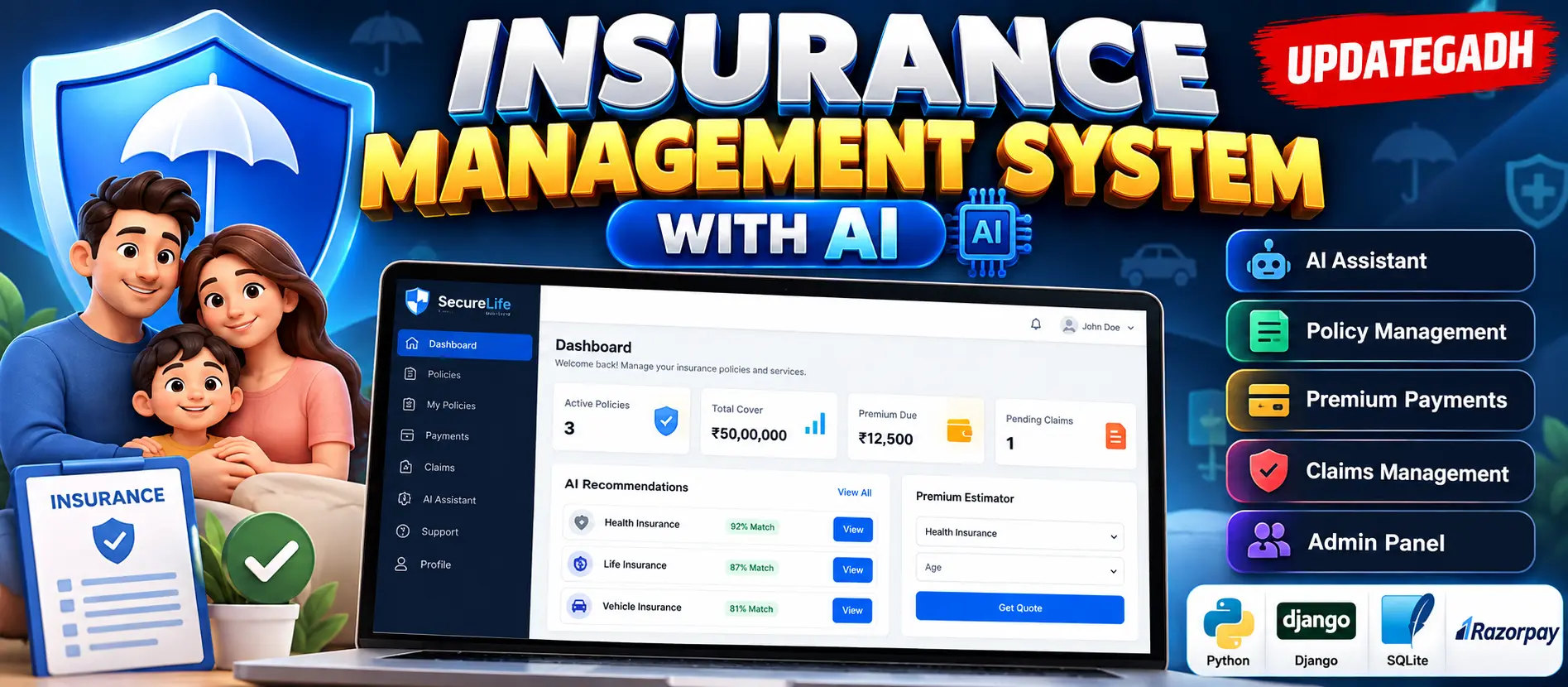
Insurance Management System with AI is a Django-based web application named SecureLife that combines insurance policy management, premium payments, claims handling, customer support, and custom Python AI features. The system includes customer and administrator areas with AI-powered policy recommendations, premium estimation, risk profiling, claim fraud screening, sentiment analysis, urgency detection, and customer segmentation.
What You Will Get
Insurance Management System with AI
Insurance Management System with AI is a Django-based web application named SecureLife. The project combines insurance policy management with customer services, premium payments, claims handling, support questions, and a custom Python machine-learning engine.
The application uses Django 5.1.15 for the web framework, SQLite for data storage, and Razorpay for premium payment processing. The AI functionality is implemented directly inside the project without NumPy or scikit-learn.
Key Features
- Customer registration and profile management
- Insurance policy browsing and category filtering
- AI-based policy recommendations
- AI-powered premium estimation
- Customer risk profiling
- Insurance policy applications
- Premium payment processing through Razorpay
- Payment history and printable receipts
- Insurance claim submission and tracking
- AI claim fraud screening
- Aria AI support assistant
- Support question sentiment analysis
- Support question urgency analysis
- AI-drafted replies for administrators
- Customer segmentation using K-Means
- AI Insights dashboard
- Customer activity history
- Help desk question management
AI and Machine Learning Features
The project contains a custom AI engine under the ai application. The Aria Support Assistant uses TF-IDF, Multinomial Naive Bayes, and cosine nearest-pattern matching to answer support questions. It can also use customer policy, payment, due, and claim information when responding to personal questions.
The sentiment and urgency analysis functionality uses Multinomial Naive Bayes with keyword rules to classify support questions and assist with question triage.
The Policy Recommender uses Softmax multinomial logistic regression with SGD to generate personal match scores for insurance plans and support cross-sell suggestions.
The Premium Estimator uses log-linear ridge regression with a closed-form approach to provide premium estimates and policy price checks.
The Risk Profiler uses logistic regression to calculate a health and claim risk score from customer profile information. The Claim Fraud Screen also uses logistic regression to calculate a risk score for submitted claims and provides a risk label and supporting factors.
Customer segmentation is performed using K-Means with k-means++ for the administrator AI Insights page.
Customer Portal
The customer portal provides access to the main insurance services. Customers can maintain their profile, browse and filter policies, apply for insurance policies, make premium payments, view payment history, submit claims, track claim status, use the Aria AI assistant, receive recommendations, estimate premiums, and submit support questions.
The dashboard displays information including total cover, premiums due, AI recommendations, risk score, and recent activity.
Policy and Application Management
Customers can browse policies using search and category filtering. Policies can also be ranked using AI match results. Individual policy pages provide an AI price check, while duplicate policy applications are blocked.
Administrators can manage policy categories and insurance policies, review applications, and approve or reject applications. Separate views are available for approved, disapproved, and waiting policy holders.
Premium Payment
Razorpay is integrated for premium payment processing. The payment flow supports UPI, cards, net banking, and wallets. Payment records contain transaction details such as amount, currency, gateway, receipt number, Razorpay order information, payment information, status, and payment date.
The server creates payment orders and verifies the Razorpay HMAC-SHA256 signature before marking a premium as paid. A demo checkout is available when Razorpay keys are not configured.
Claims Management
Customers can submit supported insurance claims by providing the incident date, claimed amount, and description. Claims can then be tracked through their status.
The system stores an AI risk score, risk label, and related factors for each claim. Administrators can review, approve, reject, or rescore claims from the claims queue.
Admin Console
The administrator console provides tools for managing customers, policy categories, insurance policies, applications, payments, claims, and support questions.
The business dashboard displays revenue information, applications by category, AI alerts, and pending approvals. Administrators can also access detailed customer information containing policy, payment, claim, and cross-sell information.
AI Insights
The AI Insights page provides the model registry and metrics along with triage information, assistant analytics, demand forecasting, and customer segmentation information.
Database
The application uses SQLite through Django's database configuration. Important models include Category, Policy, PolicyRecord, Payment, Claim, Question, Customer, and ChatLog.
Technology Stack
| Technology | Purpose |
|---|---|
| Python | Application and AI logic |
| Django 5.1.15 | Web application framework |
| SQLite | Database management |
| Django Templates | Frontend templates |
| CSS | Interface styling |
| JavaScript | Client-side functionality |
| Razorpay | Premium payment processing |
| django-widget-tweaks | Template form handling |
| Pillow | Image handling |
Testing
The project includes tests for the insurance application. The documented testing command is python manage.py test insurance.
Watch Project Demo
Watch the project demonstration to understand the customer portal, insurance management features, AI functionality, payment workflow, claims management, and administrator console.
Watch Insurance Management System with AI Demo
More Details and Full Documentation
For complete project information, technical details, implementation instructions, and documentation, visit the original UpdateGadh project page.
View Complete Insurance Management System with AI Documentation
Project Modules
2. Customer Portal Module
3. Insurance Category Module
4. Insurance Policy Module
5. Policy Application Module
6. Policy Recommendation Module
7. Premium Estimation Module
8. Risk Profiling Module
9. Premium Payment Module
10. Razorpay Payment Module
11. Payment History Module
12. Insurance Claims Module
13. Claim Fraud Screening Module
14. Aria AI Support Assistant Module
15. Sentiment Analysis Module
16. Urgency Analysis Module
17. Help Desk Module
18. Customer Segmentation Module
19. AI Insights Module
20. Customer Management Module
21. Administrator Console Module
22. AI Model Training Module
23. Activity History Module
24. Testing Module
Installation Guide
1. Install Python 3.10 or newer and make sure Python is added to PATH.
2. Extract the Insurance Management System project ZIP file.
3. Open a terminal in the project folder.
4. Create a virtual environment using: python -m venv .venv
5. Activate the virtual environment on Windows using: .venv\Scripts\activate
6. For macOS or Linux, activate it using: source .venv/bin/activate
7. Install the required packages using: python -m pip install -r requirements.txt
8. Apply the database migrations using: python manage.py migrate
9. Add sample insurance categories and policies using: python manage.py seed_demo
10. Create an administrator account using: python manage.py createsuperuser
11. Start the Django development server using: python manage.py runserver
12. Open http://127.0.0.1:8000/ in your browser.
13. To retrain the AI models, use: python manage.py train_ai
14. Configure DJANGO_SECRET_KEY, DJANGO_DEBUG, and DJANGO_ALLOWED_HOSTS when required.
15. Configure RAZORPAY_KEY_ID and RAZORPAY_KEY_SECRET for real Razorpay payments.
16. Run the insurance application tests using: python manage.py test insurance
FAQ for this project coming soon.
No reviews yet. Be the first to review!
Write a Review
Related Projects
 38% OFF
Hot
38% OFF
Hot
 23% OFF
Featured
23% OFF
Featured
 20% OFF
Featured
20% OFF
Featured
 23% OFF
Featured
23% OFF
Featured