 23% OFF
 AI-Based Assignment Evaluator System
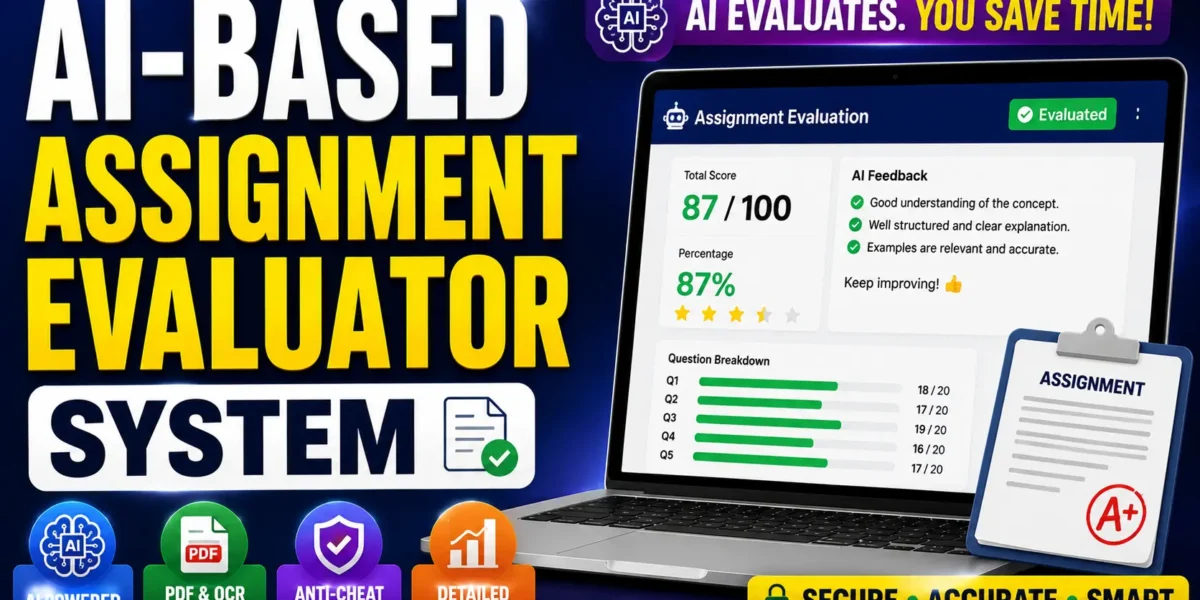
AI-Based Assignment Evaluator System is an advanced web application built with Python FastAPI that automatically evaluates student assignments using OpenAI GPT-4o-mini and Sentence Transformers, generates detailed feedback, calculates scores, and stores results.
Read more- Built with
- PythonMachine LearningBootstrapHTML/CSS
- You get
- Source codeDatabaseProject reportPPTSetup guide
- Delivery
- Instant download after payment
AI-Based Assignment Evaluator System is an advanced web-based application developed using Python, FastAPI, OpenAI GPT-4o-mini, and Sentence Transformers. The system is designed to automate student assignment evaluation by analyzing answers, calculating scores, generating detailed feedback, identifying missing points, and providing improvement suggestions.
Teachers can create assignments with questions, model answers, and marks, then share them with selected students or all registered students. Students can submit their answers by typing directly in the browser or by uploading typed or handwritten PDF files. The AI evaluation engine combines GPT-based evaluation with semantic similarity scoring to generate a final result.
Key Features
- Assignment Creation: Teachers can create assignments with multiple questions, model answers, and marks for each question.
- Targeted Assignment Sharing: Assignments can be shared with specific students or all registered students.
- Submission Overview: Teachers can view student submissions, scores, percentages, submission types, and anti-cheat flags.
- Detailed Evaluation: Teachers can view per-question AI feedback along with student answers.
- Class Dashboard: View overall class statistics and assignment performance.
- Typing Mode: Students can write answers directly in the browser.
- Anti-Cheat Monitoring: Detects excessive tab switches, copy-paste attempts, and window blur events.
- PDF Upload: Students can upload typed or handwritten PDF assignments.
- OCR Support: Text can be extracted from scanned PDF pages using Pytesseract when required.
- Instant AI Results: Students receive scores, percentages, question-wise feedback, missing points, and suggestions after submission.
- Submission History: Students can track previous submissions and results.
- OpenAI Evaluation: GPT-4o-mini evaluates answers against model answers and generates structured feedback.
- Semantic Similarity: Sentence Transformers calculates similarity between student and model answer embeddings.
- Blended Scoring: Final scores combine 70% OpenAI marks and 30% similarity-based marks.
- Fallback Evaluation: The system can use semantic similarity scoring when an OpenAI API key is unavailable.
Technology Stack
| Technology | Details |
|---|---|
| Programming Language | Python 3.13 |
| Backend Framework | FastAPI |
| AI Engine | OpenAI GPT-4o-mini |
| NLP / Similarity | Sentence Transformers (all-MiniLM-L6-v2) |
| Database | SQLite via SQLAlchemy ORM |
| PDF / OCR | PyMuPDF, Pytesseract |
| Authentication | JWT, python-jose, passlib bcrypt |
| Frontend | HTML5, CSS3, Vanilla JavaScript |
| Server | Uvicorn |
System Requirements
- Python 3.13
- Pip
- OpenAI API Key for GPT-based evaluation
- Modern Web Browser
- Terminal or Command Prompt
How It Works
The teacher first creates an assignment by adding questions, model answers, and marks. The assignment can then be shared with selected students or all registered students. Students access their personalized assignment list and submit answers either by typing in the browser or uploading a PDF.
For PDF submissions, PyMuPDF extracts the text, while Pytesseract provides OCR support for scanned documents. The system evaluates each answer using OpenAI GPT-4o-mini and Sentence Transformers. The final score is calculated using a blended formula of 70% OpenAI marks and 30% semantic similarity marks. Results, feedback, missing points, and improvement suggestions are then stored in SQLite and displayed on the student and teacher dashboards.
Perfect For
- BCA Final Year Projects
- MCA Final Year Projects
- B.Tech CS/IT Projects
- M.Tech Final Year Projects
- Artificial Intelligence Projects
- Machine Learning Projects
- Python Projects
- Generative AI Projects
Why This Project Is Useful for Students
This project provides practical experience with modern AI and full-stack development technologies including FastAPI, OpenAI API integration, Sentence Transformers, semantic similarity, OCR, PDF processing, SQLAlchemy, JWT authentication, and automated assignment evaluation.
Watch Project Demo
More Details & Full Documentation
Teacher Module
- Teacher registration and login
- Assignment creation
- Add questions and model answers
- Configure marks
- Share assignments with selected students
- Share assignments with all students
- View student submissions
- View scores and percentages
- View submission type
- View anti-cheat flags
- View detailed AI feedback
- View student answers
- View class statistics
- View assignment performance
Student Module
- Student login
- Personalized assignment list
- Assignment submission
- Typing mode
- Real-time anti-cheat monitoring
- PDF upload mode
- Typed PDF support
- Handwritten PDF support
- Instant AI results
- Question-wise score
- Percentage
- AI feedback
- Missing points
- Improvement suggestions
- Submission history
AI Evaluation Engine
- OpenAI GPT-4o-mini integration
- Academic evaluator prompt
- Structured JSON evaluation
- Sentence Transformers
- all-MiniLM-L6-v2 model
- Semantic similarity calculation
- 70% OpenAI + 30% similarity blended scoring
- Graceful fallback evaluation
PDF & OCR Module
- PDF text extraction
- PyMuPDF processing
- Pytesseract OCR
- Scanned document support
Authentication Module
- JWT authentication
- Role-based access control
- Password hashing with bcrypt
Prerequisites
- Python 3.13
- Pip
- OpenAI API Key
- Terminal / Command Prompt
Step 1: Install Dependencies
pip install -r requirements.txt
pip install email-validator bcrypt==4.0.1
Note
Use bcrypt==4.0.1 because newer versions are incompatible with passlib 1.7.4.
Step 2: Configure Environment Variables
Open the .env file and configure
OPENAI_API_KEY=sk-...your_key_here...
SECRET_KEY=your_secret_key
DATABASE_URL=sqlite:///./assignment_evaluator.db
UPLOAD_FOLDER=uploads
ACCESS_TOKEN_EXPIRE_MINUTES=1440
Step 3: Start the Server
python run.py
Step 4: Create Demo Accounts and Sample Data
python setup_demo.py
This creates
- Demo Teacher: teacher@demo.com
- Demo Student: student@demo.com
- Password: demo1234
It also creates a sample assignment for testing.
Stuck while running it? Chat with us on WhatsApp for free installation help.
No reviews yet. Be the first to review this project.