 33% OFF
 Train Ticket Reservation System Using Python and Django
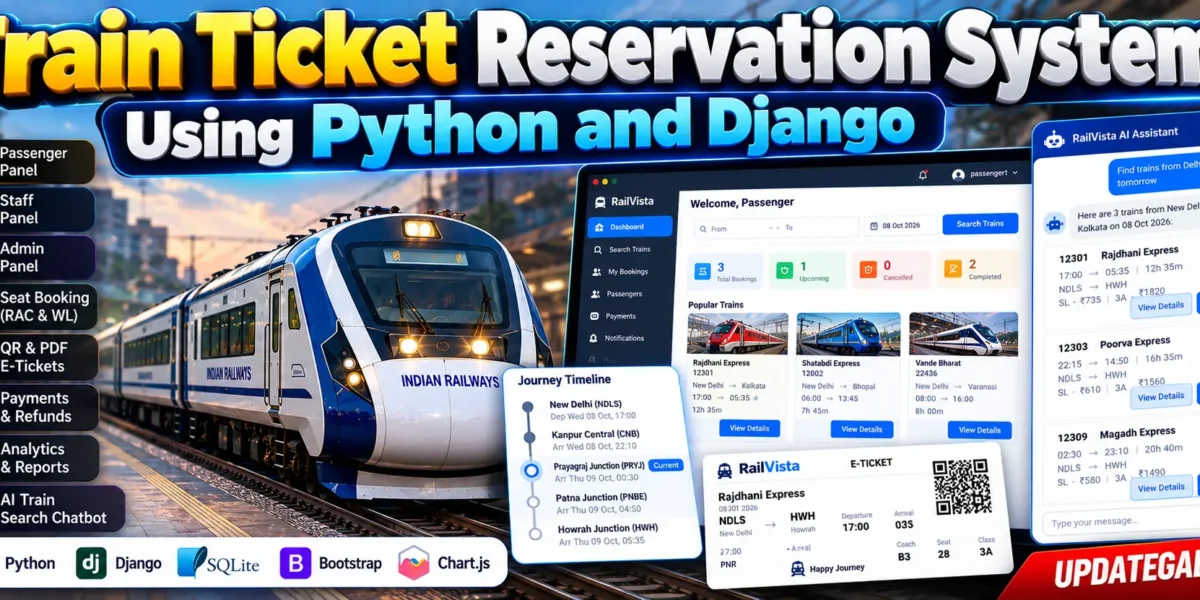
Train Ticket Reservation System Using Python and Django is a railway reservation and management application built with Django, Python, SQLite, and Bootstrap-based templates. It provides separate Passenger, Staff, and Admin portals for train search, seat selection, ticket booking, cancellations, refunds, and railway operations. Features include RAC and waiting-list management, QR-based e-tickets, PDF tickets, database-driven analytics, notifications, and an AI/ML train-search chatbot.
Read more- Built with
- PythonDjangoBootstrapHTML/CSSJavaScript
- You get
- Source codeDatabaseProject reportPPTSetup guide
- Delivery
- Instant download after payment
Project Overview
The Train Ticket Reservation System Using Python and Django is a full-stack web application designed to manage railway reservations and operational activities through a centralized platform. Developed with Python and Django, it provides separate interfaces for passengers, railway staff, and administrators.
Passengers can search for trains, compare routes, select coaches and seats, add passenger details, complete the demonstration payment workflow, and receive their tickets. The application also supports cancellations, refunds, RAC and waiting-list management, notifications, and railway operations.
Key Features
- Passenger Management: Register accounts, log in, maintain profiles, and save passenger details for bookings.
- Train Search: Search trains by source station, destination, and journey date. Compare available trains and review journey information.
- Coach and Seat Selection: Select travel classes, coaches, and seats with automatic seat allocation and segment-based availability.
- Booking Management: Add passengers, calculate fares, complete the demonstration payment workflow, and generate booking references and PNR tickets.
- RAC and Waiting Lists: Manage reservation-against-cancellation and waiting-list bookings, including eligible passenger promotions after cancellations.
- Ticket Generation: Generate QR-based e-tickets, PDF tickets, and receipts for passenger bookings.
- Cancellation and Refunds: Cancel complete bookings or individual passengers, calculate applicable cancellation charges, and track refund statuses.
- AI/ML Train-Search Chatbot: Search available database records using conversational queries and continue to train details or the existing booking process.
- Journey Timeline: Display passed, current, and upcoming stations through a visual railway journey timeline.
- Railway Operations: Manage stations, trains, routes, stops, coaches, seats, coach classes, fares, schedules, and platform assignments.
- Staff Workspace: View train schedules, search passengers, verify tickets, manage boarding, update delays and train status, handle rescheduling, and export passenger information to CSV.
- Admin Dashboard and Analytics: Display database-driven revenue, bookings, passengers, refunds, active trains, stations, RAC counts, waiting-list counts, and support issues. Interactive charts show booking and revenue trends, route performance, and seat occupancy.
- Reports and Notifications: Generate daily, weekly, and monthly reports, export CSV files, record system activity, and send notifications for booking confirmations, cancellations, reminders, and password-related operations.
- Security: Includes role-based access control, CSRF protection, password hashing, login throttling, password validation, signed QR ticket tokens, and secure cookie settings.
User Roles
Passenger
Passengers can manage profiles and saved passenger details, search and compare trains, select seats, book tickets, access PNR and PDF tickets, cancel bookings, track refunds, and view journey information.
Railway Staff
Staff can monitor schedules, search passengers, verify tickets, manage boarding information, update delays and train status, manage platforms, and access operational reports.
Administrator
Administrators manage users, staff, railway master data, bookings, payments, refunds, reservations, reports, system analytics, and activity logs through the administration dashboard.
Technology Stack
- Programming Language: Python
- Framework: Django
- Database: SQLite, with PostgreSQL support
- Frontend: HTML5, CSS3, and JavaScript
- UI Assets: Bootstrap Icons
- Charts: Chart.js
- Image Processing: Pillow
- PDF Generation: ReportLab
- Additional Functionality: QR code generation and Django email support
Software and Tools Required
- Python
- pip package manager
- Visual Studio Code
- A modern web browser
- Project dependencies listed in requirements.txt
Project Benefits
- Combines passenger reservations and railway operations in one application.
- Demonstrates seat allocation, segment-based availability, RAC, and waiting-list workflows.
- Provides ticket generation, cancellations, and refund tracking.
- Includes a conversational train-search chatbot.
- Uses database-driven dashboard statistics and interactive analytics.
- Supports QR tickets, PDF documents, and CSV reports.
More Details and Full Documentation
For complete project details, screenshots, features, demonstration login information, and installation instructions, visit the original UPDATEGADH project page.
- Passenger Registration and Profile Management
- Train Search and Route Comparison
- Coach and Seat Management
- Booking and Reservation Management
- RAC and Waiting-List Management
- Ticket and PNR Generation
- Cancellation and Refund Management
- AI/ML Train-Search Chatbot
- Railway Master Data Management
- Staff and Railway Operations
- Admin Dashboard and Analytics
- Payment and Transaction Records
- Reports and CSV Export
- Notifications and Email System
- Security and Activity Logs
- Railway Journey Timeline
- Install Python and Visual Studio Code on your computer.
- Extract the project ZIP file and open the project folder in Visual Studio Code.
- Open the integrated terminal in the project directory.
- Create a virtual environment: python -m venv venv
- Activate the virtual environment on Windows: venv\Scripts\activate
- Install the project dependencies: pip install -r requirements.txt
- Apply database migrations: python manage.py migrate
- Create demonstration railway data, user accounts, and sample bookings: python manage.py seed_data --with-bookings
- Start the Django development server: python manage.py runserver localhost:8001
- Open the local server address http://localhost:8001 in your browser.
- Use the seeded demonstration accounts: Admin username: admin, Staff username: staff1, Passenger username: passenger1.
- Use the corresponding passwords configured by the seed process. The source page lists usernames but does not specify their passwords.
- Change demonstration passwords before deploying the application in a production environment.
Stuck while running it? Chat with us on WhatsApp for free installation help.
No reviews yet. Be the first to review this project.