 25% OFF
 Student Feedback System Using Python and ML
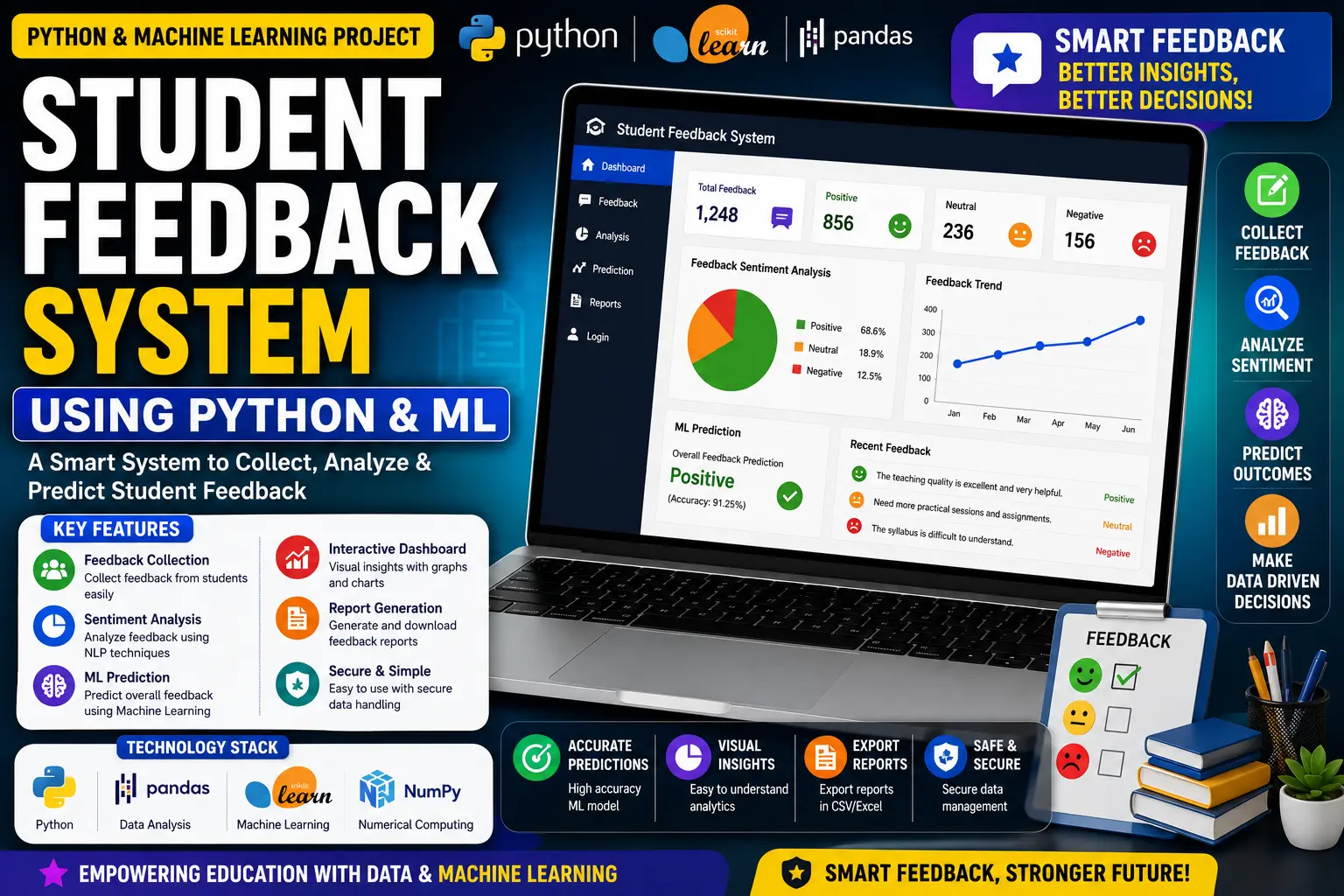
Student Feedback System using Python and Machine Learning is a web-based application that collects anonymous student feedback and uses ML-based sentiment analysis to classify responses as Positive, Neutral or Negative.
Read more- Built with
- PythonMachine LearningBootstrapHTML/CSSJavaScript
- You get
- Source codeProject reportPPTViva questionsSetup guide
- Delivery
- Instant download after payment
Student Feedback System using Python and Machine Learning is a web-based application designed to collect and analyze student feedback using machine learning-based sentiment analysis. Developed using Python, Flask, Scikit-learn, SQLite, HTML, CSS and Bootstrap, the system allows students to submit anonymous feedback while administrators can review feedback and analyze sentiment trends through interactive dashboards.
The application processes submitted feedback and automatically classifies the sentiment as Positive, Neutral or Negative using machine learning models such as Naive Bayes and Support Vector Machine (SVM). The system also provides data visualizations to help administrators understand overall feedback patterns and sentiment distribution.
Key Features
- Anonymous Feedback Submission: Students can submit feedback without revealing their personal details, encouraging honest and unbiased responses.
- Machine Learning Sentiment Analysis: Submitted feedback is processed using machine learning classifiers such as Naive Bayes and SVM to identify whether the response is Positive, Neutral or Negative.
- Role-Based Authentication: The system provides separate access for Students and Administrators based on their assigned roles.
- Student Dashboard: Students can log in and submit their feedback anonymously through the feedback interface.
- Admin Dashboard: Administrators can review submitted feedback, view statistics and analyze sentiment trends.
- Sentiment Distribution: Feedback results can be visualized using pie charts and bar graphs for easier analysis.
- Feedback Statistics: The admin dashboard provides total feedback statistics and trends over time.
- Structured Data Storage: User and feedback information is stored using SQLite for reliable retrieval and historical analysis.
- Feedback Search and Analysis: Stored feedback can be retrieved and reviewed for further analysis.
- Modular Architecture: The application follows an MVC-style separation between machine learning logic, templates and application functionality.
- Automatic Sentiment Classification: Pre-trained ML models automatically analyze incoming feedback and assign a sentiment score.
Technology Stack
| Component | Technology |
|---|---|
| Programming Language | Python |
| Backend Framework | Flask |
| Frontend | HTML, CSS, Bootstrap |
| Machine Learning | Scikit-learn |
| ML Models | Naive Bayes, SVM |
| Database | SQLite |
| Visualization | Matplotlib |
System Requirements
- Python environment
- Flask
- Scikit-learn
- SQLite
- Matplotlib
- Modern web browser such as Chrome, Firefox or Edge
- Required Python packages configured for the project
How It Works
The Student Feedback System provides separate access for Students and Administrators. Students can log in and submit feedback through the feedback interface by selecting the relevant teacher or department and entering their feedback text.
Once feedback is submitted, the text is processed by a pre-trained machine learning model. The system uses models such as Multinomial Naive Bayes and SVM to classify the feedback into three sentiment categories: Positive, Neutral and Negative.
The processed feedback is stored for later retrieval and analysis. Administrators can access the dashboard to view the total number of feedback submissions, review feedback entries and analyze sentiment distribution through charts and graphs generated using Matplotlib.
Perfect For
This project is suitable for BCA, MCA, B.Tech CS/IT students, Python learners, Machine Learning students, Data Science learners and educators who want to understand how machine learning can be integrated into a practical feedback management web application.
It can be used for academic submissions, final-year projects, portfolio development and learning practical concepts such as Flask web development, sentiment analysis, machine learning classification, database storage and data visualization.
Machine Learning Integration
The system integrates pre-trained machine learning models to automatically analyze student feedback. Models such as Multinomial Naive Bayes and SVM are used to classify feedback into Positive, Neutral and Negative categories.
The trained model files are stored inside the models folder and are loaded by the Flask application to analyze newly submitted feedback automatically.
Watch Project Demo
Watch the project walkthrough and setup tutorial on our YouTube channel.
▶ Watch on YouTube – Decode It
More Details & Full Documentation
For complete project details, source code and setup information, visit the official project page.
Student Module
- Student login
- Anonymous feedback submission
- Teacher/department selection
- Submit feedback
- View student dashboard
Admin Module
- Admin login
- View total feedback submissions
- Review submitted feedback
- View sentiment scores
- Analyze sentiment distribution
- View feedback trends
- Pie chart visualization
- Bar graph visualization
Machine Learning Module
- Feedback text processing
- Naive Bayes classifier
- SVM classifier
- Positive sentiment classification
- Neutral sentiment classification
- Negative sentiment classification
- Install Python
- Extract the project ZIP file
- Open the project folder in VS Code or another Python IDE
- Install the required Python packages
- Open the project terminal
- Run the application using:
python server.py
- Open the local Flask server in your browser
- Login as Student or Admin according to the available credentials
Stuck while running it? Chat with us on WhatsApp for free installation help.
No reviews yet. Be the first to review this project.