Employee Management System Using Python and Django
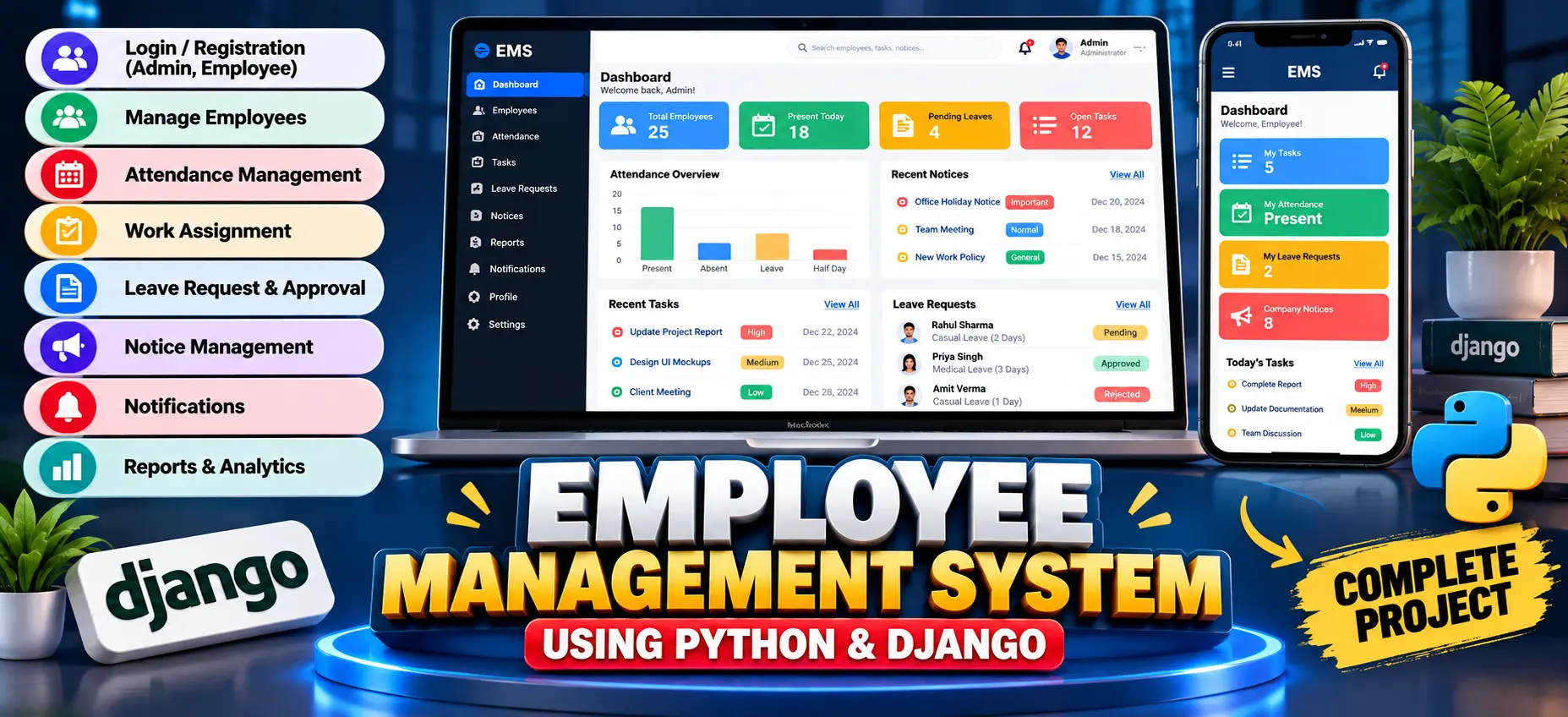
Employee Management System built with Python and Django for managing employee records, attendance, work assignments, leave requests, notices, notifications, activity history, and operational reports through separate role-based workspaces.
What You Will Get
Project Overview
Employee Management System Using Python and Django is a web-based application designed to organize employee information and everyday workforce operations in one connected system. The project uses Django for application development and SQLite for structured data storage.
The system connects employee records, attendance, work assignments, leave requests, notices, notifications, activity history, and operational reports through role-based access. It provides different workspaces for Admin, HR Manager, and Employee users.
Key Features
- Role-Based Access
- Employee Management
- Attendance Management
- Work Assignment and Task Tracking
- Leave Request Workflow
- Notice Management
- In-App Notifications
- Activity History
- Operational Reports
- Responsive Interface
- Employee Search and Management
- Task Status Management
Employee Management
Authorized management users can create, search, update, and manage employee profiles. Employee information includes employee ID, department, role, designation, joining date, contact details, and active status.
Attendance Management
The attendance module maintains daily employee attendance records. Attendance can be recorded using Present, Absent, Leave, and Half-Day statuses, with optional check-in, check-out, and remarks.
Work Assignment and Task Tracking
Managers can assign work to employees with task descriptions, due dates, priorities, and status values. Employees can view their assigned work and update the progress status of their tasks.
Leave Management
Employees can submit leave requests by selecting a leave type, date range, and reason. Management users can review pending requests and approve or reject them. Leave decisions can also generate notifications for employees.
Notice Management
Authorized users can publish workplace notices with different priority levels, including normal, important, and urgent notices. This provides a centralized way to communicate important information to employees.
Notifications
The notification system keeps users informed about important activities such as newly assigned tasks and leave approval or rejection decisions. Notifications are connected to the relevant user account.
Activity History
Important system actions are recorded in an activity timeline, providing operational visibility into activities performed within the application.
Operational Reports
Management users can access database summaries related to attendance, task status, and leave requests. These reports provide a useful overview of workforce operations.
Professional Dashboard
The project includes a custom professional dashboard rather than relying only on the default Django administration interface. The dashboard contains a sidebar, top navigation, search area, profile access, notifications, KPI cards, work queues, notices, and recent activity.
Management users receive an operational view of active employees, attendance records, pending leave requests, and open work, while employees receive a focused workspace for their assignments and requests.
User Roles
- Admin: Overall management access for employees, attendance, work, notices, leave requests, and reports.
- HR Manager: Workforce operations including employee records, attendance, tasks, notices, leave workflows, and reports.
- Employee: Personal workspace for assigned tasks, attendance information, notices, notifications, and leave requests.
Technology Stack
- Python
- Django
- HTML
- CSS
- SQLite
Software and Tools Required
- Python
- Visual Studio Code
- Django
- Web Browser
More Details and Full Documentation
Project Modules
Employee Management
Attendance Management
Work Assignment
Task Management
Leave Management
Notice Management
Notification Management
Activity History
Reports
Admin Workspace
HR Manager Workspace
Employee Workspace
Professional Dashboard
Profile Management
Role-Based Access
Installation Guide
1. Install Python and Visual Studio Code.
2. Extract the project and open the project folder in VS Code.
3. Open the VS Code terminal.
4. Create a virtual environment:
python -m venv venv
5. Activate the virtual environment on Windows:
venv\Scripts\activate
6. Install the required dependencies:
pip install -r requirements.txt
7. Create database migrations:
python manage.py makemigrations
8. Apply the migrations:
python manage.py migrate
9. Create a management account:
python manage.py createsuperuser
10. Start the Django development server:
python manage.py runserver
11. Open the project in your browser:
http://127.0.0.1:8000/
12. A demo-data command is also included for local testing.
FAQ for this project coming soon.
No reviews yet. Be the first to review!
Write a Review
Related Projects
 33% OFF
Featured
33% OFF
Featured
 38% OFF
Hot
38% OFF
Hot
 25% OFF
Featured
25% OFF
Featured
 70% OFF
Hot
70% OFF
Hot