Demo Video
AI-Powered English Learning App Using React
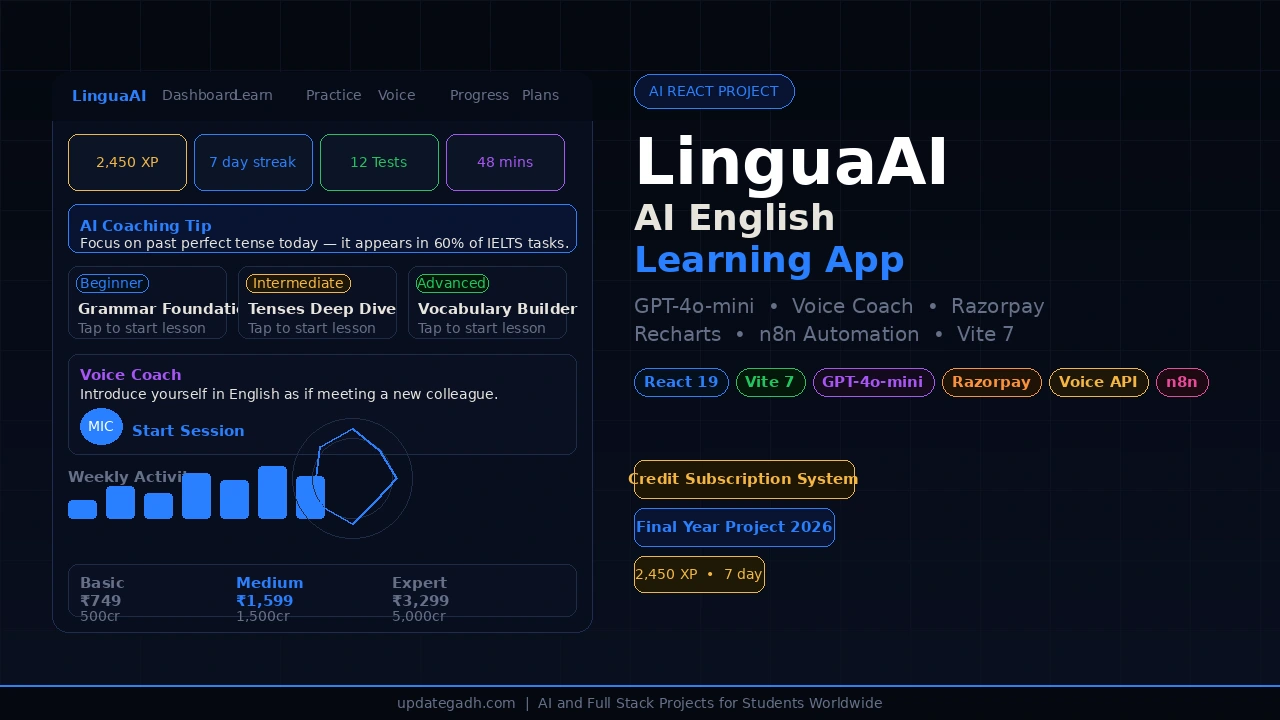
AI-Powered English Learning App using React, Vite and OpenAI GPT-4o-mini with AI-generated lessons, practice tests, voice coaching, progress analytics, user profiles, and Razorpay subscription payments.
What You Will Get
Project Overview
AI-Powered English Learning App is a modern single-page web application built with React 19 and Vite 7. The application uses OpenAI GPT-4o-mini to generate dynamic English lessons, provide AI explanations, and deliver personalized voice coaching.
The app combines interactive learning, practice tests, browser-based speech recognition, progress analytics, credit management, and Razorpay subscription payments in one responsive learning platform.
Key Features
- AI-Powered English Lessons
- Interactive In-Lesson Q&A
- Randomized MCQ Practice Tests
- AI-Generated Answer Explanations
- Voice Coach
- Speech Recognition
- Text-to-Speech Feedback
- Progress Dashboard
- Skill-Based Analytics
- XP and Streak Tracking
- Daily Task Checklist
- Credit and Subscription System
- Razorpay Checkout
- Local User Registration and Login
- User Test History
- Responsive Dark Theme
- n8n Webhook Automation
AI Lesson Generation
Users can select topics such as Grammar, Tenses, Vocabulary, Phrases, Idioms, Pronunciation, Writing, and Reading. Lessons can be generated at Beginner, Intermediate, or Advanced levels using OpenAI GPT-4o-mini.
After a lesson is generated, users can ask follow-up questions through the in-lesson Q&A chat. Completed lessons are saved to the user's profile.
Practice Test Engine
The practice module provides randomized 8-question multiple-choice tests covering grammar, tenses, vocabulary, phrases, and communication. Answers are scored instantly and the application provides detailed reviews with AI-generated explanations.
Test results are stored in the user's skill scores, test history, and daily progress information.
Voice Coach
The Voice Coach provides browser-based speaking practice using the Web Speech API. Users receive a speaking prompt, activate their microphone, and speak naturally while their speech is transcribed on screen.
The transcript is sent to GPT-4o-mini for pronunciation and grammar correction feedback. The resulting feedback is then read aloud using browser text-to-speech.
Progress Dashboard
The progress dashboard provides visual learning analytics through weekly activity, skill-based radar charts, a 14-day activity chart, and test score trends. The system also includes XP tracking, learning streaks, and a daily task checklist.
Credit and Subscription System
The application includes a credit-based subscription system integrated with the Razorpay Checkout SDK. Users can select between Basic, Medium, and Expert subscription plans with monthly or annual billing options.
Annual billing includes a 20 percent discount according to the project configuration. Successful payments add credits to the user's profile.
User Profiles
The application uses browser localStorage for user profiles, registration, login sessions, test history, credits, and activity data. This allows the project to operate without a traditional backend server.
n8n Automation
The application includes n8n webhook integrations for events such as lesson completion, test completion, and subscription purchases. These webhooks can be used to connect learning activity with external automation workflows.
Modern User Interface
The application uses a responsive dark theme with Inter typography, custom scrolling, smooth animations, and responsive layouts. The interface is designed to provide a consistent learning experience across supported screen sizes.
Technology Stack
- React 19
- Vite 7
- OpenAI GPT-4o-mini
- Web Speech API
- Recharts 3
- Razorpay Checkout SDK
- n8n Webhooks
- JavaScript
- HTML
- CSS
- localStorage
Application Data Storage
The project uses browser localStorage for user profiles, test history, credits, session information, and activity data. No traditional backend server or database is required for the provided implementation.
Software and Tools Required
- Node.js
- Visual Studio Code
- Modern Web Browser
- OpenAI API Key
- Razorpay Test or Live Key
- n8n Webhook URL
Watch Project Demo
Watch AI-Powered English Learning App Demo
More Details and Full Documentation
Project Modules
In-Lesson Q&A
Practice Test Engine
MCQ Question System
AI Answer Explanations
Voice Coach
Speech Recognition
Text-to-Speech
Progress Dashboard
Skill Analytics
XP and Streak Tracking
Daily Task Checklist
User Registration
User Login
User Profile
Test History
Credit Management
Subscription Plans
Razorpay Payment
n8n Webhook Automation
Responsive Dark UI
Installation Guide
1. Install Node.js and Visual Studio Code.
2. Extract the project and open the project folder in VS Code.
3. Open the VS Code terminal.
4. Navigate to the project folder:
cd lingua-ai
5. Install the project dependencies:
npm install
6. Create a .env file in the project root directory.
7. Add the required environment variables:
VITE_OPENAI_API_KEY=your_openai_api_key
VITE_OPENAI_MODEL=gpt-4o-mini
VITE_N8N_WEBHOOK_URL=your_n8n_webhook_url
VITE_RAZORPAY_KEY=your_razorpay_key
8. Start the development server:
npm run dev
9. Open the local URL displayed in the terminal.
10. Register an account and start using the learning modules.
11. For a production build, run:
npm run build
12. Preview the production build:
npm run preview
FAQ for this project coming soon.
No reviews yet. Be the first to review!
Write a Review
Related Projects
 20% OFF
Featured
20% OFF
Featured
 33% OFF
Featured
33% OFF
Featured
 23% OFF
Featured
23% OFF
Featured
 25% OFF
Featured
25% OFF
Featured