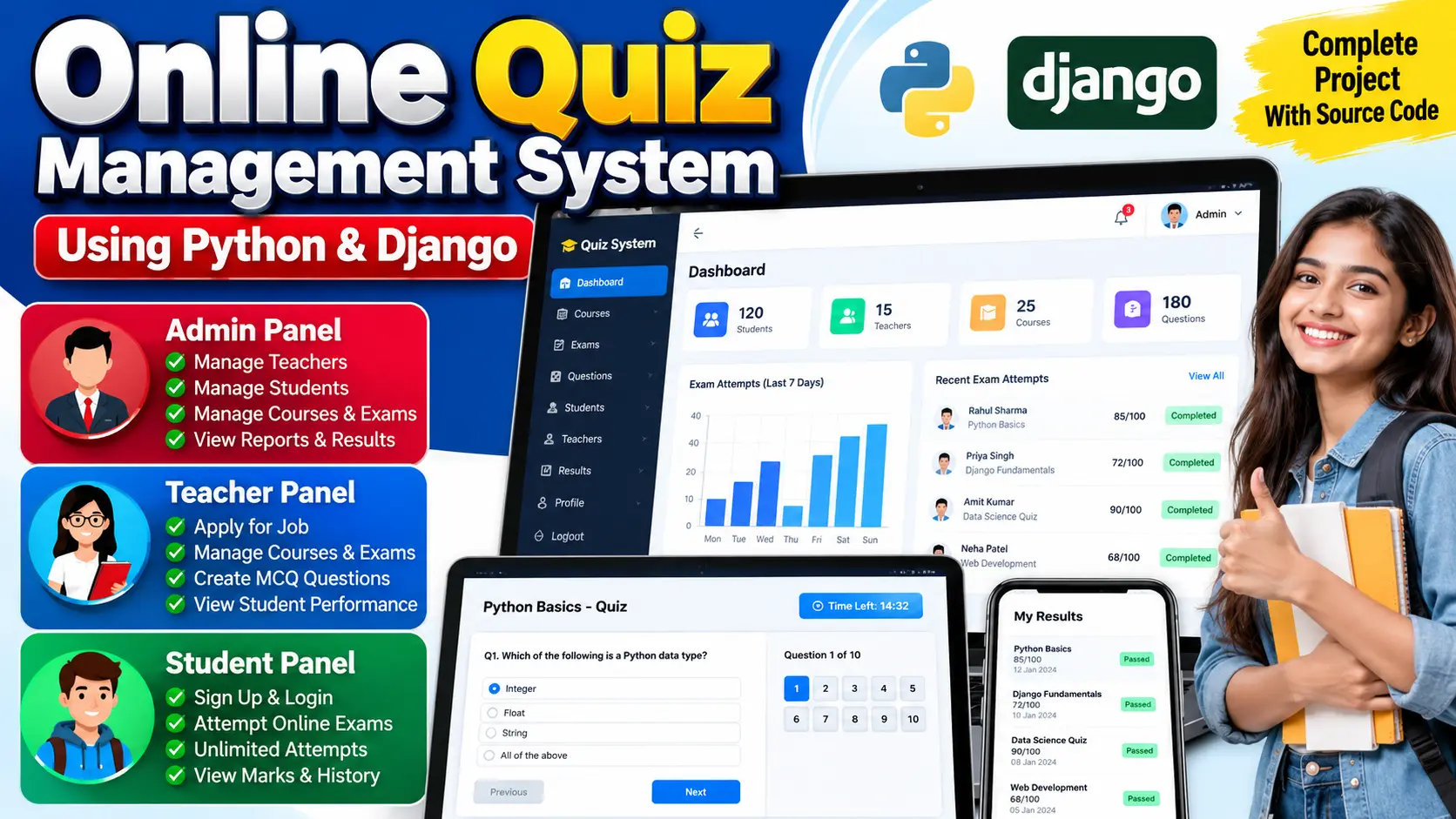
Online Quiz Management System Using Python and Django
Online Quiz Management System built with Python and Django for managing students, teachers, courses, exams, MCQ questions, marks, and performance records through separate Admin, Teacher, and Student roles.
What You Will Get
Project Overview
The Online Quiz Management System is a web-based examination platform developed using Python and Django for schools, colleges, and coaching institutes. The system provides separate roles for Admin, Teacher, and Student, allowing each user to perform specific examination and quiz management activities.
The application manages courses, exams, multiple-choice questions, student attempts, marks, teacher applications, and performance records through a centralized platform. SQLite3 is used as the default database.
Available Features
- Admin, Teacher, and Student roles
- Admin dashboard
- Teacher application and approval
- Student registration and login
- Teacher dashboard
- Student dashboard
- Course management
- Exam management
- MCQ question management
- Four-option multiple-choice questions
- Correct answer and marks configuration
- Online exam attempts
- Marks storage
- Student performance tracking
- Attempt history
- Contact page email configuration
Admin Workspace
The Admin workspace provides centralized management of the quiz platform. Administrators can view dashboard statistics for students, teachers, courses, and questions.
Administrators can approve, update, or delete teacher accounts, manage student accounts, create and remove courses and exams, manage questions, and monitor student performance and exam marks.
Teacher Workspace
Teachers can apply for teaching positions through the platform. Their login access is activated after approval by the administrator.
Approved teachers receive a personalized dashboard and can manage the courses and exams assigned to them. They can create, view, and delete MCQ questions with answer options, correct answers, and marks.
Student Workspace
Students can register directly and log in to their dashboard without administrator approval. The dashboard displays available courses, exams, and questions.
Students can take available exams and view the marks recorded for each attempt. The system stores individual attempt results so students can track their performance over time.
Course and Exam Management
Administrators and approved teachers can create and manage courses and exams. Courses provide the organizational structure for the question bank and examination activities.
Question Management
The system supports MCQ-based questions with four answer options. Questions can be associated with specific courses or exams, and each question can have a defined correct answer and marks.
Performance Tracking
The system stores student marks for exam attempts. Administrators can review student performance and attempt information to understand examination results and overall progress.
Role-Based Access
- Admin: Manages teachers, students, courses, exams, questions, and performance.
- Teacher: Applies for approval and manages assigned courses, exams, and questions after approval.
- Student: Registers, logs in, views available exams, attempts quizzes, and reviews marks and attempt history.
Technology Stack
- Programming Language: Python
- Framework: Django
- Frontend: HTML, CSS, JavaScript
- Database: SQLite3
Software and Tools Required
- Python 3.7.6 or higher
- Visual Studio Code
- Web Browser
- pip
- Virtual Environment
More Details and Full Documentation
Project Modules
Teacher Module
Student Module
Teacher Application Module
Teacher Approval Module
Student Registration Module
Course Management Module
Exam Management Module
Question Management Module
MCQ Question Module
Answer and Marks Module
Online Exam Module
Exam Attempt Module
Result and Marks Module
Performance Tracking Module
Attempt History Module
Dashboard Module
Authentication Module
Contact Email Module
SQLite3 Database
Installation Guide
1. Install Python 3.7.6 or higher and add it to PATH.
2. Install Visual Studio Code.
3. Extract the project folder.
4. Open the project folder in Visual Studio Code.
5. Open the VS Code terminal.
6. Create a virtual environment using: python -m venv venv
7. Activate the virtual environment using Windows command: venv\Scripts\activate
8. Install the required packages using: python -m pip install -r requirements.txt
9. Create the database migration files using: py manage.py makemigrations
10. Apply the database migrations using: py manage.py migrate
11. Create the Admin account using: py manage.py createsuperuser
12. Enter the required username, email, and password.
13. Start the Django development server using: py manage.py runserver
14. Open http://127.0.0.1:8000/ in your browser.
15. Log in as Admin to manage students, teachers, courses, exams, questions, and performance.
16. Teachers can apply for a teaching role and wait for Admin approval.
17. Approved Teachers can manage their assigned courses, exams, and questions.
18. Students can register, log in, attempt available exams, and view their marks and attempt history.
19. For optional email functionality, configure the email credentials in settings.py.
FAQ for this project coming soon.
No reviews yet. Be the first to review!
Write a Review
Related Projects
 23% OFF
Featured
23% OFF
Featured
 33% OFF
Hot
33% OFF
Hot
 23% OFF
Featured
23% OFF
Featured
 35% OFF
Featured
35% OFF
Featured