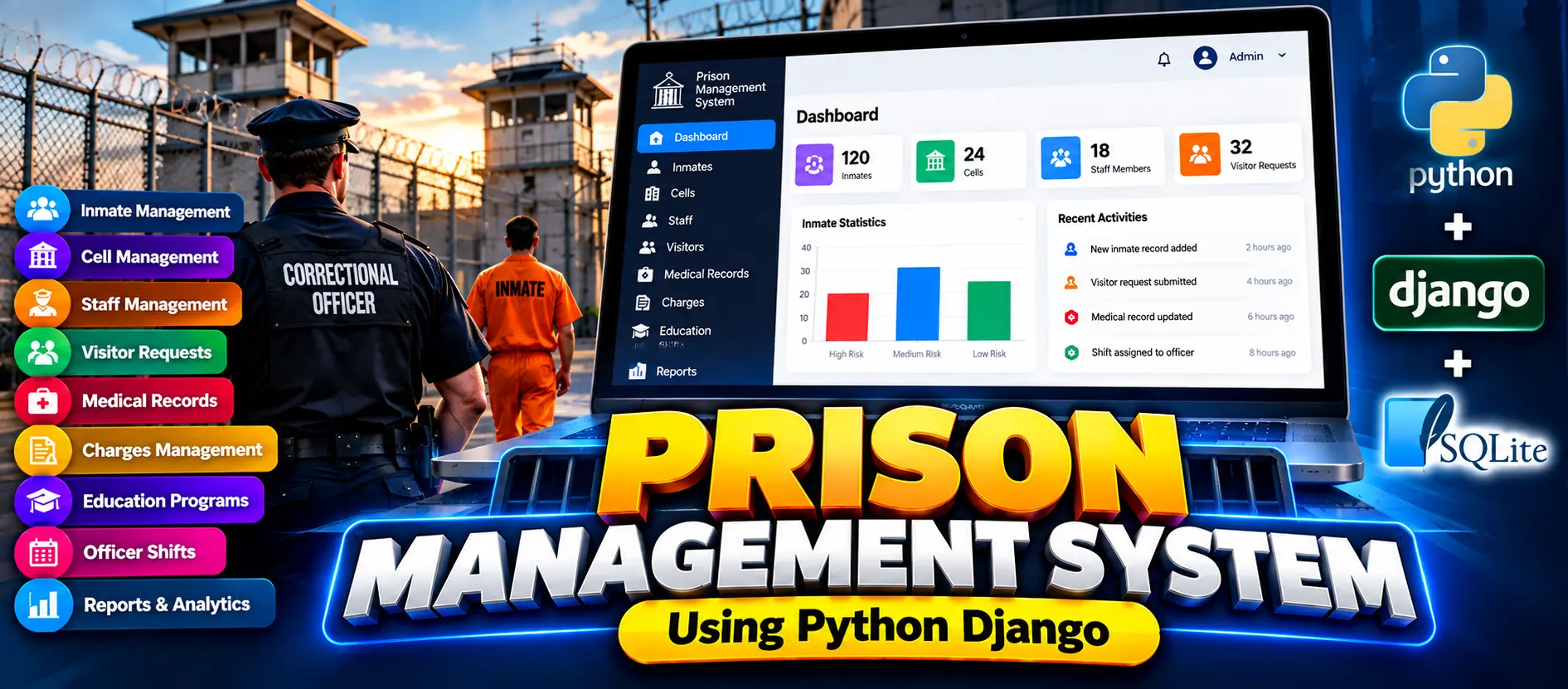
Prison Management System Using Python Django
Prison Management System Using Python Django is an advanced web application for managing inmate records, cells, staff, visitor requests, medical records, charges, education programs, officer shifts, and operational reports with role-based access for Administrators, Correctional Officers, and Medical Staff.
What You Will Get
Project Overview
Prison Management System Using Python Django is an advanced web-based management application developed with Python and Django. The system uses SQLite for data storage and provides a centralized platform for managing interconnected prison operations.
The application provides separate access according to user responsibilities. Administrators, Correctional Officers, and Medical Staff receive different dashboards, sidebar navigation, available actions, and protected module access based on their assigned roles.
Key Features
- Role-Based Authentication
- Protected URL Access
- Role-Based Dashboard
- Role-Based Sidebar Navigation
- Role-Based Action Buttons
- Inmate Management
- Cell and Occupancy Management
- Staff Management
- Visitor Request Management
- Medical Records Management
- Charges Management
- Education Programs
- Officer Shift Management
- Operational Reports
- Activity Tracking
- Responsive Dashboard Interface
Technology Stack
- Python
- Django
- HTML
- CSS
- JavaScript
- SQLite
- Django ORM
Software and Tools Required
- Python
- Visual Studio Code
- Django
- Web Browser
More Details and Full Documentation
Project Modules
Dashboard
Inmate Management
Cell Management
Staff Management
Visitor Request Management
Medical Records
Charges Management
Education Programs
Officer Shifts
Operational Reports
Activity Tracking
Administrator Workspace
Correctional Officer Workspace
Medical Staff Workspace
Role-Based Access Control
Protected URL Access
Responsive Dashboard
Installation Guide
1. Install Python and Visual Studio Code.
2. Extract the project and open the project folder in VS Code.
3. Open the VS Code terminal.
4. Create a virtual environment:
python -m venv venv
5. Activate the virtual environment on Windows:
venv\Scripts\activate
6. Install the required dependencies:
pip install -r requirements.txt
7. Install Pillow if it is not already included:
python -m pip install Pillow
8. Create database migrations:
python manage.py makemigrations
9. Apply the database migrations:
python manage.py migrate
10. Create the main administrator account:
python manage.py createsuperuser
11. Start the Django development server:
python manage.py runserver
12. Open the application login page:
http://127.0.0.1:8000/login/
FAQ for this project coming soon.
No reviews yet. Be the first to review!
Write a Review
Related Projects
 33% OFF
Featured
33% OFF
Featured
 23% OFF
Featured
23% OFF
Featured
 Hot
Hot
 23% OFF
Featured
23% OFF
Featured