 20% OFF
 Learning Management System
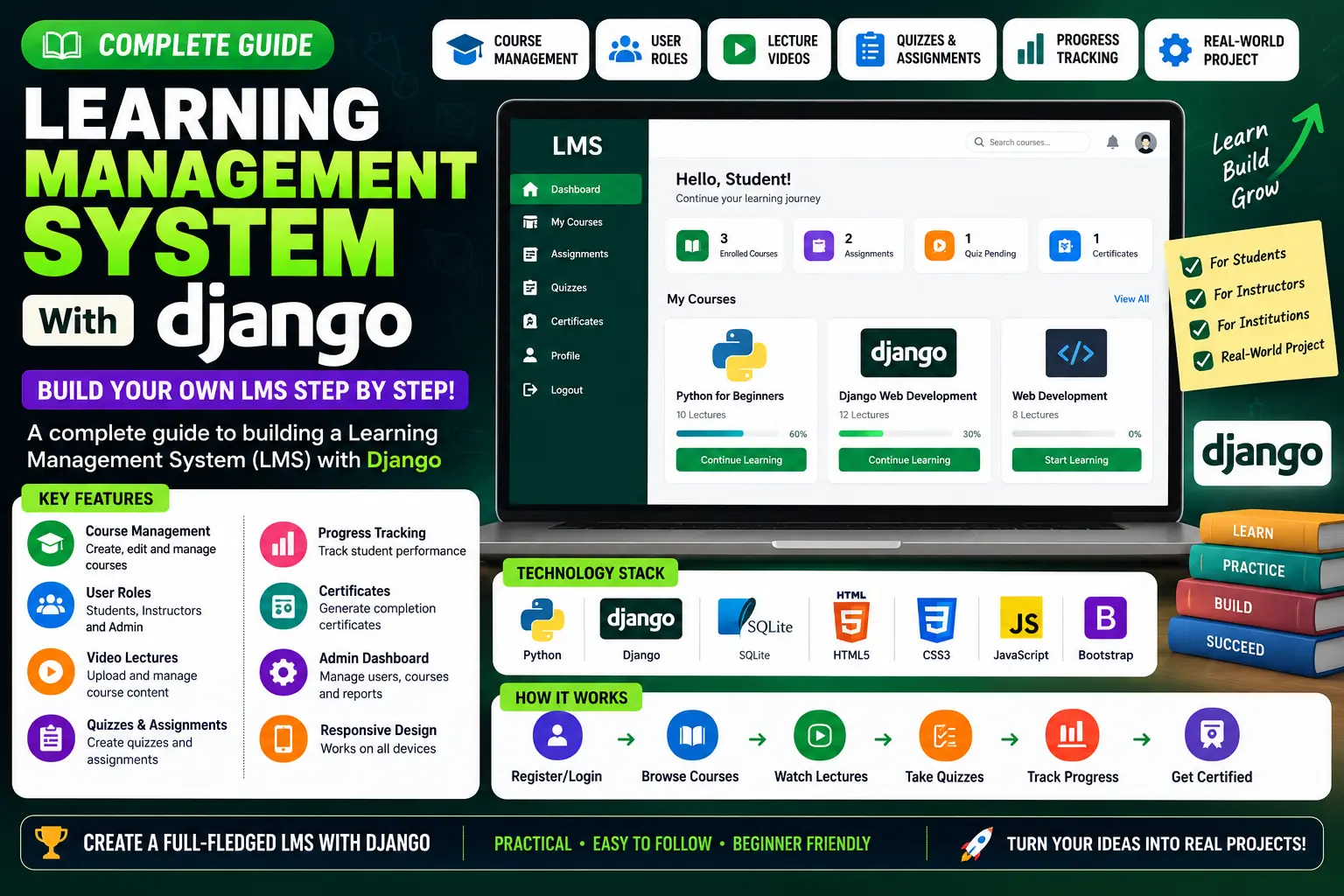
A complete Learning Management System built with Python and Django featuring four user roles, live analytics dashboard, course registration, quizzes, GPA and CGPA calculation, PDF result sheets, and Razorpay online fee payment.
Read more- Built with
- PythonDjangoBootstrapHTML/CSSJavaScript
- You get
- Source codeDatabaseProject reportPPTSetup guide
- Delivery
- Instant download after payment
Learning Management System With Django is a complete web-based education and e-learning application developed using Python 3.13 and Django 4.2. The system brings student management, course registration, learning materials, quizzes, results, GPA and CGPA calculation, analytics, and online fee payments together in a single platform.
The application includes four user roles with role-based access control. Administrators can manage programmes, courses, sessions, users, and system information. Lecturers can upload learning materials, create quizzes, enter marks, and generate result sheets. Students can register for courses, attempt quizzes, view results, calculate GPA and CGPA, and pay fees online through Razorpay.
Key Features
- Role-Based Access Control: Four user types with server-side access control using a custom Django user model.
- Live Analytics Dashboard: View counts, enrolment trends, and grade distribution through live dashboard data.
- Automatic Credentials: New students and lecturers receive generated IDs and passwords.
- Session Control: Set the current academic session and semester for registrations, results, and fees.
- Course Management: Create programmes and courses with course codes, credits, levels, years, and semesters.
- Learning Materials: Lecturers can upload PDFs, documents, slides, archives, and lecture videos.
- Quiz Builder: Create multiple-choice and essay questions with pass marks, optional single attempts, and randomized question order.
- Marks Management: Manage assignment, mid-exam, quiz, attendance, and final-exam scores.
- PDF Result Sheets: Generate printable result sheets for allocated courses.
- Course Registration: Students can add and drop courses according to their programme, level, and semester.
- Self-Marking Quizzes: Students can attempt quizzes question by question with automatic scoring and feedback.
- GPA & CGPA: Students can view grades, semester GPA, and cumulative CGPA.
- Online Fee Payment: Students can view outstanding and paid amounts and pay through card, UPI, or netbanking.
- PDF Receipts: Download payment receipts after successful fee payment.
- Multilingual Interface: Supports English, French, Spanish, and Russian.
- Light & Dark Theme: Theme follows system preference with a persistent toggle.
- Global Search: Search across courses, programmes, quizzes, and campus news.
- Activity Logging: Create, update, and delete activities are recorded for dashboard monitoring.
Technology Stack
| Technology | Details |
|---|---|
| Programming Language | Python 3.13 |
| Framework | Django 4.2 |
| Frontend | Bootstrap 5, HTML5, Custom CSS |
| Charts | Chart.js |
| Database | SQLite, PostgreSQL, MySQL |
| Forms | django-crispy-forms, django-filter |
| Reporting | ReportLab, xhtml2pdf |
| Payment | Razorpay Python SDK |
| Translation | django-modeltranslation |
| API | Django REST Framework |
| Static Files | WhiteNoise |
System Requirements
- Python 3.10 or newer
- Pip
- Modern Code Editor such as VS Code or PyCharm
- Web Browser
- Razorpay account and API credentials for online payments
How It Works
The system begins by setting the academic session and semester. Administrators create programmes and courses, while students and lecturers are onboarded with generated credentials. Courses are allocated to lecturers, who can then upload learning materials, create quizzes, and enter marks.
Students register for courses according to their programme and active semester. They can access learning materials, attempt quizzes, and view their results. The system calculates grades, GPA, and CGPA from the recorded scores. For fees, students can make online payments through Razorpay, after which the verified payment is recorded and a PDF receipt becomes available.
Perfect For
- BCA Final Year Projects
- MCA Final Year Projects
- B.Tech CS/IT Projects
- M.Tech Projects
- Python Django Students
- Education & E-Learning Projects
Why This Project Is Useful for Students
This project covers several important software development concepts in one application, including authentication, Django ORM relationships, file uploads, PDF generation, REST APIs, quizzes, result processing, GPA and CGPA calculation, and payment gateway integration. Its modular architecture also makes it suitable for academic demonstrations and viva presentations.
Watch Project Demo
More Details & Full Documentation
Administrator Module
- Role-based access control
- Live analytics dashboard
- Automatic student and lecturer credentials
- Password management
- Session and semester control
- Programme management
- Course management
- User management
- Activity logging
Lecturer Module
- Course allocation
- Material uploads
- PDF and document uploads
- Lecture video uploads
- Quiz builder
- Multiple-choice questions
- Essay questions
- Pass mark configuration
- Single-attempt quiz option
- Randomized quiz questions
- Marks entry
- Assignment marks
- Mid-exam marks
- Quiz marks
- Attendance marks
- Final-exam marks
- PDF result sheets
Student Module
- Course registration
- Add and drop courses
- Self-marking quizzes
- Quiz progress
- Instant or end-of-quiz feedback
- Results and grades
- Semester GPA
- Cumulative CGPA
- PDF registration form
- Online fee payment
- Payment history
- PDF payment receipt
System Features
- Multilingual interface
- Light and dark theme
- Global search
- Activity logging
Prerequisites
- Python 3.10 or newer
- Pip
- VS Code or PyCharm
Step 1: Create Virtual Environment
python -m venv venv
Windows
venv\Scripts\activate
macOS/Linux
source venv/bin/activate
Step 2: Install Dependencies
pip install -r requirements.txt
Step 3: Configure Environment Variables
Create a .env file in the project root
DEBUG=True
SECRET_KEY=your-secret-key-here
ALLOWED_HOSTS=127.0.0.1,localhost
EMAIL_BACKEND=django.core.mail.backends.console.EmailBackend
RAZORPAY_KEY_ID=
RAZORPAY_KEY_SECRET=
PAYMENT_CURRENCY=INR
Leave Razorpay keys blank if online payment is not required.
Step 4: Apply Migrations
python manage.py migrate
Step 5: Create Admin Account
python manage.py createsuperuser
Step 6: Run Development Server
python manage.py runserver
Step 7: Open the Application
http://127.0.0.1:8000
Sign in using the superuser account created above.
Stuck while running it? Chat with us on WhatsApp for free installation help.
No reviews yet. Be the first to review this project.