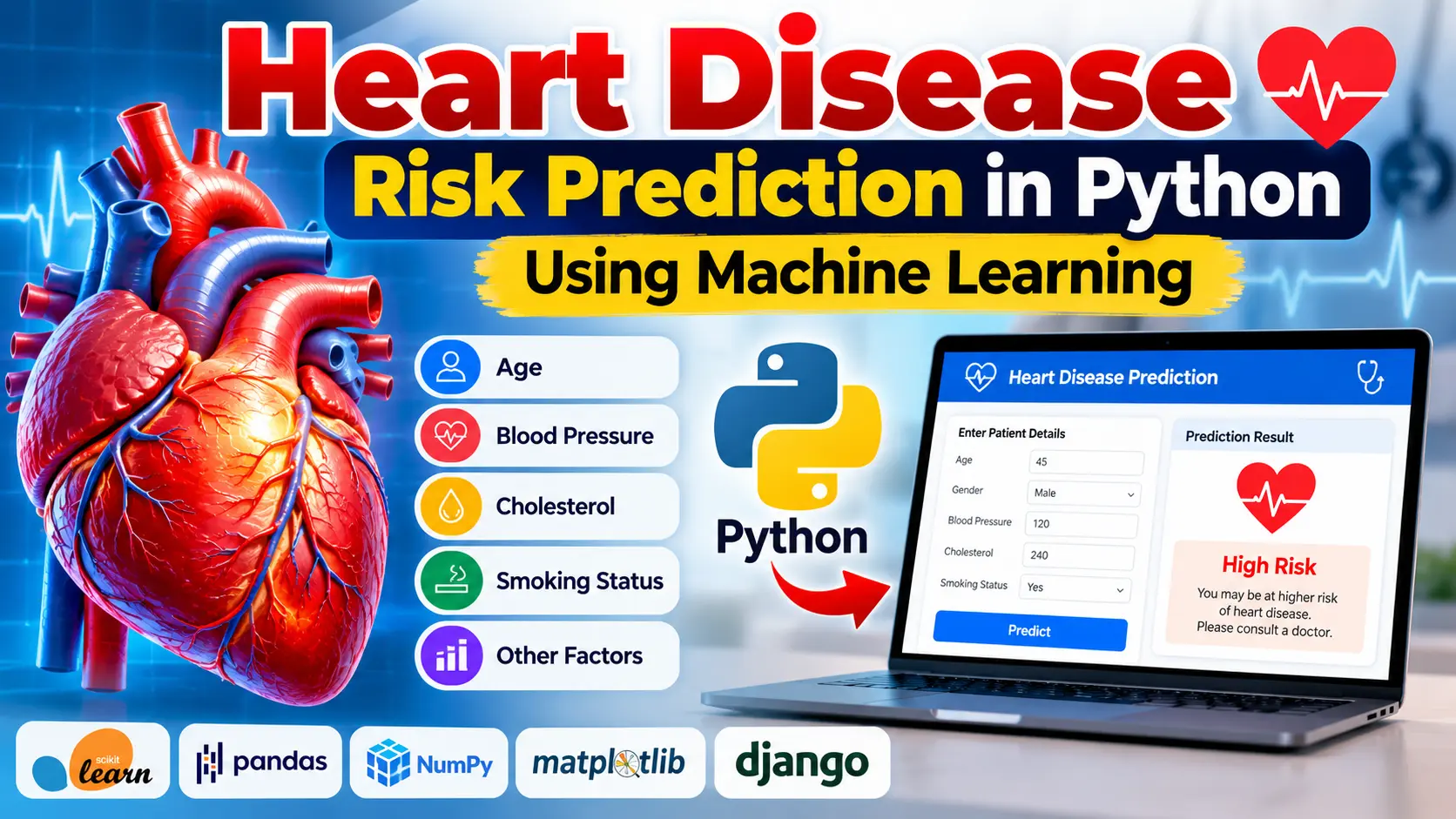
Heart Disease Risk Prediction Using Python and Machine Learning
Heart Disease Risk Prediction Using Python and Machine Learning is a healthcare analytics project that analyzes medical attributes to estimate heart disease risk. Built around Python, Pandas, NumPy and Scikit-learn, it demonstrates data preprocessing, feature selection, classification model training, prediction and model evaluation.
What You Will Get
Project Overview
Heart Disease Risk Prediction Using Python and Machine Learning is a machine learning project designed to analyze medical data and estimate the likelihood of heart disease. It demonstrates how health-related information can be processed and used to generate predictions through a trained classification model.
The project focuses on medical attributes such as age, gender, cholesterol levels, blood pressure and other relevant health indicators. It introduces students to data preparation, feature selection, model training, prediction and evaluation using Python and Scikit-learn.
The application can also be integrated with a Django or Flask web interface if the supplied implementation includes that functionality. The exact framework and database depend on the implementation.
Available Features
Health Data Analysis
Analyze patient records and relevant medical attributes to explore patterns associated with heart disease outcomes.
Data Preprocessing
Prepare the dataset for machine learning by inspecting records, handling missing values, encoding categorical variables and scaling numerical features when appropriate.
Feature Selection
Identify relevant input variables for training the classification model. Medical attributes such as age, gender, cholesterol and blood pressure can be considered according to the selected dataset.
Machine Learning Model Training
Train a classification algorithm using labelled medical data. The model learns patterns from the training records to estimate outcomes for previously unseen data.
Heart Disease Risk Prediction
Use the trained model to generate a prediction from the supplied medical attributes. The output is an estimate based on the model and dataset, not a confirmed diagnosis.
Model Evaluation
Evaluate model performance using suitable classification metrics, including accuracy, precision, recall, F1-score and a confusion matrix.
Data Visualization
Matplotlib or Seaborn can be used to visualize medical datasets and model results when visualization is included in the implementation.
Web Application Integration
A Django or Flask interface can be used, if included, to accept health-related inputs and display the model's prediction through a web browser.
How the Project Works
- Dataset Collection: Collect a labelled medical dataset containing relevant patient attributes and outcome values.
- Data Preprocessing: Inspect the data, handle missing values, encode categorical variables and scale numerical features where required.
- Model Training: Divide the dataset into training and testing sets and train a suitable classification algorithm.
- Prediction: Apply the trained model to unseen records to estimate heart disease risk.
- Evaluation: Measure model performance using appropriate classification metrics.
- Application Integration: If a web interface is provided, allow users to enter health information and view the prediction.
Technology Stack
- Programming Language: Python
- Machine Learning: Scikit-learn
- Data Analysis: Pandas
- Numerical Processing: NumPy
- Data Visualization: Matplotlib and Seaborn, when required
- Web Framework: Django or Flask, depending on the implementation
- Development Environment: Visual Studio Code
Software and Tools Required
- Python
- Visual Studio Code
- Python extension for VS Code
- pip package manager
- Required Python libraries
- Project dataset and source files
Project Applications
- Educational machine learning experiments
- Medical dataset analysis
- Healthcare analytics demonstrations
- Predictive modelling practice
- Python and Scikit-learn learning projects
Project Limitations
Prediction quality depends on dataset quality, the selected algorithm and the validation process. A model trained on limited data may not perform reliably for different populations. Real-world medical use requires rigorous clinical validation, appropriate privacy safeguards and professional oversight.
Important Medical Disclaimer
This project is intended for educational and research purposes. Its predictions are estimates and must not be used as a substitute for professional medical advice, clinical testing or diagnosis.
More Details and Full Documentation
Project Modules
2. Health Data Analysis Module
3. Data Preprocessing Module
4. Missing Value Handling Module
5. Categorical Data Encoding Module
6. Numerical Feature Scaling Module
7. Feature Selection Module
8. Machine Learning Model Training Module
9. Heart Disease Risk Prediction Module
10. Model Evaluation Module
11. Classification Metrics Module
12. Data Visualization Module
13. Web Application Integration Module, if included
Installation Guide
1. Install Python and Visual Studio Code on your computer.
2. Extract the project ZIP file and open the extracted folder in VS Code.
3. Open the integrated terminal in the project directory.
4. Check the Python installation using: python --version
5. Create a virtual environment using: python -m venv venv
6. Activate the environment on Windows using: venv\Scripts\activate
7. Upgrade pip using: python -m pip install --upgrade pip
8. If requirements.txt is available, install dependencies using: python -m pip install -r requirements.txt
9. If requirements.txt is not available, install the packages specified by the supplied project documentation.
10. Verify that the dataset and required source files are present.
11. Open the project README or inspect its files to identify the correct training script and application entry point.
12. Run the model training script if the project requires training before prediction.
13. If the project contains a Django application and manage.py, run: python manage.py runserver
14. If the project contains a Flask application, use the startup command documented in its source files.
15. If the project is notebook-based, open the notebook in VS Code and execute its cells in order.
16. Open the local application URL if a web interface is included.
17. Test the model with suitable input data and review the prediction and evaluation results.
18. Treat predictions as educational estimates rather than medical diagnoses.
FAQ for this project coming soon.
No reviews yet. Be the first to review!
Write a Review
Related Projects
 38% OFF
Featured
38% OFF
Featured
 38% OFF
Hot
38% OFF
Hot
 13% OFF
Featured
13% OFF
Featured
 38% OFF
Hot
38% OFF
Hot