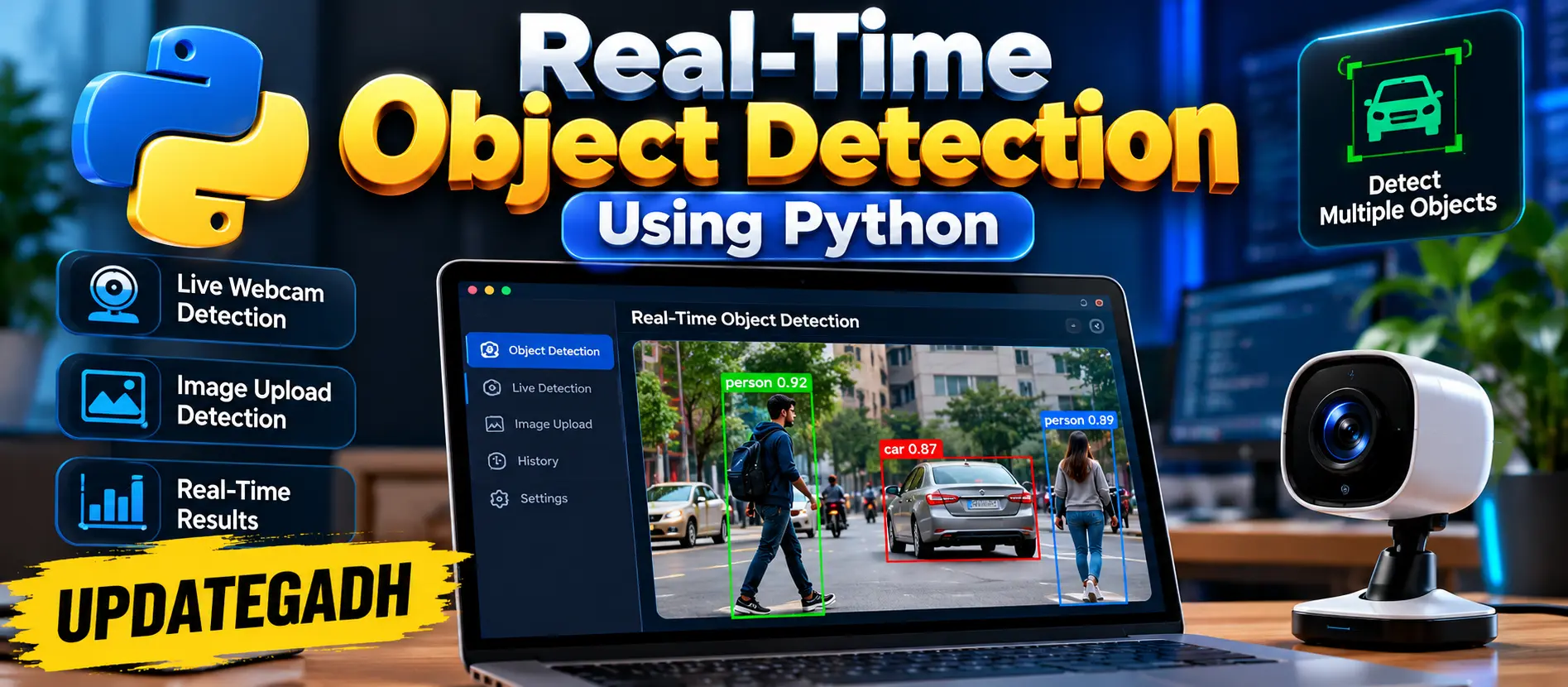
Real-Time Object Detection Using Python
Real-Time Object Detection Using Python is a Flask-based computer vision application that uses OpenCV and a pretrained YOLO model to detect objects through a live webcam or uploaded images with confidence controls, detection statistics, annotated results, and downloadable outputs.
What You Will Get
Project Overview
Real-Time Object Detection Using Python is a practical computer vision web application developed with Python, Flask, OpenCV, and a pretrained YOLO detection model. The system provides a browser-based workspace for detecting objects from live webcam frames as well as uploaded images.
The application focuses on the complete object detection workflow, including camera input, image processing, YOLO inference, confidence control, bounding-box annotation, detection statistics, result visualization, and recent activity tracking.
Key Features
- Real-Time Webcam Object Detection
- Pretrained YOLO Object Detection
- Confidence Threshold Control
- Detection Statistics
- Detected Class Summary
- Image Analysis
- JPG, JPEG, PNG and WEBP Image Support
- Downloadable Detection Results
- Recent Detection Activity
- Responsive Web Interface
- Image Validation
- Upload Size Validation
Real-Time Webcam Detection
The live detection workspace allows users to start their browser camera and send frames to the Python detection engine for continuous analysis. The processed frames are returned with bounding boxes and confidence labels for detected objects.
Image Analysis
Users can analyze existing images without using the webcam. Supported JPG, JPEG, PNG, and WEBP files can be uploaded through the Image Analysis section. After processing, the system displays the annotated result and allows the output to be downloaded.
Confidence Control
The confidence slider allows users to adjust the detection threshold. A higher threshold makes the detector more selective, while a lower threshold allows detections with lower confidence values to be considered.
Detection Statistics
The dashboard displays useful detection information including the total number of detected objects, unique object classes, and model processing time.
Class Summary
Detected object categories are presented as compact visual class indicators, making it easier to understand which types of objects were identified during the detection process.
Detection Engine
The detection engine loads the pretrained YOLO model and converts model predictions into structured detection information. OpenCV is used to process images and draw bounding boxes and confidence labels on the detected objects.
Web Dashboard
The dashboard combines the live camera workspace, image analysis, confidence controls, detection summaries, and recent activity into a responsive interface. JavaScript communicates asynchronously with the Flask backend and updates detection results without requiring a complete page reload.
Detection Workflow
The detection process begins in the browser. For webcam detection, JavaScript captures the current video frame and sends the encoded image to the Flask API. The backend decodes the image using OpenCV and passes it to the YOLO detection engine.
YOLO returns bounding boxes, class identifiers, and confidence values. OpenCV then draws the detected regions and labels on the image. The annotated result and detection statistics are returned to the browser for display.
Validation and Practical Design
The application validates uploaded file types and limits the maximum upload size. It also checks whether received image data can be decoded before sending it to the detection model. Invalid confidence values are rejected by the API.
Application Components
- Flask Application: Connects the web interface with the detection engine and provides dashboard, webcam, upload, confidence, and result routes.
- Detection Engine: Handles pretrained YOLO inference and OpenCV-based annotation.
- Data Models: Uses lightweight Python data classes to store detection information, image dimensions, processing time, and timestamps.
- Web Dashboard: Provides camera controls, image analysis, detection summaries, confidence settings, and activity information.
Technology Stack
- Python
- Flask
- OpenCV
- YOLO Pretrained Model
- HTML
- CSS
- JavaScript
Database
The provided implementation does not use a database. Recent detection activity is maintained in memory for the running application session.
Software and Tools Required
- Python
- Visual Studio Code
- Flask
- Modern Web Browser
- Webcam for live detection
More Details and Full Documentation
Project Modules
Web Dashboard
Real-Time Webcam Detection
Image Analysis
YOLO Detection Engine
OpenCV Image Processing
Confidence Control
Detection Statistics
Class Summary
Detection Result Management
Recent Activity
Image Validation
File Upload Validation
Annotated Result Download
Responsive Interface
Installation Guide
1. Install Python and Visual Studio Code.
2. Extract the project and open the project folder in VS Code.
3. Open the VS Code terminal.
4. Create a virtual environment:
python -m venv venv
5. Activate the virtual environment on Windows:
venv\Scripts\activate
6. Upgrade pip:
python -m pip install --upgrade pip
7. Install the required dependencies:
python -m pip install -r requirements.txt
8. Start the Flask application:
python main.py
9. The Flask server will start on port 5000.
10. Open the local address shown in the terminal in a modern web browser.
11. Allow camera permission when prompted to use real-time webcam detection.
12. Click Start Camera to begin live object detection.
13. To analyze an existing image, open the Image Analysis section and upload a supported JPG, JPEG, PNG or WEBP file.
14. The first model initialization may take additional time because the pretrained YOLO model may need to be downloaded.
FAQ for this project coming soon.
No reviews yet. Be the first to review!
Write a Review
Related Projects
 50% OFF
Featured
50% OFF
Featured
 11% OFF
 35% OFF
Featured
35% OFF
Featured
 23% OFF
Featured
23% OFF
Featured