 38% OFF
 Vehicle Service Management System Using Django and SQLite
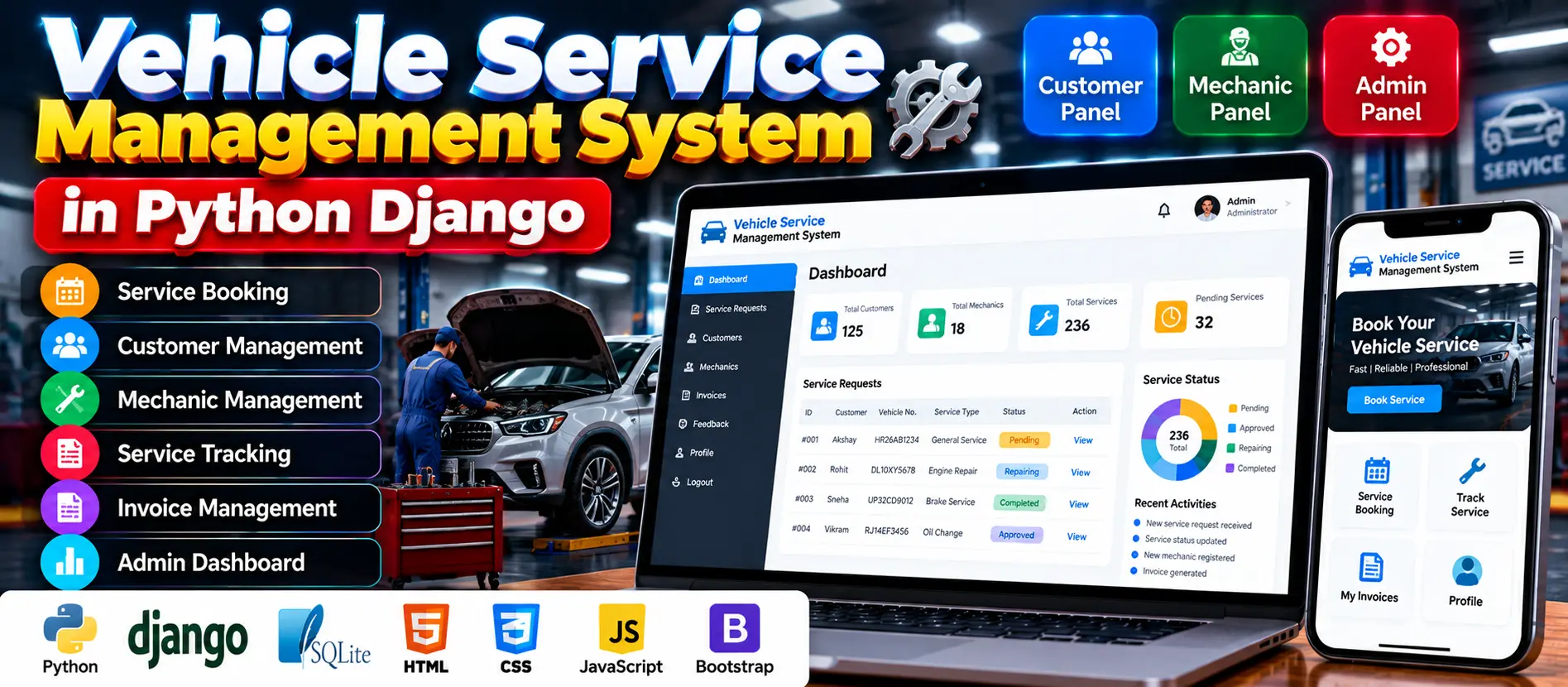
The Vehicle Service Management System Using Django and SQLite is a web-based application that helps customers submit vehicle service requests, mechanics manage assigned repairs, and administrators oversee service operations. It includes customer, mechanic, and admin panels for tracking repair progress, managing invoices, handling feedback, and monitoring service costs.
Read more- Built with
- PythonDjangoBootstrapHTML/CSSJavaScript
- You get
- Source codeDatabaseProject reportPPTSetup guide
- Delivery
- Instant download after payment
Project Overview
The Vehicle Service Management System Using Django and SQLite is a web application designed to organize vehicle servicing operations. Customers can submit service requests, track their status, view invoices, and provide feedback. Mechanics can manage assigned repair jobs and update their progress, while administrators manage customers, mechanics, service requests, assignments, salaries, and service costs.
Available Features
- Customer Registration and Login: Customers can create accounts and access their service information.
- Service Requests: Submit vehicle details, vehicle model, registration number, and reported issues.
- Service Status Tracking: Track requests through Pending, Approved, Repairing, Repairing Done, and Released statuses.
- Request Cancellation: Cancel or delete pending requests that have not been approved or processed.
- Invoice Viewing: View invoices for repaired vehicles.
- Customer Profile Management: Update personal information and contact details.
- Mechanic Applications: Mechanics can submit job applications containing their skills and experience.
- Mechanic Approval: Administrators review applications before activating mechanic accounts.
- Repair Assignment: Mechanics can view assigned vehicles and update repair statuses.
- Salary Details: Mechanics can view salary or compensation information.
- Admin Dashboard: Display statistics for customers, mechanics, and service orders.
- Service Management: Administrators can create, update, approve, assign, and delete service requests.
- Walk-In Service Requests: Administrators can create service requests for customers visiting without online bookings.
- Service Cost Monitoring: Review service costs, invoices, and pending orders.
- Feedback Management: Review feedback submitted by customers and mechanics.
Which Technologies Are Used in This Project?
- Python: Core programming language.
- Django 3.0.5: Web application framework.
- SQLite: Database for application records.
- HTML: Structures web pages.
- CSS: Styles the user interface.
More Details and Full Documentation
For complete project information, features, and setup instructions, visit Vehicle Service Management System Using Django and SQLite on UPDATEGADH.
- Customer Registration and Login
- Customer Profile Management
- Vehicle Service Requests
- Service Status Tracking
- Service Request Cancellation
- Invoice Management
- Mechanic Job Applications
- Mechanic Account Approval
- Assigned Vehicle Management
- Repair Status Updates
- Mechanic Salary Details
- Admin Dashboard
- Customer Management
- Mechanic Management
- Service Request Approval and Assignment
- Walk-In Customer Requests
- Service Cost and Pending Order Management
- Customer and Mechanic Feedback
- Install Python and Visual Studio Code.
- Download and extract the project ZIP file.
- Open the extracted project folder in Visual Studio Code.
- Open the integrated terminal.
- Create a virtual environment:
python -m venv venv
- Activate the environment on Windows:
venv\Scripts\activate
- Install the dependencies listed in the project, if a requirements.txt file is supplied:
pip install -r requirements.txt
- Check the project settings and confirm the database configuration.
- Run database migrations:
python manage.py migrate
- Create an administrator account using the documented Django command:
python manage.py createsuperuser
- Start the development server:
python manage.py runserver
- Open the application:
http://127.0.0.1:8000/
- Test customer registration, service requests, mechanic assignments, repair status updates, invoices, and feedback.
Stuck while running it? Chat with us on WhatsApp for free installation help.
No reviews yet. Be the first to review this project.