 20% OFF
 Vehicle Management System Using Python and AI Chatbot
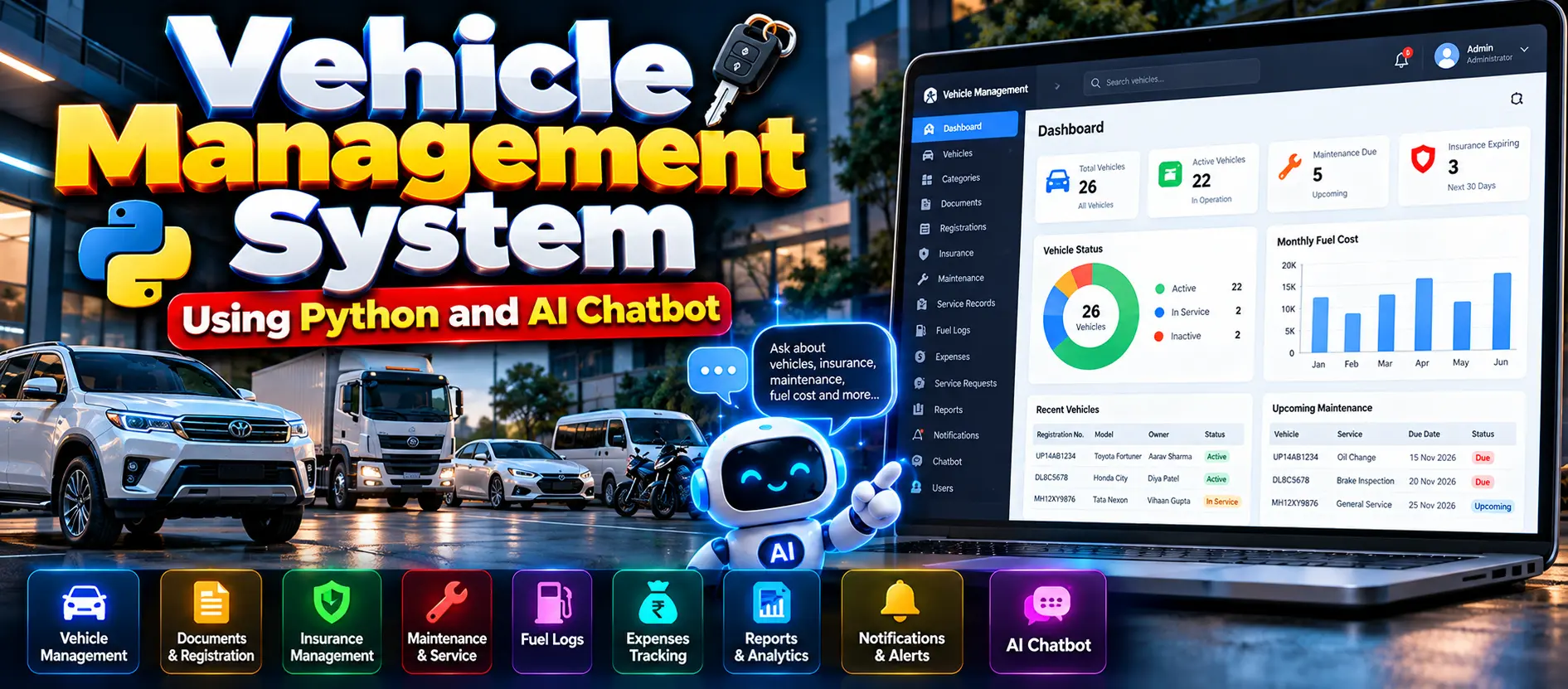
The Vehicle Management System Using Python and AI Chatbot is a Django-based web application that manages vehicle records, insurance, registration documents, maintenance, fuel logs, expenses, and service requests. It includes Administrator, Fleet Manager, and Vehicle Owner roles, dashboards, reports, CSV exports, notifications, and a machine-learning chatbot powered by NLTK and Scikit-learn.
Read more- Built with
- PythonDjangoMachine LearningBootstrapHTML/CSSJavaScript
- You get
- Source codeDatabaseProject reportPPTSetup guide
- Delivery
- Instant download after payment
Project Overview
The Vehicle Management System Using Python and AI Chatbot is a web-based management application developed using Python and Django with SQLite. It helps manage vehicle information, ownership records, documents, registration, insurance, maintenance schedules, service history, fuel records, expenses, and service requests.
The application provides separate access for administrators, fleet managers, and vehicle owners. It also includes dashboards, reports, CSV exports, notifications, and a machine-learning chatbot that answers supported questions using application data.
Available Features
- Role-Based Access: Separate permissions for administrators, fleet managers, and vehicle owners.
- Vehicle Management: Maintain registration numbers, VINs, make, model, year, category, fuel type, transmission, status, odometer readings, and purchase details.
- Vehicle Categories: Organize vehicles by category.
- Ownership Records: Maintain vehicle ownership and transfer information.
- Document Management: Store vehicle documents, document numbers, uploaded files, and expiry dates.
- Registration Management: Maintain registration details, RTO office information, and registration dates.
- Insurance Management: Record insurance providers, policy numbers, coverage types, premiums, and validity periods.
- Maintenance Scheduling: Track maintenance tasks, due dates, odometer targets, priorities, and overdue maintenance.
- Service History: Record service dates, service types, garages, descriptions, odometer readings, and costs.
- Fuel Logs: Track fuel quantities, rates, total costs, dates, stations, and odometer readings.
- Expense Tracking: Record vehicle-related expenses by category, description, amount, and date.
- Service Requests: Submit and manage service requests with preferred dates and request statuses.
- Dashboards and KPIs: Display role-specific summaries and vehicle-related information.
- Reports and CSV Exports: Access reports and export supported records.
- Alerts and Notifications: Manage notifications for relevant expiry dates and overdue items.
- Custom Administration Panel: Manage users, system settings, and chatbot training intents.
- Profile and Account Management: Access profile details and change passwords.
- AI Chatbot: Answer supported vehicle-management questions using application records.
- Chatbot Analytics: Review usage charts, fallback rates, model metrics, unanswered questions, and classifier tests.
- Chatbot Training: Train the chatbot using stored intents or a JSON training dataset.
Which Technologies Are Used in This Project?
- Python: Main programming language.
- Django: Web framework for application logic, authentication, and management panels.
- SQLite: Database for application records.
- HTML and CSS: Page structure and styling.
- JavaScript: Interface interactions, charts, and chatbot functionality.
- Scikit-learn: Machine-learning intent classification using Logistic Regression and TF-IDF features.
- NLTK: Text tokenization and stemming.
- Joblib: Saving and loading the trained chatbot model.
- Chart.js: Dashboard charts.
More Details and Full Documentation
For additional information about the project, screenshots, user roles, and installation instructions, visit the official UPDATEGADH project page.
Vehicle Management System Using Python and AI Chatbot – UPDATEGADH
- Authentication and Role-Based Access
- Administrator Panel
- Fleet Manager Panel
- Vehicle Owner Panel
- Vehicle Management
- Vehicle Categories
- Ownership and Transfer Records
- Vehicle Document Management
- Registration Management
- Insurance Management
- Maintenance Scheduling
- Service History Management
- Fuel Log Management
- Vehicle Expense Tracking
- Service Request Management
- Role-Based Dashboards and KPIs
- Reports and CSV Exports
- Alerts and Notifications
- Profile and Account Management
- AI Chatbot and Intent Classification
- Chat History and Feedback
- Chatbot Analytics and Training Management
- System Settings
- Automated Testing
Step 1: Install Python 3.10 or newer and Visual Studio Code.
Step 2: Extract the project ZIP file and open the vehicle_management folder in VS Code.
Step 3: Open Terminal > New Terminal.
Step 4: Create a virtual environment
python -m venv venv
Step 5: Activate the virtual environment in Windows PowerShell
venv\Scripts\Activate.ps1
If PowerShell blocks activation, run
Set-ExecutionPolicy -Scope Process Bypass
Then activate the environment again.
Step 6: Install the required packages
pip install -r requirements.txt
Step 7: Prepare the database
python manage.py makemigrations accounts fleet chatbot
python manage.py migrate
Step 8: Add demonstration data and train the chatbot
python manage.py seed_demo
Step 9: Start the development server
python manage.py runserver
Step 10: Open the application
http://127.0.0.1:8000/
Step 11: Log in using one of the demonstration accounts created by the seed command.
Administrator
Username: admin
Password: Admin@12345
Fleet Manager
Username: manager
Password: Manager@12345
Vehicle Owner
Username: user
Password: User@12345
Step 12: Run the automated tests
python manage.py test
Stuck while running it? Chat with us on WhatsApp for free installation help.
No reviews yet. Be the first to review this project.