 36% OFF
Complaint Management System in PHP and MySQL
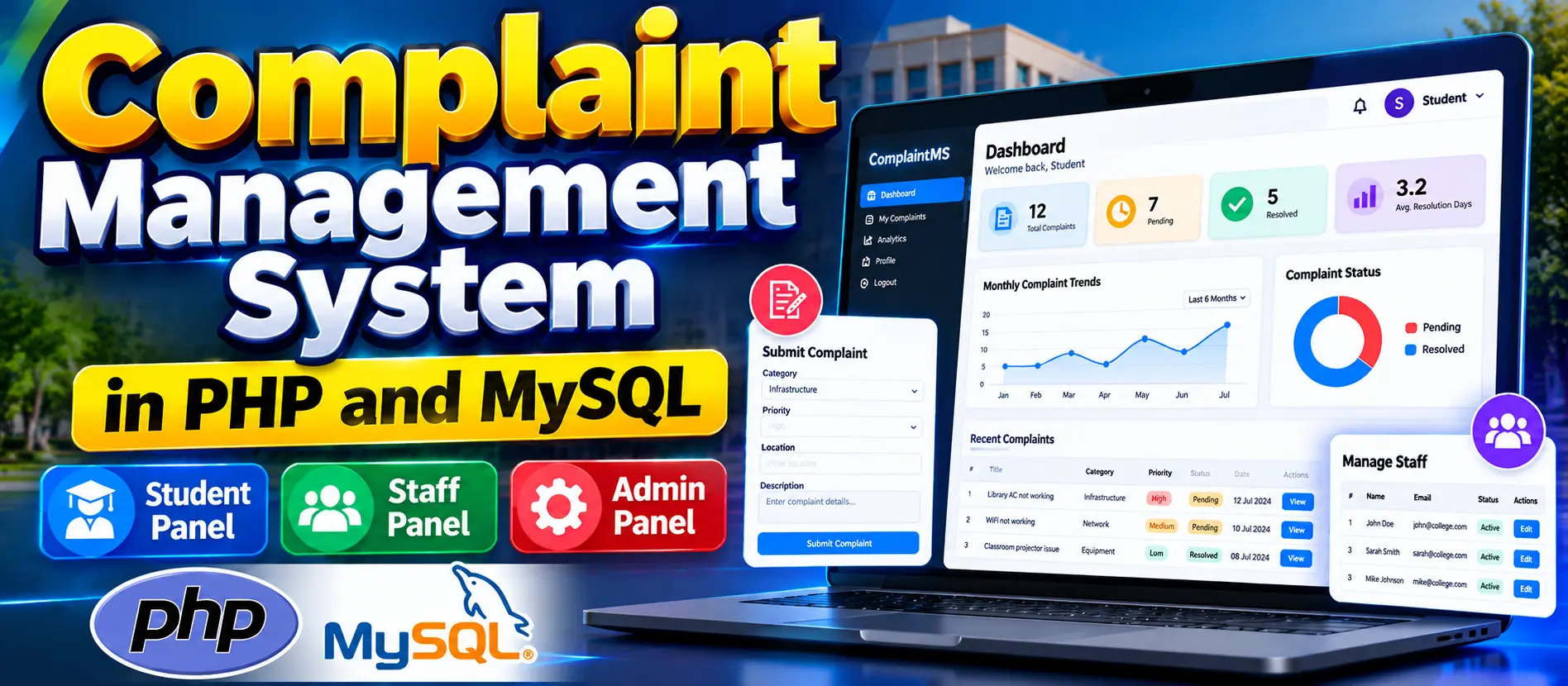
The Complaint Management System in PHP and MySQL is a web-based institute complaint portal with separate Student, Staff, and Admin access. It supports complaint submission, categorization, priority selection, staff assignment, resolution tracking, staff management, and interactive analytics dashboards using Chart.js. The application uses PHP 8, MySQL or MariaDB, and includes security measures such as bcrypt password hashing, CSRF tokens, prepared statements, and XSS protection.
Read more- Built with
- PHPMySQLBootstrapHTML/CSSJavaScript
- You get
- Source codeDatabaseProject reportPPTSetup guide
- Delivery
- Instant download after payment
Project Overview
The Complaint Management System in PHP and MySQL is a web-based application designed to organize complaint registration, assignment, tracking, and resolution within an institute. Students can submit complaints by selecting a category, location, priority, and description. Staff members can review assigned complaints and mark them as resolved, while administrators can assign complaints and manage staff accounts.
The application includes individual student analytics and system-wide staff analytics dashboards powered by Chart.js. It uses PHP 8, MySQL or MariaDB, HTML5, CSS3, and JavaScript, with security measures including bcrypt password hashing, CSRF tokens, prepared SQL statements, output escaping, and session regeneration.
Available Features
- Student Complaint Submission: Submit complaints with a category, location, priority level, and detailed description.
- Complaint Status Tracking: View submitted complaints and filter them by All, Pending, or Resolved status.
- Student Analytics Dashboard: View total, pending, and resolved complaints, average resolution time, monthly trends, status charts, priority distribution, and category breakdowns.
- Staff Complaint Management: View assigned complaints, manage pending and resolved cases, and mark complaints as resolved.
- Admin Complaint Assignment: Assign complaints to specific staff members.
- Staff Management: Add and delete staff accounts.
- Staff Analytics Dashboard: View system-wide complaint statistics, staff performance, monthly trends, complaint priorities, categories, and the top 10 complaint locations.
- Average Resolution Time: Calculate complaint resolution time using recorded resolution timestamps.
- Secure Authentication: Use bcrypt password hashing and session regeneration during login.
- Form and Database Security: Use CSRF tokens, MySQLi prepared statements, and HTML output escaping.
- Protected Admin Access: Require a master code in addition to staff login to access administrative functions.
- Browser-Based Database Setup: Run setup.php to create the database, tables, and default admin account.
- Demo Data: Use the optional seed.php script to populate sample students, staff, and complaints.
Which Technologies Are Used in This Project?
- Backend Language: PHP 8.x
- Database: MySQL or MariaDB
- Frontend: HTML5, CSS3, JavaScript
- Charts: Chart.js 4.4
- Icons: Font Awesome 6
- Fonts: Google Fonts Inter
- Database Access: MySQLi prepared statements
- Security: Bcrypt password hashing, CSRF tokens, XSS protection, and session regeneration
- Local Development: XAMPP, WAMP, or the PHP built-in development server
More Details and Full Documentation
For complete project details, features, database information, and setup instructions, visit the official UPDATEGADH project page.
More Details and Full Documentation
Watch Project Demo
Watch the Complaint Management System Project Demo on YouTube
- Student Registration and Login
- Student Complaint Management
- Complaint Categorization and Priority Management
- Complaint Status Tracking
- Student Analytics Dashboard
- Staff Login and Authentication
- Assigned Complaint Management
- Complaint Resolution Management
- Admin Access and Master Code Verification
- Complaint Assignment Management
- Staff Account Management
- Staff Analytics Dashboard
- Monthly Complaint Trend Analysis
- Complaint Status and Priority Charts
- Category and Location Analytics
- Staff Performance Analytics
- Average Resolution Time Analysis
- Database Setup and Demo Data Management
- Secure Session and Form Management
Step 1: Install PHP 8.x and Visual Studio Code. Install XAMPP or WAMP with MySQL/MariaDB.
Step 2: Copy the project folder into the XAMPP htdocs directory
C:\xampp\htdocs\complaint-management-system\
Step 3: Start MySQL from the XAMPP Control Panel.
Step 4: Open the project directory in VS Code and open its terminal.
Step 5: Start the PHP development server from the project folder
php -S localhost:8000
Step 6: Open the database setup script in your browser
http://localhost:8000/setup.php
This creates the database, tables, and default admin account.
Step 7: Optional: Populate the application with sample data
http://localhost:8000/seed.php
Step 8: Open the application
http://localhost:8000
Step 9: Use the sample student account
Email: alice@student.com
Password: password123
Step 10: Use the sample staff account
Email: admin@complainhome.com
Password: admin123
Staff Code: 5t@11
Step 11: To access the admin panel, log in as staff, select Admin Access, and enter the master code
5261
Stuck while running it? Chat with us on WhatsApp for free installation help.
No reviews yet. Be the first to review this project.