Hospital Management System is a PHP and MySQL
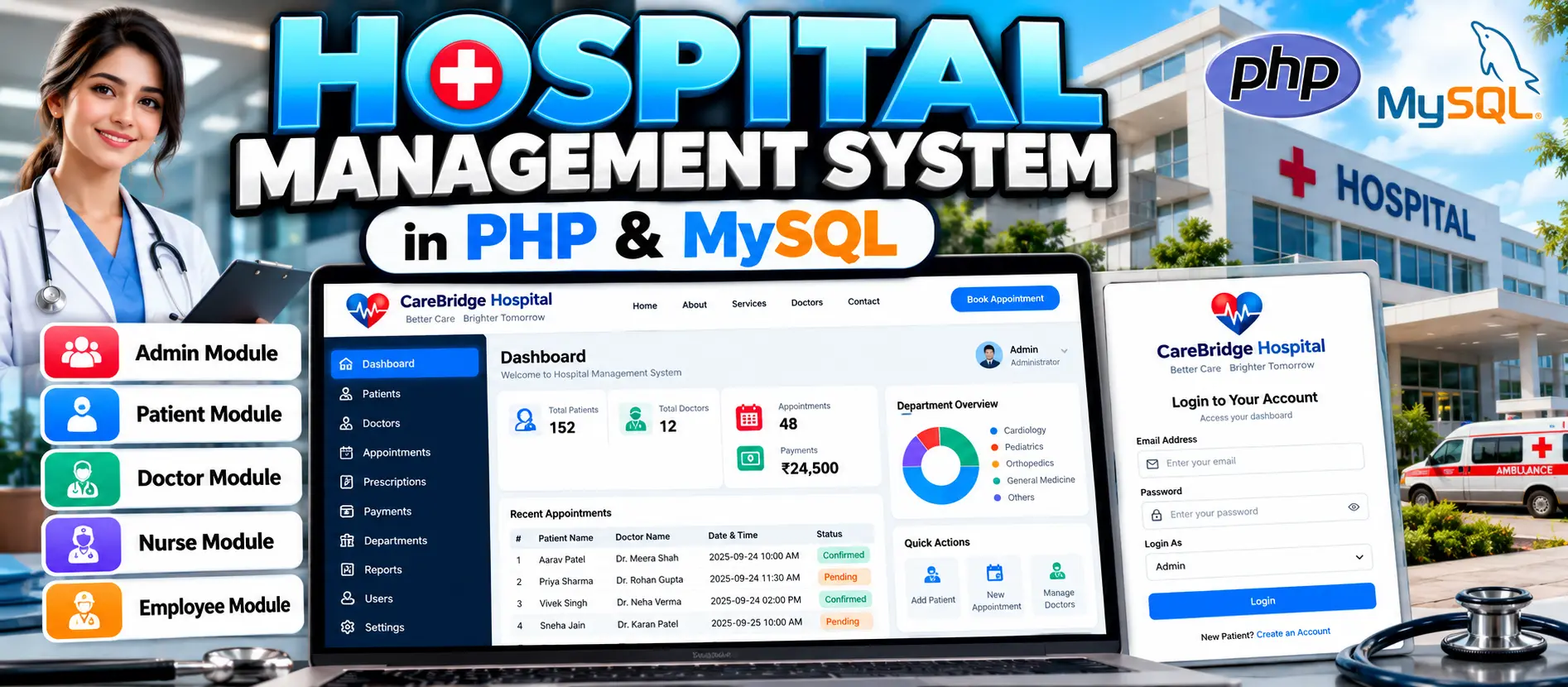
Hospital Management System is a PHP and MySQL based web application for managing hospital departments, patients, doctors, nurses, employees, appointments, prescriptions, diagnosis reports, and patient payments. The system provides separate modules for Admin, Patient, Doctor, Nurse, and Employee users.
What You Will Get
Hospital Management System in PHP and MySQL
Hospital Management System is a web-based application developed using PHP, MySQL, HTML, CSS, and JavaScript. The project is designed to digitalize common hospital operations and organize patient, doctor, nurse, employee, appointment, prescription, and payment-related information.
The application is divided into separate modules for Admin, Patient, Doctor, Nurse, and Employee users. Each role provides specific functionality for managing hospital activities and supporting communication between different participants in the hospital workflow.
Key Features
- Admin management module
- Hospital department management
- Patient management
- Doctor management
- Nurse management
- Employee management
- Patient registration and profile management
- Doctor listing and search
- Appointment booking
- Appointment status management
- Doctor appointment management
- Prescription management
- Diagnosis report access
- Patient payment transaction reports
- Personal profile management
- Appointment deletion
Admin Module
The Admin module provides centralized management of hospital operations. Administrators can manage hospital departments and user records, including patients, doctors, nurses, and employees. The administrator can also monitor doctor appointments, view patient payment transaction reports, and access diagnosis reports.
Patient Module
Patients can register and maintain their personal profiles. The module allows patients to view available doctors, search doctor information, book appointments, view appointment status, access prescriptions provided by doctors, and delete previously scheduled appointments.
Doctor Module
Doctors can manage patient details and accounts, create and manage appointments with patients, maintain their personal profiles, and add or update patient prescriptions.
Nurse Module
The Nurse module supports hospital staff involved in patient-related activities. Nurses can assist with patient information management and collaborate with doctors regarding patient details.
Employee Module
The Employee module provides general employee management functionality and supports hospital staff and departmental activities.
Appointment Management
The appointment functionality connects patients and doctors. Patients can book appointments and view their appointment information, while doctors can manage appointments with patients.
Prescription Management
Doctors can add and update prescriptions for patients. Patients can access prescriptions provided by their doctors through their account.
Payment and Diagnosis Reports
The system provides administrative access to patient payment transaction reports and diagnosis reports, helping hospital administrators monitor important records within the application.
Technology Stack
| Technology | Purpose |
|---|---|
| PHP | Backend development and server-side processing |
| MySQL | Database management |
| HTML | Web page structure |
| CSS | Interface styling |
| JavaScript | Client-side functionality |
Software Requirements
- XAMPP or another PHP development server supporting Apache and MySQL
- Visual Studio Code or another PHP-compatible editor
- Modern web browser
Database
The project uses MySQL for storing hospital-related information. The database can contain records required for patients, doctors, nurses, employees, departments, appointments, prescriptions, payments, and other application operations.
More Details and Full Documentation
For complete project information, module details, installation instructions, usage information, and the original documentation, visit the UpdateGadh project page.
Project Modules
2. Patient Module
3. Doctor Module
4. Nurse Module
5. Employee Module
6. Department Management Module
7. Patient Management Module
8. Doctor Management Module
9. Appointment Management Module
10. Prescription Management Module
11. Diagnosis Report Module
12. Patient Payment Report Module
13. Profile Management Module
14. Doctor Search Module
15. User Account Management Module
Installation Guide
1. Install XAMPP or another PHP development server that supports Apache and MySQL.
2. Install Visual Studio Code.
3. Start Apache and MySQL from the XAMPP Control Panel.
4. Extract the Hospital Management System project files.
5. Move the extracted project folder into the XAMPP htdocs directory.
6. Open phpMyAdmin in your browser.
7. Create a new MySQL database, for example hospital_db.
8. Import the SQL file provided with the project into the created database.
9. Open the project folder in Visual Studio Code.
10. Locate the database configuration file such as config.php or the corresponding database connection file.
11. Configure the MySQL host as localhost.
12. Configure the MySQL username as root.
13. Enter your local MySQL password if one is configured.
14. Set the database name to the database created during installation.
15. Save the database configuration.
16. Make sure Apache and MySQL are running.
17. Open the project through your local server URL in a browser.
18. Access the login page and test the available modules.
19. Test patient registration, doctor records, appointments, prescriptions, and administrative functions.
FAQ for this project coming soon.
No reviews yet. Be the first to review!
Write a Review
Related Projects
 50% OFF
Featured
50% OFF
Featured
 75% OFF
Featured
75% OFF
Featured
 23% OFF
Featured
23% OFF
Featured
 20% OFF
Featured
20% OFF
Featured