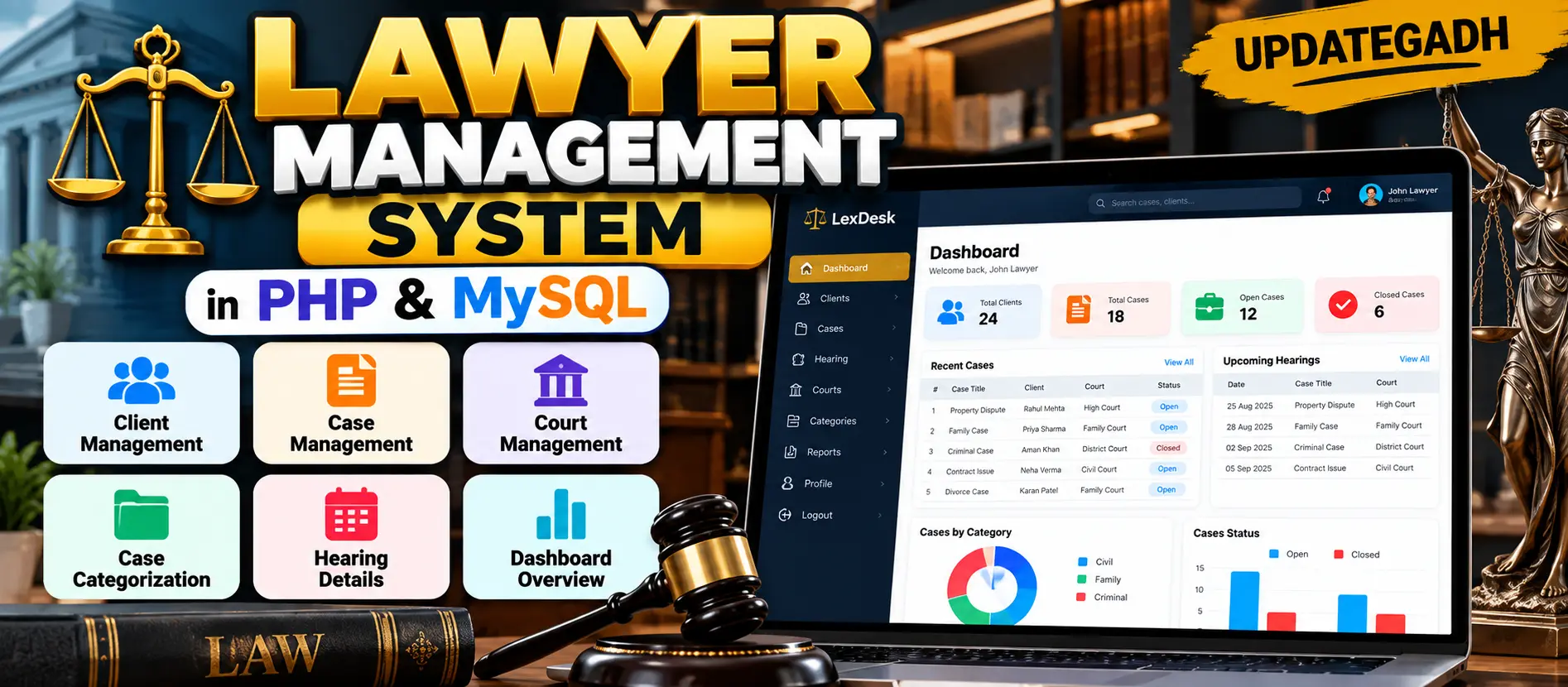
Lawyer Management System in PHP and MySQL
Lawyer Management System is a PHP and MySQL based web application for managing clients, legal cases, courts, case categories, and hearing records. The system provides authenticated lawyer access, CRUD operations, case filtering, printable hearing records, AJAX-based actions, and secure PDO database operations.
What You Will Get
Lawyer Management System in PHP and MySQL
Lawyer Management System is a web-based case management application designed to help lawyers organize client information, case records, courts, and hearing details in one structured workspace. The project is developed using HTML, CSS, Bootstrap, jQuery, PHP, AJAX, PDO, and MySQL.
The application focuses on a lawyer-based workflow where authenticated users can manage their own clients, cases, courts, and hearings. Related records are connected through the database, allowing a client to be linked with a case, a case to be associated with a court, and hearing records to be maintained against individual cases.
Key Features
- Lawyer account registration and login
- Session-based authenticated access
- Dashboard with client and case statistics
- Client record management
- Case record management
- Case categorization
- Case filtering
- Court management
- Hearing record management
- Hearing history for cases
- Printable hearing records
- Printable case-category reports
- AJAX-based delete operations
- PHP PDO prepared statements
- Password hashing and password verification
- Authenticated-user based record access
- Responsive Bootstrap interface
Lawyer Account
Lawyers can create an account using their name, contact number, email address, and password. Login credentials are validated before a session is created. Passwords are stored using PHP password hashing instead of plain-text storage.
Dashboard
The dashboard provides an overview of the lawyer's records, including total clients, total cases, open cases, and hearing records. A recent-case section provides a quick view of recently updated matters.
Client Management
The client module allows lawyers to create, view, edit, and delete client records. Client information includes name, contact number, email address, physical address, and notes. Client records are associated with the authenticated lawyer account.
Case Management
Lawyers can create cases using details such as case number, case title, client, court, category, description, and status. Existing cases can be edited or deleted. The system supports Open and Closed case statuses and maintains relationships between cases, clients, and courts.
Case Categorization
Cases can be classified into Civil, Family, or Criminal categories. The case listing provides filtering functionality so lawyers can narrow records according to the selected case category.
Court Management
The court module allows lawyers to maintain court records including court name, court type, and city. Court records can be created, edited, and deleted and can subsequently be associated with cases.
Hearing Management
Hearing records are maintained against individual cases. A hearing can contain the hearing date, remarks, and judgment information. Lawyers can review hearing history from the related case and print an individual hearing record when required.
AJAX-Based Actions
The project uses jQuery and AJAX for selected delete operations. The browser sends the relevant record ID to a PHP endpoint and receives a JSON response, demonstrating asynchronous communication between the frontend and backend.
Security and Data Handling
PHP sessions are used to protect internal pages. Passwords are handled with password_hash() and password_verify(). Database operations use PDO prepared statements to reduce SQL injection risks, while output is escaped before being displayed in HTML. Queries for private records also include the authenticated lawyer ID.
Technology Stack
| Technology | Purpose |
|---|---|
| PHP | Backend development and server-side processing |
| MySQL | Database management |
| PDO | Secure database interaction |
| HTML | Web page structure |
| CSS | Interface styling |
| Bootstrap | Responsive user interface |
| jQuery | Client-side functionality |
| AJAX | Asynchronous server communication |
Software Requirements
- XAMPP
- Visual Studio Code
- PHP environment provided through XAMPP
- MySQL
- Modern web browser
Database
The project uses a MySQL database named case_management_system. The provided SQL file creates the required database structure, tables, relationships, and demo records.
Watch Project Demo
Watch the project demonstration to understand the lawyer dashboard, client management, case management, court records, hearing workflow, and overall interface.
More Details and Full Documentation
For complete project information, source documentation, installation instructions, usage details, and implementation information, visit the original UpdateGadh project page.
Project Modules
2. Lawyer Login Module
3. Dashboard Module
4. Client Management Module
5. Case Management Module
6. Case Categorization Module
7. Case Filtering Module
8. Court Management Module
9. Hearing Management Module
10. Hearing History Module
11. Printable Hearing Report Module
12. Case Category Report Module
13. AJAX Operations Module
14. Session Management Module
15. PDO Database Module
16. Password Security Module
Installation Guide
1. Install XAMPP on your computer.
2. Install Visual Studio Code.
3. Start Apache and MySQL from the XAMPP Control Panel.
4. Extract the Lawyer Management System project.
5. Place the project folder inside C:\xampp\htdocs\case_management
6. Open phpMyAdmin in your browser.
7. Import the SQL file located at database/case_management_system.sql
8. The SQL file will create the required database, tables, relationships, and demo records.
9. Open the project in Visual Studio Code.
10. Open config.php and check the database configuration.
11. Use database name case_management_system.
12. Use username root.
13. Keep the database password empty if your local XAMPP MySQL uses the default configuration.
14. Save the database configuration.
15. Make sure Apache and MySQL are running.
16. Open http://localhost/case_management/ in your browser.
17. The lawyer login page will appear.
18. Use the included demo account for testing.
19. Email: lawyer@lexdesk.local
20. Password: lawyer123
21. Register or log in to access the lawyer dashboard.
22. Add clients, create cases, manage courts, and record hearing details.
23. Use the available report and print options when required.
FAQ for this project coming soon.
No reviews yet. Be the first to review!
Write a Review
Related Projects
 20% OFF
Featured
20% OFF
Featured
 50% OFF
Featured
50% OFF
Featured
 38% OFF
Hot
38% OFF
Hot
 20% OFF
Featured
20% OFF
Featured