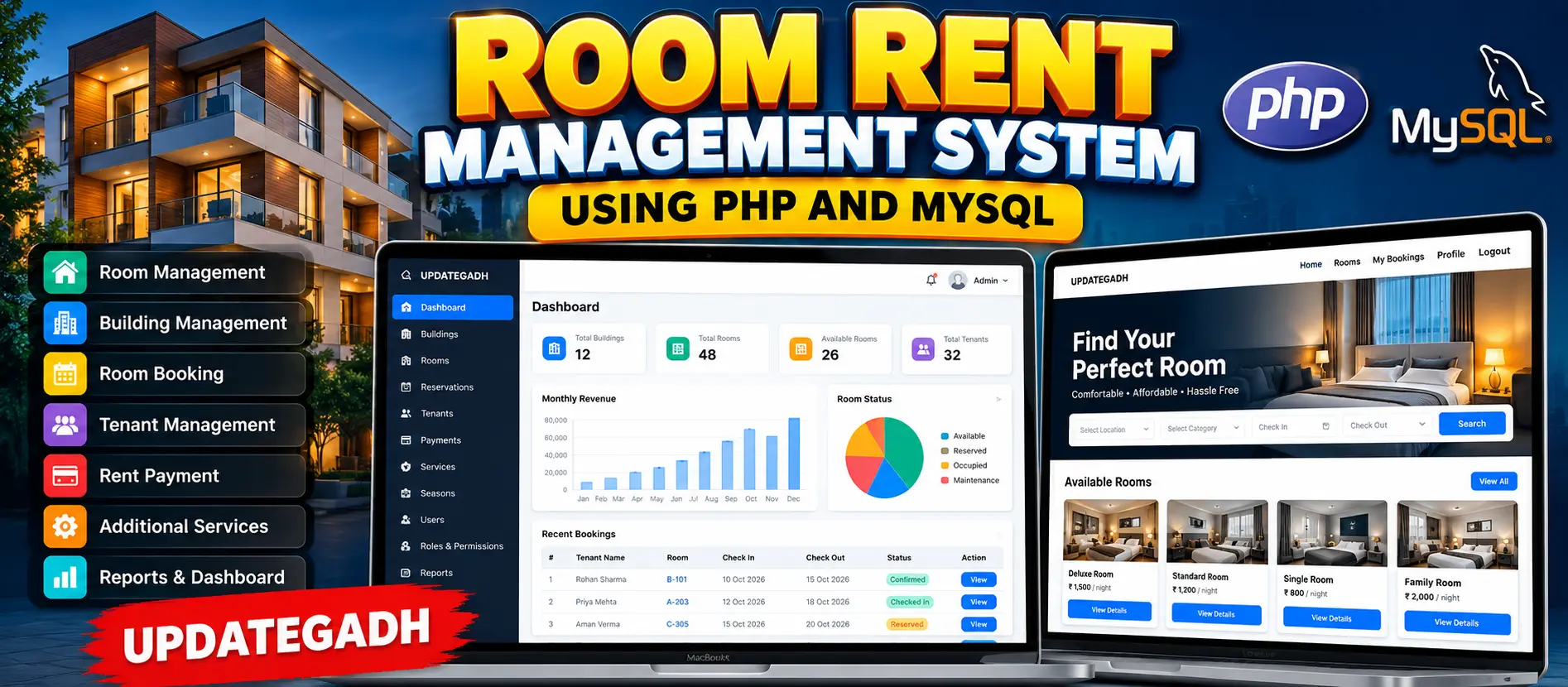
Room Rent Management System Using PHP and MySQL
Room Rent Management System Using PHP and MySQL is a professional web-based rental management application for managing buildings, rooms, tenants, reservations, rental periods, payments and additional services. It provides separate Admin and User workspaces with room availability tracking, seasonal rent management, check-in and check-out, payment records, reports, analytics, search, filtering and a responsive Bootstrap interface.
What You Will Get
Project Overview
Room Rent Management System Using PHP and MySQL is a web-based management application designed to simplify the complete process of managing rental properties. The system provides separate Admin and User workspaces for managing buildings, rooms, tenants, reservations, rental periods, payments and additional services.
The application is developed using Core PHP, MySQL, HTML, CSS, JavaScript, AJAX and Bootstrap. It uses a real MySQL database with PHP Sessions for authentication and PDO for database access.
Available Features
- Admin Login and Logout
- Admin Dashboard
- User Registration and Login
- User Management
- Role Management
- Permission Management
- Building Management
- Room Category Management
- Room Management
- Room Availability Tracking
- Tenant Management
- Room Booking and Reservation
- Check-In and Check-Out Management
- Rental Period Management
- Rent Payment Management
- Additional Services
- Reservation Status Management
- Seasonal Rent Management
- Booking History
- Payment Records
- Search and Filtering
- Dashboard Statistics
- Reports and Analytics
- Profile Management
- Responsive Bootstrap Interface
Administrator Workspace
The Administrator has centralized control over the rental operation. Administrators can manage users, roles, permissions, buildings, room categories, rooms, tenants, reservations, additional services, payments, seasonal rental rates and reports.
User Workspace
Registered users can browse available rooms, search and filter rental properties, view room information, select additional services, submit reservations, check booking status, view booking history, review payment information and manage their profile.
Building Management
Administrators can create and manage multiple buildings. Building records can contain information such as building name, address, description and status.
Room Management
Each building can contain multiple rooms. Administrators can manage room numbers, floors, capacity, room categories, rental prices, descriptions and availability status.
Room statuses include Available, Reserved, Occupied and Maintenance.
Room Categories
The system supports customizable room categories such as Single, Double, Deluxe and other rental categories. Each category can contain a description and base rental amount.
Tenant Management
Administrators can maintain tenant information including identity details, address, emergency contact information and associated user accounts.
Room Booking and Reservation
Users can browse available rooms and use search and filtering options to find suitable accommodation. During booking, users can select check-in and check-out dates, rental periods and additional services.
The system calculates the estimated rental amount according to the selected room, rental duration and additional services. The reservation is then stored in the database for administrator processing.
Check-In and Check-Out
Administrators can manage the reservation lifecycle. Confirmed reservations can be marked as checked in when the tenant occupies the room. After the rental period is completed, the reservation can be marked as checked out and the room can become available again.
Additional Services
The application supports additional services that can be selected during room booking. Services can include Wi-Fi, laundry, cleaning and other property-specific services. Each service can have its own price and status.
Seasonal Rent Management
Administrators can define different rental seasons with start dates, end dates and rental multipliers. This allows rental pricing to be adjusted according to different periods.
Payment Management
Administrators can record rental payments against reservations. Supported payment methods include Cash, UPI, Card and Bank Transfer.
Payment records maintain information such as payment amount, payment date, payment method, reference number and payment status.
Reports and Analytics
The reporting section provides reservation statistics based on reservation status and monthly payment revenue. These database-driven reports help administrators monitor the overall rental operation.
Search and Filtering
Users can search available rooms using room numbers, buildings and room categories. Category-based filtering makes it easier to find rooms according to specific requirements.
Profile Management
Users can view and update their profile information, including name and phone number. The registered email remains associated with the account.
Dashboard Statistics
The Admin dashboard provides real database-driven statistics including total users, buildings, rooms, available rooms, reservations, tenants, services and collected revenue.
Technology Stack
- Core PHP
- MySQL
- HTML5
- CSS3
- Bootstrap
- JavaScript
- AJAX
- PHP Sessions
- PDO
Software and Tools Required
- XAMPP
- PHP
- MySQL
- phpMyAdmin
- Visual Studio Code
- Modern Web Browser
More Details and Full Documentation
View Room Rent Management System Using PHP and MySQL Details
Project Modules
2. User Registration and Login Module
3. User Management Module
4. Role Management Module
5. Permission Management Module
6. Admin Dashboard Module
7. Building Management Module
8. Room Category Management Module
9. Room Management Module
10. Room Availability Module
11. Tenant Management Module
12. Room Booking Module
13. Reservation Management Module
14. Check-In Module
15. Check-Out Module
16. Rental Period Module
17. Rent Payment Module
18. Additional Services Module
19. Reservation Status Module
20. Seasonal Rent Management Module
21. Booking History Module
22. Payment Records Module
23. Search and Filtering Module
24. Reports and Analytics Module
25. Profile Management Module
26. MySQL Database Module
27. Responsive Bootstrap UI Module
Installation Guide
1. Install XAMPP on your computer.
2. Start Apache and MySQL from the XAMPP Control Panel.
3. Extract the project ZIP file.
4. Copy the extracted project into the XAMPP htdocs directory.
5. Use the project folder name: Room_Rent_Management_System_FIXED
6. Open phpMyAdmin using: http://localhost/phpmyadmin/
7. Import the SQL file located at: database/schema.sql
8. The SQL file creates the required database and tables.
9. Open the database configuration file: config/database.php
10. Check the MySQL hostname, database name, username and password.
11. Update the database configuration according to your local XAMPP setup.
12. Save the database configuration file.
13. Make sure Apache and MySQL are running.
14. Open the project using: http://localhost/Room_Rent_Management_System_FIXED/
15. Admin Email: admin@updategadh.com
16. Admin Password: Admin@123
17. Login to the Admin dashboard and configure buildings, room categories, rooms and additional services.
18. Register or use a User account to browse rooms and create reservations.
FAQ for this project coming soon.
No reviews yet. Be the first to review!
Write a Review
Related Projects
 20% OFF
Featured
20% OFF
Featured
 12% OFF
Featured
12% OFF
Featured
 18% OFF
Hot
18% OFF
Hot
 31% OFF
Featured
31% OFF
Featured