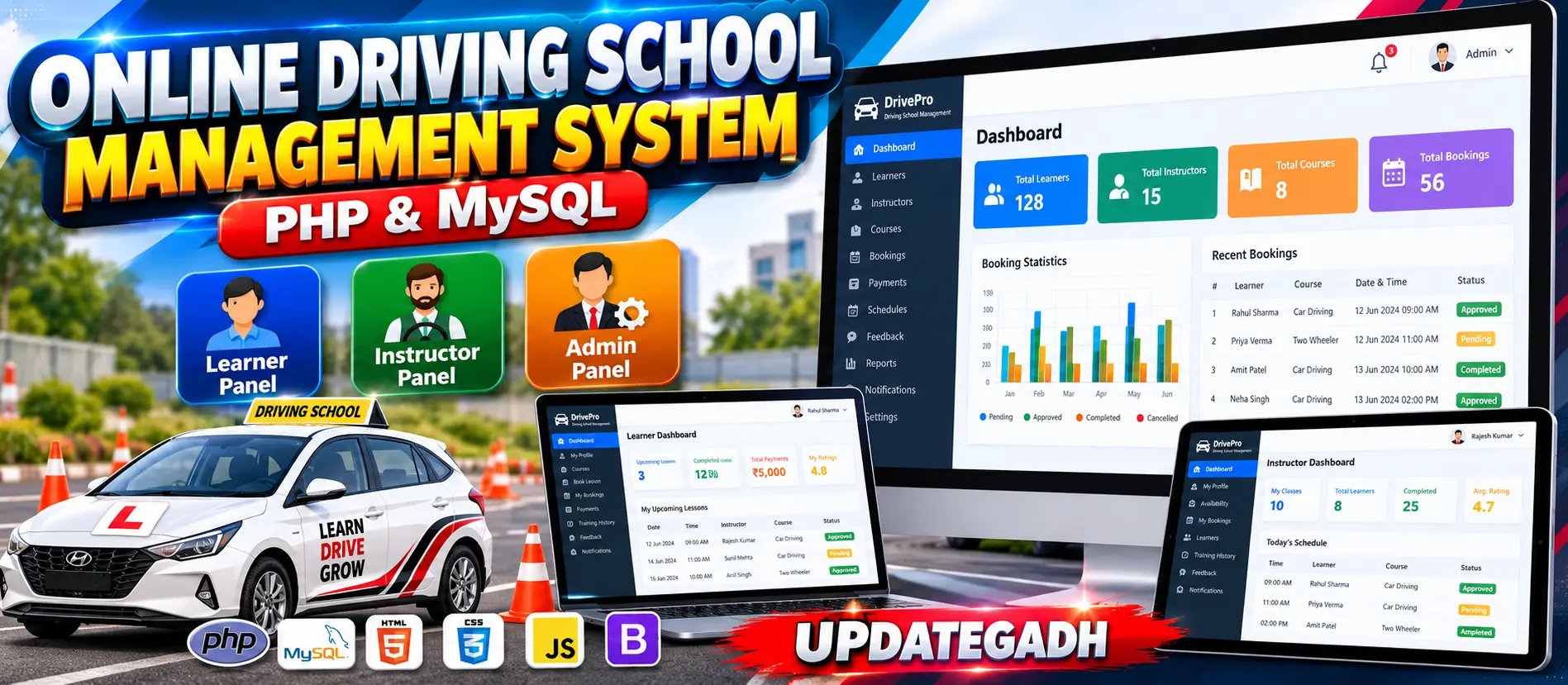
Online Driving School Management System in PHP and MySQL
Online Driving School Management System in PHP and MySQL is a professional web-based platform for managing learners, instructors, driving courses, lesson bookings, schedules, payments, training records, feedback, notifications and daily driving-school operations. It provides separate Admin, Instructor and Learner workspaces with real database-driven dashboards, booking validation, double-booking prevention, payment tracking and responsive UI.
What You Will Get
Project Overview
Online Driving School Management System in PHP and MySQL is a web-based management application designed to centralize driving school operations. The system provides separate workspaces for Admin, Instructor and Learner users and manages the complete workflow from learner registration and course selection to instructor scheduling, lesson booking, payments, training records and feedback.
The application is developed using PHP, MySQL, HTML, CSS, Bootstrap and JavaScript. It uses real database operations, role-based authorization, secure sessions, booking validation, payment records, notifications and responsive user interface components.
Available Features
- Learner registration and login
- Role-based access
- Learner profile management
- Instructor profile management
- Driving experience management
- Driving course management
- Course category management
- Instructor availability management
- Training location management
- Driving lesson booking
- Double-booking prevention
- Booking status management
- Payment management
- Cash, Card and UPI payment records
- Payment history
- Receipt generation
- Training history
- Lesson notes
- Feedback and ratings
- Notifications
- Search and filters
- Dashboard statistics
- Activity records
Technology Stack
- PHP
- MySQL
- HTML
- CSS
- JavaScript
- Bootstrap
- Apache
- phpMyAdmin
Software and Tools Required
- Windows, Linux or macOS
- XAMPP or another PHP development environment
- PHP
- MySQL
- Apache Server
- phpMyAdmin
- Visual Studio Code
- Modern Web Browser
More Details and Full Documentation
View Online Driving School Management System in PHP and MySQL Details
Project Modules
2. Role-Based Access Module
3. Learner Profile Management
4. Instructor Profile Management
5. Driving Experience Module
6. Driving Course Management
7. Course Category Management
8. Instructor Availability Module
9. Training Location Module
10. Driving Lesson Booking Module
11. Double Booking Prevention Module
12. Booking Status Management
13. Payment Management Module
14. Payment History Module
15. Receipt Generation Module
16. Training History Module
17. Lesson Notes Module
18. Feedback and Rating Module
19. Notification Module
20. Search and Filtering Module
21. Admin Dashboard
22. Instructor Dashboard
23. Learner Dashboard
24. Activity Records Module
25. System Settings Module
26. MySQL Database Module
27. Responsive UI Module
Installation Guide
1. Install XAMPP on your computer.
2. Start Apache and MySQL from the XAMPP Control Panel.
3. Extract the project ZIP file.
4. Copy the extracted project into the XAMPP htdocs directory.
5. Use the project folder name: driving_school
6. Open phpMyAdmin in your browser.
7. Create a new MySQL database using: CREATE DATABASE driving_school;
8. Select the driving_school database in phpMyAdmin.
9. Import the SQL database file included with the project.
10. Open the project's database configuration file.
11. Configure the database host as: localhost
12. Configure the database username as: root
13. Configure the database password according to your local XAMPP MySQL configuration.
14. Configure the database name as: driving_school
15. Save the database configuration.
16. Open the project in Visual Studio Code.
17. Make sure Apache and MySQL are running.
18. Open the project in your browser using: http://localhost/driving_school/
19. Register as a Learner to access the learner workspace.
20. Use the appropriate Admin or Instructor account to access role-specific management features.
FAQ for this project coming soon.
No reviews yet. Be the first to review!
Write a Review
Related Projects
 75% OFF
Featured
75% OFF
Featured
 23% OFF
Featured
23% OFF
Featured
 20% OFF
Featured
20% OFF
Featured
 23% OFF
Featured
23% OFF
Featured