 12% OFF
 Courier Management System
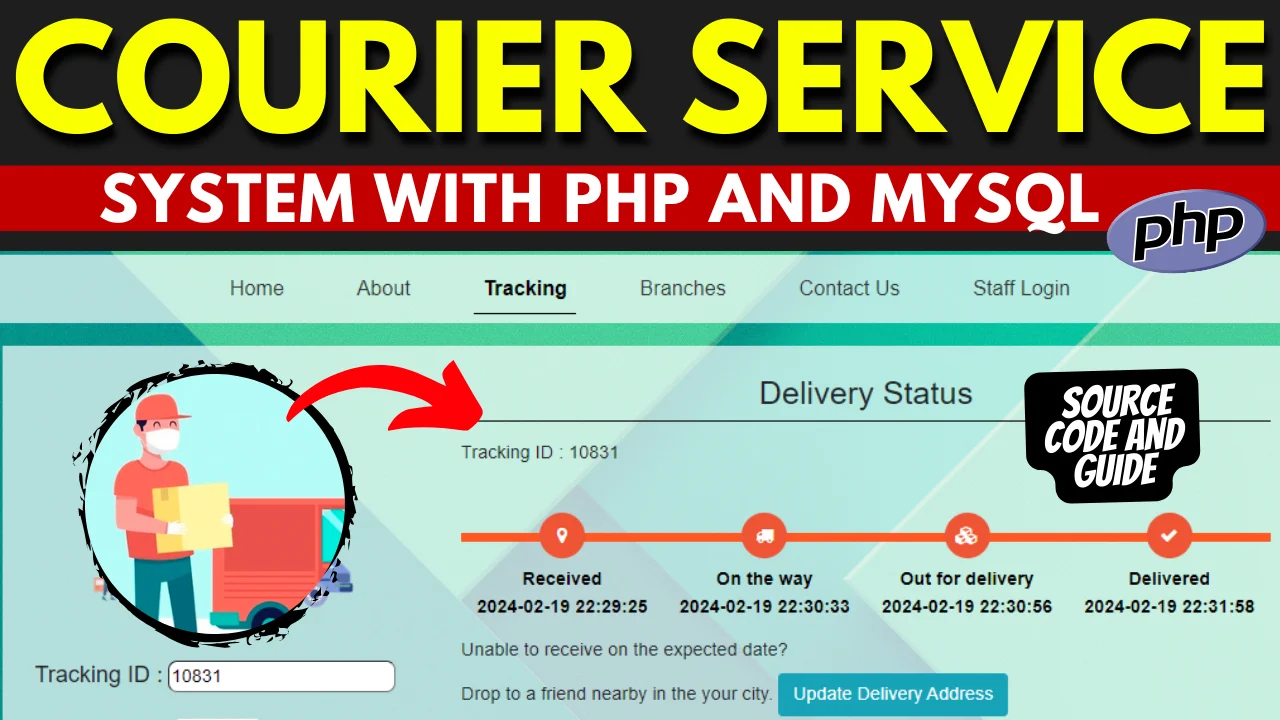
A complete Courier Management System built with PHP and MySQL featuring parcel booking, shipment tracking, delivery status, consignment history and customer management.
Read more- Built with
- PHPMySQLHTML/CSSJavaScript
- You get
- Source codeDatabaseProject reportPPTViva questionsSetup guide
- Delivery
- Instant download after payment
Courier Management System Using PHP & MySQL
The Courier Management System is a web-based application developed using PHP and MySQL to manage courier bookings, parcels, shipments, delivery information and consignment records from a centralized platform.
The system is designed to simplify courier and parcel management by allowing users to place courier requests, track shipments, view delivery status and maintain consignment history. Administrators can manage courier records and monitor shipment-related information through the management interface.
This project is suitable for students, developers, courier businesses and organizations looking for a customizable PHP and MySQL based courier management solution.
Project Highlights
- Admin Login
- Admin Dashboard
- Customer Management
- Courier Booking
- Parcel Management
- Shipment Tracking
- Delivery Status Management
- Consignment Management
- Consignment History
- Sender and Receiver Information
- Address Management
- Delivery Updates
- Search and Tracking
- Customer Support and Feedback
- MySQL Database Integration
Admin Module
The Admin Module provides centralized management of courier and shipment-related information.
- Admin Login
- Admin Dashboard
- Manage Customers
- Manage Courier Bookings
- Manage Parcels
- Manage Consignments
- Update Shipment Status
- Manage Delivery Information
- View Shipment History
- Search Courier Records
- View Customer Information
- Manage Feedback and Support Requests
Customer Module
Customers can use the system to submit courier requests and access shipment-related information.
- Customer Registration
- Customer Login
- Customer Profile
- Book a Courier
- Enter Sender Details
- Enter Receiver Details
- Enter Parcel Information
- Track Shipment
- View Delivery Status
- View Consignment History
- Update Address Information
- Submit Feedback
Courier Booking Module
The courier booking module allows customers or operators to create a new parcel shipment by entering the required sender, receiver and parcel details.
- New Courier Booking
- Sender Information
- Receiver Information
- Pickup Address
- Delivery Address
- Parcel Details
- Shipment Information
- Consignment Record
Shipment Tracking
The tracking feature allows users to check the current status of a courier using the available shipment or consignment information.
- Shipment Tracking
- Consignment Tracking
- Delivery Status
- Shipment Updates
- Parcel History
- Transit Information
Delivery Status Management
Administrators can maintain the status of courier shipments and update delivery-related information as the parcel moves through different stages of the delivery process.
- Booked
- Processing
- In Transit
- Out for Delivery
- Delivered
- Delayed / Other Status
Consignment History
The system maintains courier and consignment records so that shipment information can be reviewed when required. Users can access available records to check previous and current shipments.
Customer Support
A feedback and support section can be used to collect customer queries, feedback and concerns related to courier services and shipment management.
Technologies Used
- Frontend: HTML5, CSS3, JavaScript
- Backend: PHP
- Database: MySQL
- Server: Apache / XAMPP
- Development Tool: Visual Studio Code
Database
MySQL is used to store customer information, courier bookings, parcel details, shipment records, delivery status and consignment history.
Installation Guide
- Download and extract the project ZIP file.
- Copy the project folder into the XAMPP htdocs directory.
- Start Apache and MySQL from the XAMPP Control Panel.
- Open phpMyAdmin in your browser.
- Create a new MySQL database for the project.
- Import the provided SQL database file.
- Open the database configuration file.
- Update the database name, username and password according to your MySQL configuration.
- Open the project in Visual Studio Code.
- Run the project using XAMPP localhost.
- Open the project URL in your browser.
- Login using the provided credentials.
System Requirements
- Windows / Linux / macOS
- XAMPP
- Apache Server
- PHP
- MySQL
- Visual Studio Code or any PHP-compatible editor
- Modern Web Browser
How the System Works
- Customer registers or logs into the system.
- Customer creates a new courier booking.
- Sender and receiver details are entered.
- Parcel and delivery information is recorded.
- The system creates the courier/consignment record.
- Shipment status can be updated during the delivery process.
- Customer can track the available shipment information.
- Delivery information is maintained in the system.
- Previous courier records remain available as consignment history.
Who Can Use This Project?
This Courier Management System is suitable for BCA, MCA, B.Tech, M.Tech and other computer science students looking for a practical PHP and MySQL project. It can also be used as a starting point for developing a customized courier, parcel or logistics management application.
Benefits
- Centralized courier management
- Easy parcel booking
- Shipment tracking
- Organized consignment records
- Delivery status management
- Customer information management
- MySQL-based data storage
- Easy XAMPP installation
- Customizable PHP source code
Conclusion
The Courier Management System provides a structured platform for managing courier bookings, parcels, shipments, delivery status and consignment history. Built using PHP and MySQL, the project is easy to understand, install and customize for educational or small-scale courier management requirements.
This project is intended as an educational and customizable software solution. Additional logistics, payment, notification or real-time tracking integrations can be added according to specific business requirements.
Admin Module
- Admin Login
- Admin Dashboard
- Manage Customers
- Manage Courier Bookings
- Manage Parcels
- Manage Consignments
- Update Shipment Status
- Manage Delivery Information
- View Shipment History
- Search Courier Records
- Manage Feedback & Support
Customer Module
- Customer Registration
- Customer Login
- Customer Profile
- Book Courier
- Sender Details
- Receiver Details
- Parcel Details
- Pickup Address
- Delivery Address
- Track Shipment
- View Delivery Status
- Consignment History
- Submit Feedback
Courier Module
- Courier Booking
- Parcel Management
- Consignment Management
- Shipment Tracking
- Delivery Status
- Shipment Updates
- Delivery History
Tracking Module
- Track Courier
- Track Consignment
- View Shipment Status
- View Parcel History
- Delivery Updates
- Download and extract the ZIP file.
- Copy the project folder into XAMPP/htdocs.
- Start Apache and MySQL from XAMPP.
- Open phpMyAdmin.
- Create a new MySQL database.
- Import the provided database SQL file.
- Update the database credentials in the project configuration file.
- Open the project in Visual Studio Code.
- Run the project using XAMPP localhost.
- Open the project URL in your browser.
- Login using the provided Admin or Customer credentials.
- The Courier Management System is ready to use.
Stuck while running it? Chat with us on WhatsApp for free installation help.
No reviews yet. Be the first to review this project.