 18% OFF
 CSC Banking Management System
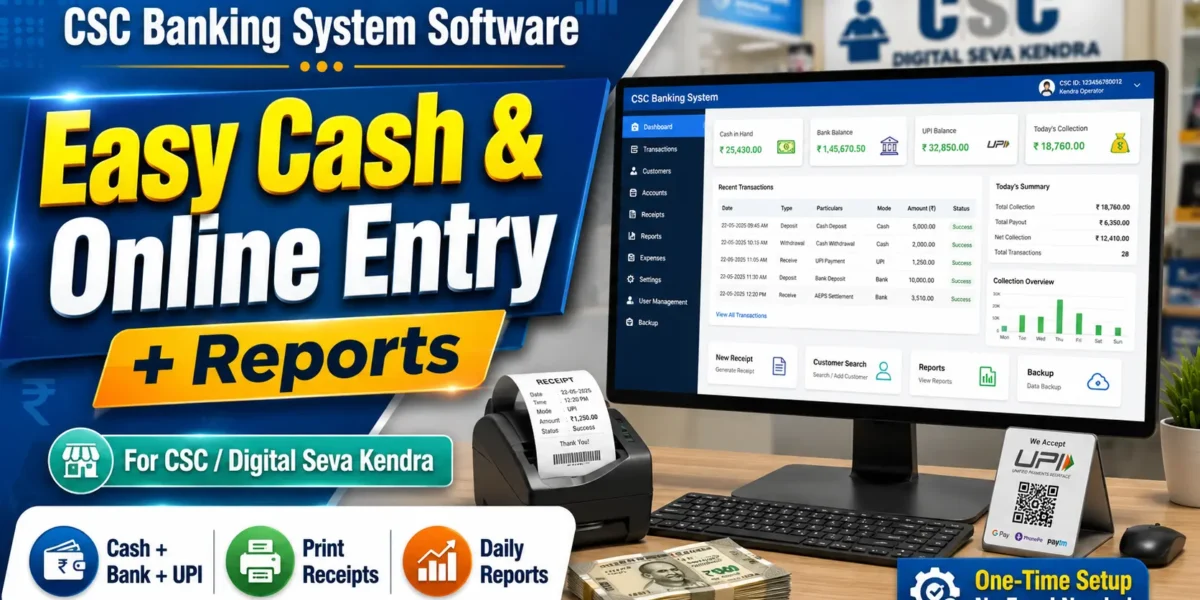
Complete CSC Banking Management System software for CSC centers with customer management, banking transactions, account services, reports and admin dashboard.
Read more- Built with
- PHPMySQLHTML/CSS
- You get
- Source codeDatabaseProject reportPPTSetup guide
- Delivery
- Instant download after payment
CSC Banking Management System Software for CSC Centers
The CSC Banking Management System is a web-based software solution designed for Common Service Centers (CSC) and digital service centers. It provides a centralized platform for managing customers, banking-related services, transactions, accounts and daily CSC operations.
The system includes an administrator dashboard with management features and a user-friendly interface for handling customer information and banking service records. It can be used as an academic project, learning project or as a base system for developing a customized CSC banking application.
Project Highlights
- Admin Login System
- Admin Dashboard
- Customer Management
- Customer Account Management
- Banking Service Management
- Deposit Management
- Withdrawal Management
- Transaction Management
- Transaction History
- Balance Management
- Customer Records
- Reports and Statistics
- Search and Manage Records
- Responsive User Interface
Admin Module
The Admin Module provides centralized control over the CSC Banking Management System.
- Admin Login
- Admin Dashboard
- Manage Customers
- Add New Customers
- Update Customer Information
- View Customer Details
- Manage Customer Accounts
- Manage Banking Transactions
- Manage Deposits
- Manage Withdrawals
- View Transaction History
- Generate Reports
- View System Statistics
Customer Management
The system allows CSC operators to maintain customer information in an organized manner. Customer records can be added, viewed and updated from the management panel.
- Customer Registration
- Customer Profile Management
- Account Information
- Contact Details
- Customer Search
- Customer Transaction Records
Banking Transaction Module
The transaction module helps manage common banking-related operations and maintain transaction records.
- Deposit Transactions
- Withdrawal Transactions
- Balance Updates
- Transaction Records
- Transaction History
- Transaction Details
Reports Module
The reporting section helps administrators view important banking and customer-related information from the system.
- Customer Reports
- Transaction Reports
- Deposit Reports
- Withdrawal Reports
- Account Information
- Dashboard Statistics
Technologies Used
- Frontend: HTML5, CSS3, JavaScript
- Backend: PHP
- Database: MySQL
- Server: Apache / XAMPP
- Development Tool: Visual Studio Code
Database
MySQL database is used to store customer information, account details, transaction records and other application data. The database structure can be customized according to the requirements of a particular CSC center.
Installation Guide
- Download and extract the project ZIP file.
- Copy the extracted project folder into the XAMPP htdocs directory.
- Start Apache and MySQL from the XAMPP Control Panel.
- Open phpMyAdmin in your browser.
- Create a new MySQL database for the project.
- Import the provided SQL database file into phpMyAdmin.
- Open the project configuration file.
- Update the database name, username and password according to your local MySQL configuration.
- Open the project in Visual Studio Code.
- Run the project using XAMPP localhost.
- Open the project URL in your browser.
- Login using the provided administrator credentials.
System Requirements
- Windows / Linux / macOS
- XAMPP
- Apache Server
- PHP
- MySQL
- Visual Studio Code or any PHP-compatible editor
- Google Chrome, Microsoft Edge or another modern browser
Who Can Use This Project?
This CSC Banking Management System is suitable for BCA, MCA, B.Tech, M.Tech and other computer science students who want to learn PHP and MySQL development. It can also be used as a base project for CSC centers and digital service businesses that need a customized customer and transaction management solution.
Benefits of the System
- Centralized customer management
- Easy transaction record management
- Organized customer account information
- Quick access to transaction history
- Simple admin dashboard
- MySQL-based data storage
- Easy to install on XAMPP localhost
- Can be customized according to business requirements
Conclusion
The CSC Banking Management System provides a structured platform for managing customers, accounts and banking-related transaction records in a CSC environment. With PHP and MySQL at its core, the project is easy to understand, install and customize, making it suitable for students, developers and CSC service-center projects.
Admin Module
- Admin Login
- Admin Dashboard
- Manage Customers
- Add Customer
- Edit Customer
- View Customer Details
- Manage Customer Accounts
- Manage Transactions
- Manage Deposits
- Manage Withdrawals
- View Transaction History
- Generate Reports
- View Dashboard Statistics
Customer Module
- Customer Registration
- Customer Profile
- Account Information
- Customer Details
- Transaction Records
- Deposit Records
- Withdrawal Records
- Transaction History
Banking Module
- Account Management
- Deposit Management
- Withdrawal Management
- Balance Management
- Transaction Management
- Transaction History
- Banking Reports
Reports Module
- Customer Reports
- Account Reports
- Deposit Reports
- Withdrawal Reports
- Transaction Reports
- Dashboard Statistics
- Download and extract the ZIP file.
- Copy the project folder into XAMPP/htdocs.
- Start Apache and MySQL from XAMPP.
- Open phpMyAdmin.
- Create a new MySQL database.
- Import the provided database SQL file.
- Update the database credentials in the project configuration file.
- Open the project in Visual Studio Code.
- Run the project using XAMPP localhost.
- Open the project URL in your browser.
- Login using the provided Admin credentials.
- The CSC Banking Management System is ready to use.
Stuck while running it? Chat with us on WhatsApp for free installation help.
No reviews yet. Be the first to review this project.