 21% OFF
 Courier Management System Parcel Tracking
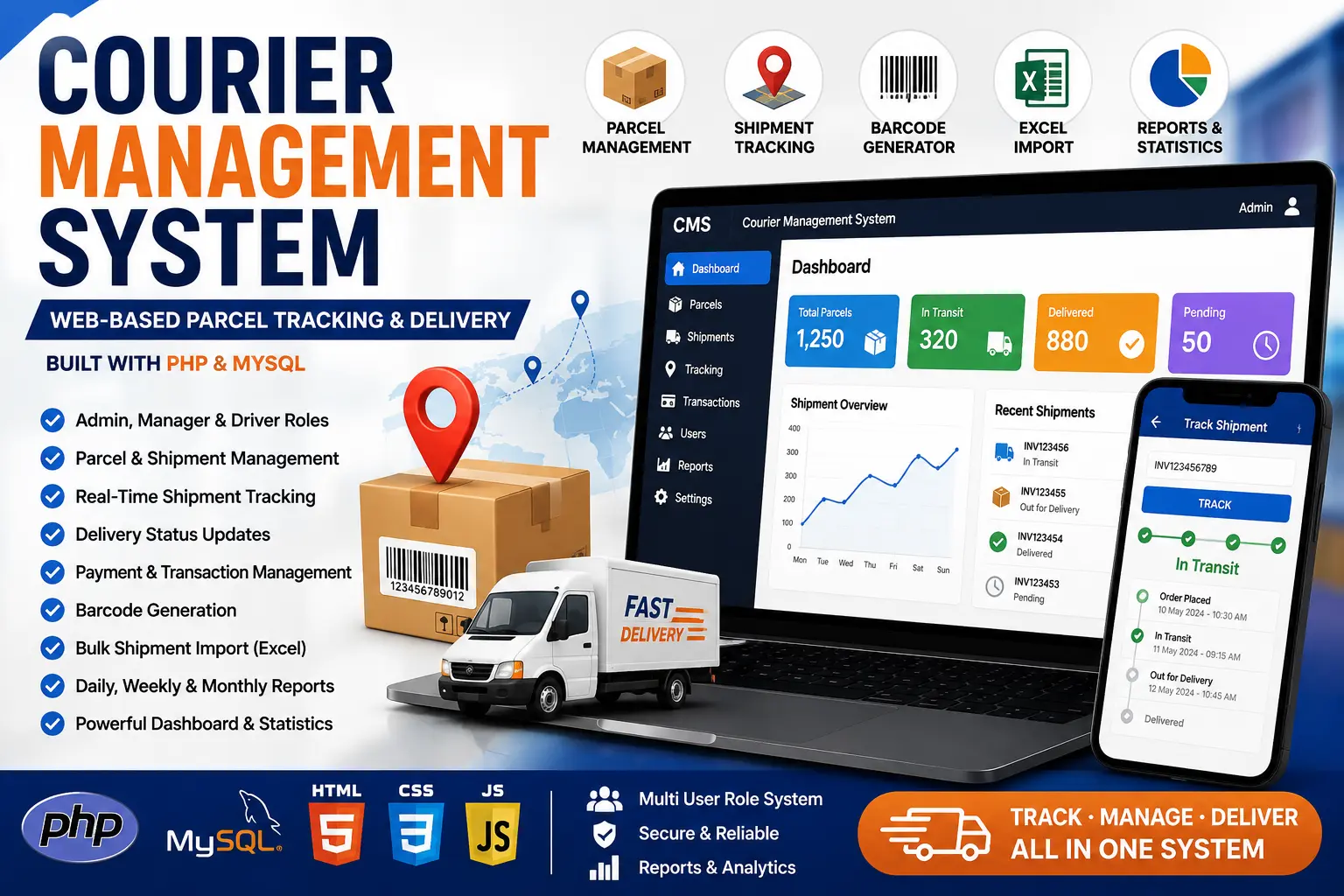
A web-based Courier Management System built with Core PHP and MySQL featuring parcel management, shipment tracking, barcode generation, payments, Excel import and delivery reports.
Read more- Built with
- PHPMySQLHTML/CSS
- You get
- Source codeDatabaseProject reportPPTViva questionsSetup guide
- Delivery
- Instant download after payment
Courier Management System – Web-Based Parcel Tracking and Delivery
The Courier Management System is a web-based application designed to simplify courier, parcel and shipment management. It provides a centralized platform for managing users, parcels, shipments, delivery status, transactions, barcodes and business reports.
The system is developed using Core PHP, MySQL, HTML, CSS and JavaScript. It provides different user roles such as Admin, Manager and Driver, allowing courier businesses to organize daily operations according to user permissions.
The application includes shipment tracking, parcel management, barcode support, transaction management, bulk shipment import and reporting features. It can be used as a learning project, portfolio project or as a customizable foundation for a courier and logistics management application.
Project Highlights
- Admin Management
- Manager Management
- Driver Management
- User Role Management
- Parcel Management
- Shipment Management
- Shipment Tracking
- Delivery Status Updates
- Payment and Transaction Management
- Barcode Generation
- Bulk Shipment Import
- Excel Import and Export
- Daily, Weekly and Monthly Reports
- Courier Dashboard
- Business Statistics
- MySQL Database
Admin Module
The Admin module provides centralized control over users, shipments, parcels, transactions and system operations.
- Admin Login
- Admin Dashboard
- Manage Users
- Manage Managers
- Manage Drivers
- Manage Parcels
- Manage Shipments
- Manage Transactions
- View Reports
- View Business Statistics
- Monitor Delivery Operations
Manager Module
The Manager module helps manage day-to-day courier operations and shipment information according to the permissions assigned by the administrator.
- Manager Login
- View Dashboard
- Manage Shipments
- Manage Parcel Records
- Update Shipment Information
- Monitor Delivery Status
- View Transactions
- View Reports
Driver Module
The Driver module provides access to delivery-related information and allows drivers to work with assigned shipment records.
- Driver Login
- View Assigned Shipments
- View Parcel Details
- View Sender Information
- View Receiver Information
- Update Delivery Status
- Track Delivery Information
Parcel Management
The parcel management module allows administrators and authorized users to maintain complete parcel information including sender, receiver and destination details.
- Add Parcel
- Update Parcel
- Delete Parcel
- View Parcel Details
- Sender Information
- Receiver Information
- Destination Details
- Parcel Status
Shipment Tracking
The shipment tracking module helps users monitor courier shipments and follow their delivery progress from dispatch through delivery.
- Shipment Tracking
- Shipment Status
- Dispatch Information
- Delivery Information
- Parcel Tracking
- Delivery Progress
Payment & Transaction Management
The system includes transaction management for maintaining payment-related information associated with courier shipments.
- Payment Records
- Transaction Records
- Transaction Status
- Shipment-wise Transactions
- Payment History
Barcode Management
The application includes barcode functionality for courier parcels. Barcodes can be generated for parcel identification and can be used as part of the shipment management workflow.
- Generate Parcel Barcode
- Barcode-based Parcel Identification
- Shipment Barcode Support
Excel Import & Export
The system supports spreadsheet-based shipment data management. Bulk shipment information can be imported using spreadsheet files, making it easier to handle large amounts of courier data.
- Bulk Shipment Import
- Excel File Support
- Shipment Data Management
- Import and Export Support
Reports Module
The reporting module provides useful information about courier operations and business activities.
- Daily Reports
- Weekly Reports
- Monthly Reports
- Shipment Reports
- Parcel Reports
- Delivery Reports
- Transaction Reports
- Business Statistics
Dashboard
The dashboard provides an overview of important courier business information from a centralized interface.
- Total Parcels
- Pending Deliveries
- Completed Deliveries
- Shipment Statistics
- Transaction Information
- Delivery Overview
Technologies Used
- Frontend: HTML, CSS, JavaScript
- Backend: Core PHP
- Database: MySQL
- Spreadsheet Library: PhpSpreadsheet
- Barcode Library: PHP Barcode Generator
System Requirements
- PHP 7.4 or higher
- MySQL 5.7 or higher
- Apache Server
- XAMPP or compatible PHP server
- Composer
- Modern Web Browser
- Visual Studio Code or any PHP-compatible editor
Installation Guide
- Download and extract the project ZIP file.
- Copy the project folder into the XAMPP htdocs directory.
- Start Apache and MySQL from the XAMPP Control Panel.
- Open phpMyAdmin.
- Create a new MySQL database.
- Import the provided SQL database file.
- Open the project configuration file.
- Update the database name, username and password.
- Install the required Composer dependencies if they are not already included.
- Make sure PhpSpreadsheet and barcode library dependencies are properly configured.
- Open the project in Visual Studio Code.
- Run the project using XAMPP localhost.
- Open the project URL in your browser.
- Login using the provided credentials.
How the System Works
- Admin logs into the system.
- Admin manages users and assigns appropriate roles.
- Courier shipment and parcel information is added to the system.
- Parcel details are stored in the MySQL database.
- A barcode can be generated for parcel identification.
- Shipment status is updated during the delivery process.
- Drivers can access their assigned delivery information.
- Payment and transaction information is maintained with shipment records.
- Managers and administrators can monitor courier operations.
- Reports can be generated for daily, weekly and monthly analysis.
Who Can Use This Project?
This Courier Management System is suitable for BCA, MCA, B.Tech, M.Tech and other computer science students looking for a practical PHP and MySQL project. It can also be used by developers as a base application for building customized courier and logistics management software.
Benefits
- Centralized courier management
- Multiple user roles
- Shipment tracking
- Parcel management
- Barcode support
- Payment and transaction records
- Bulk Excel shipment import
- Detailed reports
- Business dashboard
- PHP and MySQL based architecture
- Customizable source code
Conclusion
The Courier Management System provides a complete web-based platform for organizing courier and parcel operations. With user roles, shipment tracking, parcel management, barcode support, transaction handling, Excel import and reporting features, the project provides a strong foundation for learning and developing courier management applications.
Admin Module
- Admin Login
- Admin Dashboard
- User Management
- Manager Management
- Driver Management
- Parcel Management
- Shipment Management
- Transaction Management
- Reports
- Business Statistics
Manager Module
- Manager Login
- Manager Dashboard
- Manage Shipments
- Manage Parcels
- Update Shipment Information
- Monitor Delivery Status
- View Transactions
- View Reports
Driver Module
- Driver Login
- View Assigned Shipments
- View Parcel Details
- Sender & Receiver Details
- Update Delivery Status
- Delivery Information
Shipment Module
- Create Shipment
- Parcel Management
- Shipment Tracking
- Delivery Status
- Shipment History
- Destination Management
Payment Module
- Payment Records
- Transaction Management
- Transaction Status
- Payment History
Barcode Module
- Generate Parcel Barcode
- Barcode Identification
- Shipment Barcode
Import & Reports
- Excel Shipment Import
- Bulk Data Import
- Daily Reports
- Weekly Reports
- Monthly Reports
- Shipment Reports
- Transaction Reports
- Download and extract the ZIP file.
- Copy the project folder into XAMPP/htdocs.
- Start Apache and MySQL from XAMPP.
- Open phpMyAdmin.
- Create a new MySQL database.
- Import the provided SQL database file.
- Update the database credentials in the configuration file.
- Install Composer dependencies if required.
- Configure PhpSpreadsheet and barcode dependencies.
- Open the project in Visual Studio Code.
- Run the project using XAMPP localhost.
- Open the project URL in your browser.
- Login using the provided Admin credentials.
- Configure users, shipments and courier operations.
Stuck while running it? Chat with us on WhatsApp for free installation help.
No reviews yet. Be the first to review this project.