Support: WhatsApp Us Instant Download after Payment  |  Free Installation Support
Online Gas Booking System Using PHP and MySQL
Demo Video
PHP Projects

Online Gas Booking System Using PHP and MySQL

0.0 (0 reviews) | 0 sold

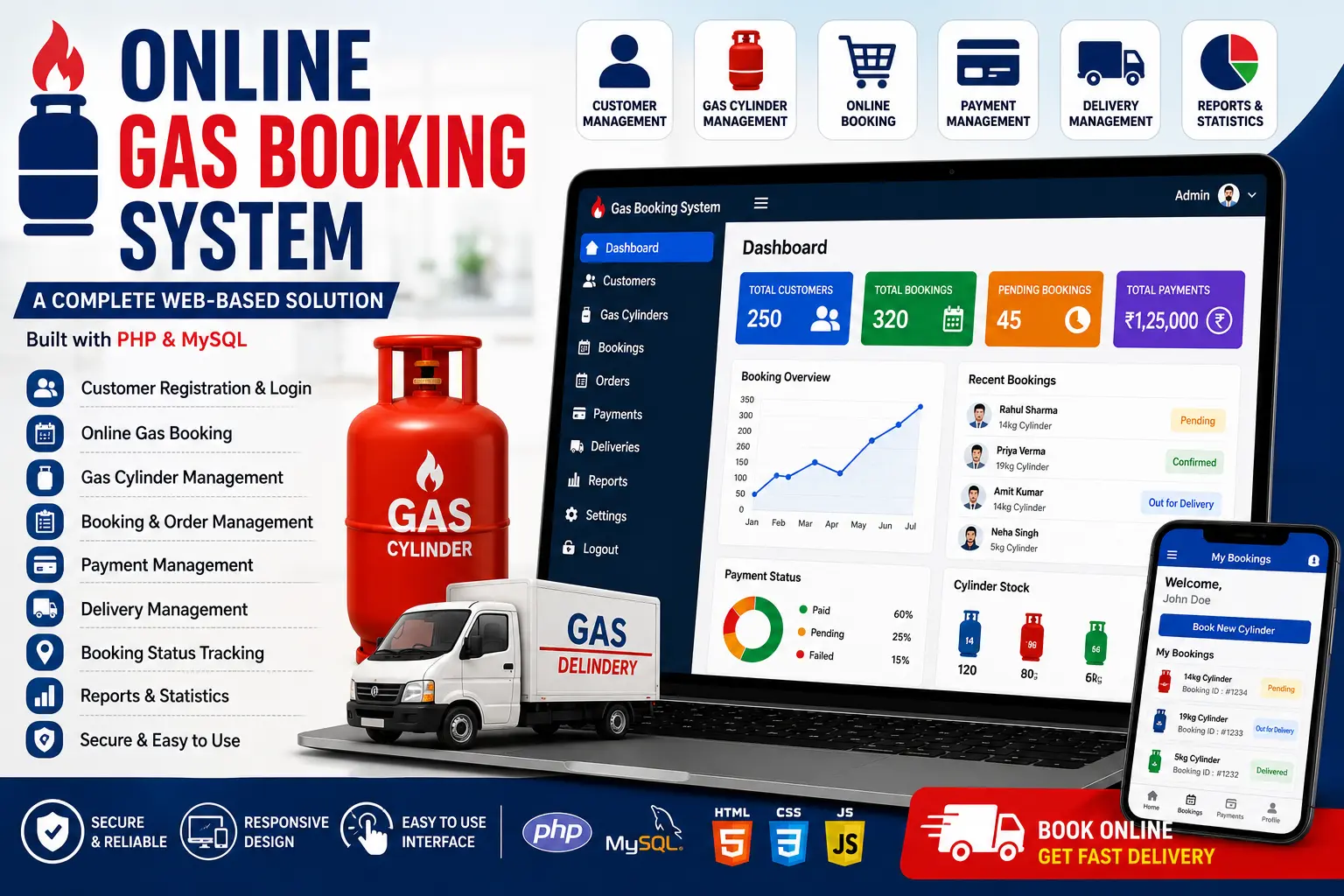
A complete Online Gas Booking System built with PHP and MySQL for managing customers, gas bookings, cylinders, orders, payments and delivery records.

Technologies: PHP MySQL HTML/CSS
What You Will Get
Source Code
Database File
Project Report
PPT Presentation
Viva Questions
Setup Guide
₹1.43 ₹100.00 99% OFF
Inquire
Secure Payment Instant Download Free Support Free Updates

Online Gas Booking System Using PHP & MySQL

The Online Gas Booking System is a web-based application designed to simplify the process of booking gas cylinders and managing customer orders. The system provides a centralized platform for customers and administrators to manage gas bookings, customer information, orders, payments and delivery-related records.

Customers can register and log in to the system, manage their profile, view available gas services and submit gas booking requests online. Administrators can manage customers, gas bookings, orders, payments and delivery information through the admin panel.

The project is developed using PHP and MySQL with a web-based interface and is suitable for students, developers, gas agencies and businesses looking for a customizable gas booking management application.

Project Highlights

  • Customer Registration
  • Customer Login
  • Admin Login
  • Admin Dashboard
  • Online Gas Booking
  • Customer Management
  • Gas Cylinder Management
  • Booking Management
  • Order Management
  • Payment Management
  • Delivery Management
  • Booking Status Tracking
  • Booking History
  • Customer Profile Management
  • Reports and Statistics
  • MySQL Database Integration

Admin Module

The Admin Module provides centralized control over customers, gas bookings, orders, payments and delivery records.

  • Admin Login
  • Admin Dashboard
  • Manage Customers
  • Manage Gas Products
  • Manage Gas Cylinders
  • View Gas Bookings
  • Manage Orders
  • Update Booking Status
  • Manage Payments
  • Manage Delivery Records
  • View Booking History
  • View Reports
  • View System Statistics

Customer Module

The Customer Module allows users to create an account and place gas cylinder booking requests online.

  • Customer Registration
  • Customer Login
  • Customer Dashboard
  • Manage Profile
  • View Available Gas Services
  • Book Gas Cylinder
  • View Booking Status
  • View Booking History
  • View Payment Information
  • View Delivery Information

Online Gas Booking

The online booking module allows customers to submit gas cylinder booking requests without manually visiting the gas agency.

  • Create New Booking
  • Select Gas Cylinder
  • Enter Customer Details
  • Enter Delivery Address
  • Submit Booking Request
  • View Booking Status
  • Cancel Booking if Supported
  • View Previous Bookings

Gas Cylinder Management

Administrators can maintain information about available gas cylinders and related products through the management panel.

  • Add Gas Product
  • Edit Gas Product
  • Delete Gas Product
  • View Product Information
  • Manage Availability
  • Manage Cylinder Records

Booking Management

The booking management module helps administrators process customer booking requests and maintain their current status.

  • View New Bookings
  • Process Booking Requests
  • Update Booking Status
  • View Pending Bookings
  • View Completed Bookings
  • View Booking History

Payment Management

The payment section allows the system to maintain payment-related information associated with gas bookings and orders.

  • Payment Records
  • Booking-Wise Payment Information
  • Payment Status
  • Payment History
  • Order Payment Records

Delivery Management

The delivery module helps administrators maintain delivery information related to customer gas bookings.

  • Delivery Records
  • Delivery Address
  • Delivery Status
  • Pending Deliveries
  • Completed Deliveries

Booking History

Customers can access their previous gas booking records from their account. Administrators can also review booking history through the admin panel.

  • Previous Bookings
  • Booking Dates
  • Booking Status
  • Payment Information
  • Delivery Information

Dashboard

The admin dashboard provides an overview of important gas booking and customer activities.

  • Total Customers
  • Total Bookings
  • Pending Bookings
  • Completed Bookings
  • Payment Information
  • Delivery Information

Reports

The reporting section can be used to review important booking and business information stored in the system.

  • Customer Reports
  • Booking Reports
  • Payment Reports
  • Delivery Reports
  • Order Reports
  • Booking Statistics

Technologies Used

  • Frontend: HTML5, CSS3, JavaScript
  • Backend: PHP
  • Database: MySQL
  • Server: Apache / XAMPP
  • Development Tool: Visual Studio Code

Database

MySQL is used to store customer details, gas booking information, cylinder records, orders, payments, delivery information and booking history.

Installation Guide

  1. Download and extract the project ZIP file.
  2. Install XAMPP on your computer.
  3. Copy the project folder into the XAMPP htdocs directory.
  4. Start Apache and MySQL from the XAMPP Control Panel.
  5. Open phpMyAdmin in your browser.
  6. Create a new MySQL database.
  7. Import the provided SQL database file.
  8. Open the database configuration file.
  9. Update the database name, username and password.
  10. Open the project in Visual Studio Code.
  11. Run the project using XAMPP localhost.
  12. Open the project URL in your browser.
  13. Login using the provided Admin or Customer credentials.

System Requirements

  • Windows / Linux / macOS
  • XAMPP
  • Apache Server
  • PHP
  • MySQL
  • Visual Studio Code or PHP-compatible editor
  • Modern Web Browser

How the System Works

  1. Customer creates an account.
  2. Customer logs into the system.
  3. Available gas services or cylinders are displayed.
  4. Customer selects the required gas service.
  5. Customer enters the delivery information.
  6. Customer submits the booking request.
  7. Admin receives and processes the booking.
  8. Booking and payment information is stored in the database.
  9. Delivery information is updated by the administrator.
  10. Customer can check the booking status and history.

Benefits

  • Online gas cylinder booking
  • Centralized customer management
  • Easy booking management
  • Order management
  • Payment record management
  • Delivery status tracking
  • Booking history
  • Admin dashboard
  • MySQL database integration
  • Easy XAMPP installation
  • Customizable PHP source code

Who Can Use This Project?

This Online Gas Booking System is suitable for BCA, MCA, B.Tech, M.Tech and other computer science students looking for a practical PHP and MySQL project. It can also be used as a starting point for developers who want to build a customized gas agency or cylinder booking application.

Conclusion

The Online Gas Booking System provides a simple web-based platform for managing customers, gas cylinder bookings, orders, payments and delivery information. By moving the booking process online, the system can help organize customer requests and maintain booking records through a centralized database.

This project is intended as an educational and customizable software solution. Additional features such as online payment gateway integration, SMS notifications, delivery-agent management, real-time delivery tracking and automated booking notifications can be added according to business requirements.

Project Modules
Admin Module:

- Admin Login
- Admin Dashboard
- Manage Customers
- Manage Gas Products
- Manage Gas Cylinders
- Manage Bookings
- Manage Orders
- Manage Payments
- Manage Deliveries
- Update Booking Status
- View Booking History
- View Reports
- View Statistics

Customer Module:

- Customer Registration
- Customer Login
- Customer Dashboard
- Customer Profile
- View Gas Services
- Book Gas Cylinder
- View Booking Status
- View Booking History
- View Payment Information
- View Delivery Information

Booking Module:

- New Gas Booking
- Gas Cylinder Selection
- Customer Details
- Delivery Address
- Booking Status
- Booking History
- Booking Management

Payment Module:

- Payment Records
- Booking-Wise Payments
- Payment Status
- Payment History

Delivery Module:

- Delivery Records
- Delivery Address
- Delivery Status
- Pending Deliveries
- Completed Deliveries

Reports Module:

- Customer Reports
- Booking Reports
- Payment Reports
- Delivery Reports
- Order Reports
- Booking Statistics
Installation Guide
1. Download and extract the ZIP file.
2. Install XAMPP.
3. Copy the project folder into XAMPP/htdocs.
4. Start Apache and MySQL.
5. Open phpMyAdmin.
6. Create a new MySQL database.
7. Import the provided SQL database file.
8. Open the database configuration file.
9. Update the database credentials.
10. Open the project in Visual Studio Code.
11. Run the project using XAMPP localhost.
12. Open the project URL in your browser.
13. Login using the provided Admin or Customer credentials.
Need help running this project? Chat with us on WhatsApp — Free installation support!

FAQ for this project coming soon.

No reviews yet. Be the first to review!

Write a Review

Related Projects

Courier Management System 100% OFF Featured
PHP Projects
Courier Management System
(0)
₹1.00 ₹255.00
View
Online Voting System 17% OFF Featured
PHP Projects
Online Voting System
(0)
₹999.00 ₹1,200.00
View
Courier Management System Parcel Tracking 92% OFF Featured
PHP Projects
Courier Management System Parcel Tracking
(0)
₹1.00 ₹12.00
View
Clinic Management System Using PHP 92% OFF Featured
PHP Projects
Clinic Management System Using PHP
(0)
₹1.00 ₹12.00
View