 13% OFF
 Advance Employee Management System Using PHP and MySQL
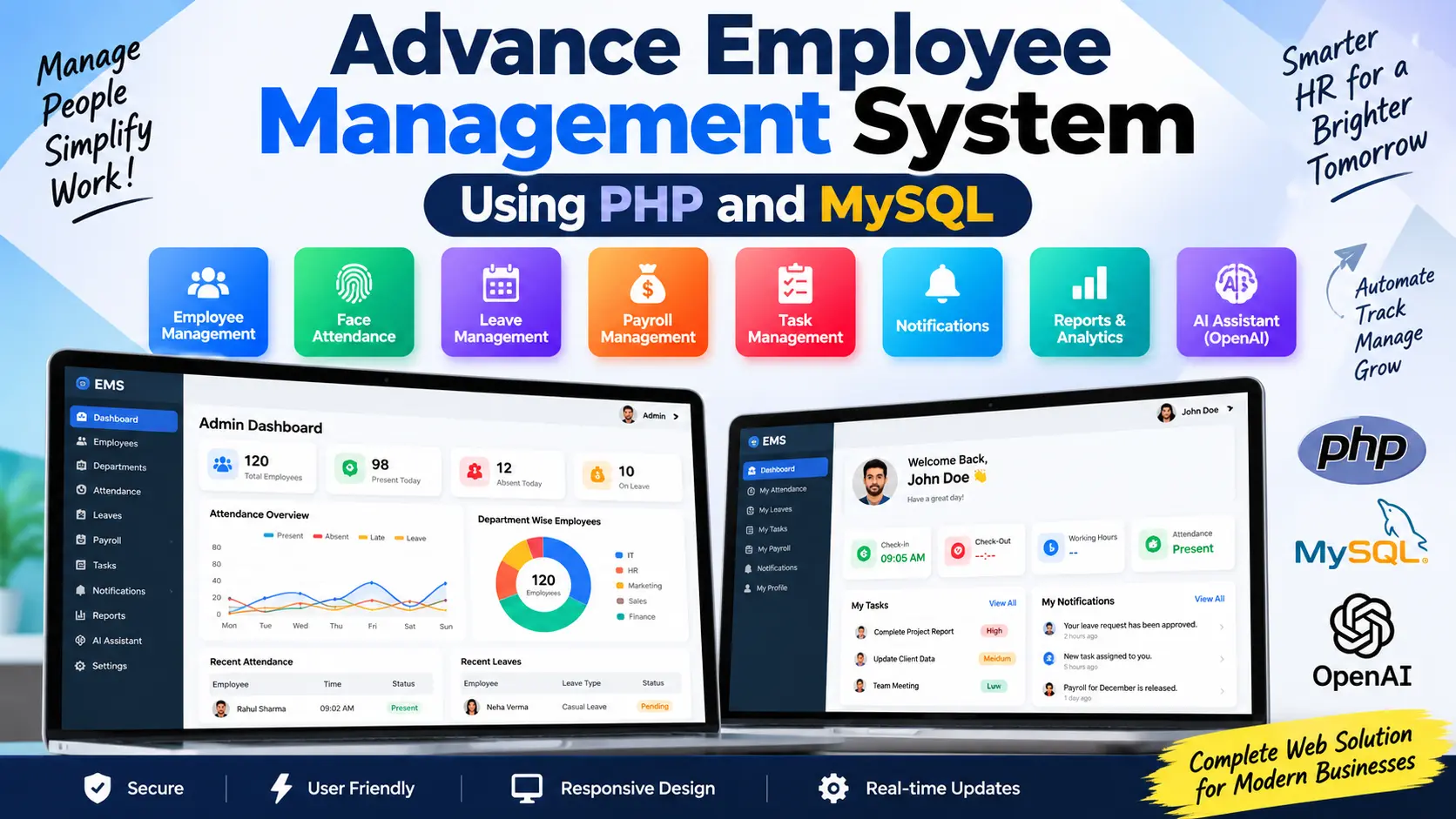
Advance Employee Management System Using PHP and MySQL is a complete HR management platform with employee management, face recognition attendance, leave management, payroll, task tracking, notifications, reports, dashboard analytics, and OpenAI-powered HR insights.
Read more- Built with
- PHPMySQLBootstrapHTML/CSSJavaScript
- You get
- Source codeDatabaseProject reportPPTSetup guide
- Delivery
- Instant download after payment
Advance Employee Management System Using PHP and MySQL
The Advance Employee Management System Using PHP and MySQL is a web-based HR management solution designed to manage employee-related operations from a centralized platform. The system combines employee management with face recognition attendance, leave management, payroll, task tracking, notifications, reports, dashboard analytics, and AI-powered insights.
Project Overview
The system provides separate Admin Panel and Employee Panel. Administrators can manage employees and HR activities, while employees can access their attendance, leaves, assigned tasks, notifications, payroll information, and profile.
Key Features
- Employee and department management
- Face registration and face recognition attendance
- Attendance tracking and management
- Online leave application and approval
- Employee payroll management
- Task assignment and progress tracking
- Employee notifications and announcements
- HR reports with CSV export
- Dashboard charts and analytics
- OpenAI-powered HR Assistant
- AI-based attendance insights
- Separate employee self-service panel
Employee Management
Administrators can add, edit, view, activate, deactivate, and manage employee records. Employee information can include employee ID, name, email, phone, department, designation, joining date, salary, profile information, and account status. Admin can also register an employee's face for face-based attendance.
Face Recognition Attendance
The project includes a camera-based attendance system that verifies employees using face recognition. During face registration, the system captures face samples and generates a face descriptor. During attendance marking, the captured face is compared with the registered employee data.
The attendance workflow includes face detection, recognition, employee verification, and check-in or check-out. Attendance information can include check-in time, check-out time, working hours, overtime, attendance status, late status, and attendance method. Duplicate attendance entries for the same day are prevented.
The project uses face-api.js and TensorFlow.js for browser-side face processing.
Attendance Management
Administrators can view and manage employee attendance records and filter them by date and department. The system provides information about present, absent, late, and on-leave employees along with check-in, check-out, working hours, and overtime details.
Attendance reports can also be exported in CSV format for further analysis.
Leave Management
Employees can submit leave applications by selecting the leave type, start date, end date, and reason. The system calculates leave duration and prevents overlapping leave applications.
Employees can view their leave history and application status, including Pending, Approved, Rejected, or Cancelled. Administrators can review requests, filter applications, approve or reject them, and add remarks. Employees receive notifications when leave decisions are made.
Payroll Management
The payroll module allows administrators to generate and manage employee salaries. Payroll information can include basic salary, allowances, overtime, bonuses, deductions, and net salary.
Administrators can manage monthly payroll, payment status, payroll history, and salary information. Employees can access their own payroll records and salary slips through the Employee Panel.
Task Management
Administrators can assign tasks to employees with details such as title, description, priority, deadline, assigned employee, and status.
Task priorities include Low, Medium, High, and Urgent. Task statuses include Pending, In Progress, Completed, and Cancelled. Employees can view assigned tasks and update their progress.
Notifications
The notification module allows administrators to send announcements and updates to employees. Notifications can be related to attendance, payroll, tasks, leave decisions, and company announcements. Employees can view read and unread notifications from their panel.
Dashboard Charts and Analytics
The Admin Dashboard uses actual database data to provide visual HR analytics. Chart.js is used for dashboard visualization.
- Attendance trends
- Today's attendance distribution
- Department-wise attendance
- Monthly attendance statistics
- Leave analysis
- Leave type analysis
- Monthly payroll expenses
- Payroll payment status
- Task status distribution
- Employee department distribution
OpenAI AI Assistant
The Admin Panel includes an OpenAI-powered AI Assistant that helps administrators understand HR data through natural-language questions.
Administrators can ask questions such as which employees have low attendance, who was late during a particular period, today's attendance summary, or an analysis of monthly attendance. The application prepares relevant structured database information and sends it to the OpenAI API for analysis.
AI Attendance Insights
The system also provides AI-based attendance insights covering attendance performance, late attendance, low-attendance employees, department performance, and possible attendance issues. This makes it easier for administrators to understand HR information without manually reviewing multiple reports.
Employee Panel
The Employee Panel gives employees access to their own HR information and activities.
- Employee Dashboard: View attendance, working hours, attendance percentage, tasks, deadlines, notifications, payroll information, and recent activity.
- My Attendance: Mark attendance using face recognition and review previous attendance records.
- My Leaves: Apply for leave, view history, check status, read admin remarks, and cancel eligible requests.
- My Tasks: View assigned tasks and update task progress.
- My Payroll: View salary information, payroll history, payment status, and salary slips.
- Notifications: Receive attendance, task, payroll, leave, and company announcements.
Reports
Administrators can generate reports for attendance, leave, payroll, and tasks. Reports can be filtered using employee, department, date range, status, and other available options. Supported reports can also be exported as CSV files.
Technology Stack
- Backend: PHP
- Database: MySQL
- Frontend: HTML5, CSS3, Bootstrap 5
- Client-side Programming: JavaScript
- Dynamic Requests: AJAX / Fetch API
- Charts: Chart.js
- Face Recognition: face-api.js and TensorFlow.js
- AI: OpenAI API
Software and Tools Required
- PHP-supported web server
- MySQL
- Web browser with camera access for face attendance
- Code editor such as Visual Studio Code
More Details & Full Documentation
View the complete Advance Employee Management System Using PHP and MySQL project details
- Employee Management
- Department Management
- Face Registration
- Face Recognition Attendance
- Attendance Management
- Leave Management
- Payroll Management
- Task Management
- Notification Management
- Dashboard Charts and Analytics
- OpenAI AI Assistant
- AI Attendance Insights
- Employee Dashboard
- Employee Attendance
- Employee Leaves
- Employee Tasks
- Employee Payroll
- Reports and CSV Export
- Install PHP and MySQL on your local development environment.
- Set up a PHP-supported web server such as XAMPP or another compatible environment.
- Copy the project files into the web server and project directory.
- Create the required MySQL database and configure the database connection used by the PHP application.
- Import the project and database SQL file if it is included with the source package.
- Configure the OpenAI API key for the AI Assistant and AI Attendance Insights features.
- Open the project in a browser through your local PHP server.
- Allow camera access in the browser when using face registration and face recognition attendance.
- Register employee face data before using face-based attendance.
- Log in to the appropriate panel and start managing employees, attendance, leaves, payroll, tasks, notifications, reports, and analytics.
Stuck while running it? Chat with us on WhatsApp for free installation help.
No reviews yet. Be the first to review this project.