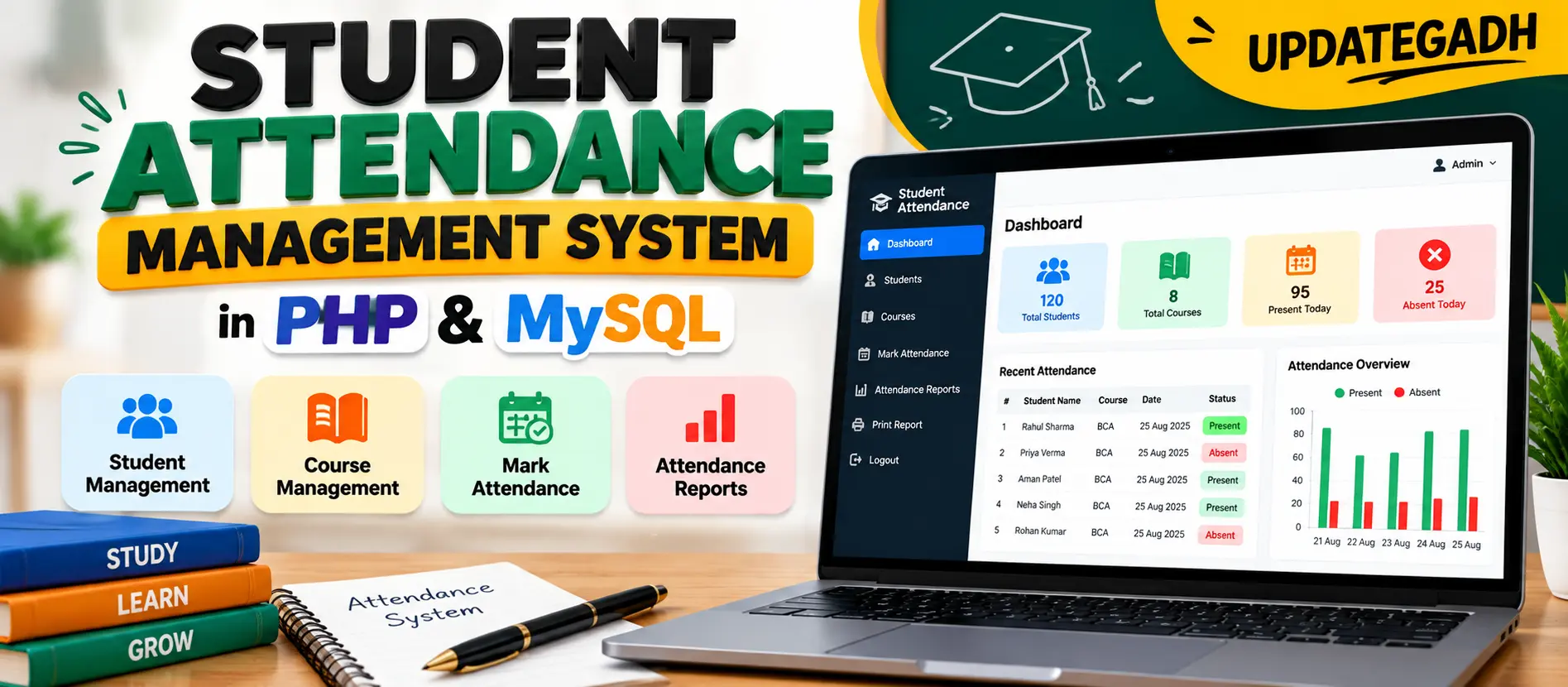
Student Attendance Management System in PHP and MySQL
Student Attendance Management System is a PHP and MySQL based web application for managing student details, courses, daily attendance, and attendance reports. The system provides an Admin panel for adding students, managing courses, marking attendance, viewing reports, and printing attendance records.
What You Will Get
Student Attendance Management System
Student Attendance Management System is a web-based attendance application developed using PHP, MySQL, HTML, CSS, and JavaScript. The project is designed to simplify the process of recording student attendance and maintaining attendance information digitally.
The system replaces repetitive manual attendance work with a structured web interface where the administrator can manage students and courses, mark students as Present or Absent, view attendance records, and generate printable attendance reports.
Key Features
- Admin login panel
- Student management
- Add, edit, and delete student records
- Student roll number, name, and course information
- Course management
- Create and manage subjects or courses
- Daily attendance marking
- Select course and date before marking attendance
- Mark students as Present or Absent
- Attendance reports
- Student and course attendance records
- Printable attendance reports
- Logout functionality
- MySQL database connectivity
Student Management
The student management functionality allows the administrator to maintain student records. Student information includes the student's name, roll number, and assigned course. The administrator can add, edit, and delete student details.
Course Management
The course management module allows the administrator to create and manage subjects or courses offered by the institution. Students can be assigned to the relevant course during student management.
Attendance Marking
Attendance marking is the core functionality of the application. The administrator selects a course and date and then records attendance for the available students by marking them as Present or Absent.
Attendance Reports
The system provides attendance reports containing attendance summaries and detailed attendance records for students. These reports can also be printed directly from the dashboard for record-keeping or submission.
Admin Panel
The administrator has access to the main system operations. After logging in, the dashboard provides options for managing students, courses, attendance, and reports. The administrator can also securely log out after completing the required operations.
Database Connectivity
The application uses MySQL to store, retrieve, and manage attendance-related information. PHP scripts such as db.php are used for database interaction.
Technology Stack
| Technology | Purpose |
|---|---|
| PHP | Backend development and server-side processing |
| MySQL | Database management |
| HTML | Web page structure |
| CSS | Interface styling |
| JavaScript | Client-side functionality |
| XAMPP | Apache and MySQL local server environment |
Software Requirements
- XAMPP
- Visual Studio Code
- Web browser such as Chrome or Firefox
Project Modules
The application is organized around the main attendance management operations. These include administrator login, student management, course management, attendance marking, attendance reporting, printing reports, database connectivity, and session logout.
Watch Project Demo
Watch the project demonstration to understand the Student Attendance Management System interface and attendance workflow.
More Details and Full Documentation
For complete project information, installation instructions, usage details, and the original documentation, visit the UpdateGadh project page.
View Complete Student Attendance Management System Documentation
Project Modules
2. Student Management Module
3. Course Management Module
4. Attendance Marking Module
5. Attendance Report Module
6. Print Report Module
7. Database Connectivity Module
8. Session Management Module
9. Logout Module
Installation Guide
1. Install XAMPP on your computer.
2. Install Visual Studio Code.
3. Start Apache and MySQL from the XAMPP Control Panel.
4. Extract the Student-Attendance-Management-System.zip project.
5. Move the extracted project folder into the XAMPP htdocs directory.
6. Open phpMyAdmin in your browser.
7. Create a new MySQL database named attendence_system.
8. Import the provided SQL file into the attendence_system database.
9. Open Visual Studio Code.
10. Select File and then Open Folder.
11. Open the project folder from the XAMPP htdocs directory.
12. Check the database connection configuration in the project.
13. Make sure Apache and MySQL are running in XAMPP.
14. Open the project URL in your browser.
15. The Student Attendance Management System login page will appear.
16. Log in through the Admin panel.
17. Add student records and manage available courses.
18. Select a course and date to mark students as Present or Absent.
19. Open attendance reports to view attendance records.
20. Use the print option when a printable attendance report is required.
FAQ for this project coming soon.
No reviews yet. Be the first to review!
Write a Review
Related Projects
 20% OFF
Featured
20% OFF
Featured
 40% OFF
Featured
40% OFF
Featured
 20% OFF
Featured
20% OFF
Featured
 25% OFF
Hot
25% OFF
Hot