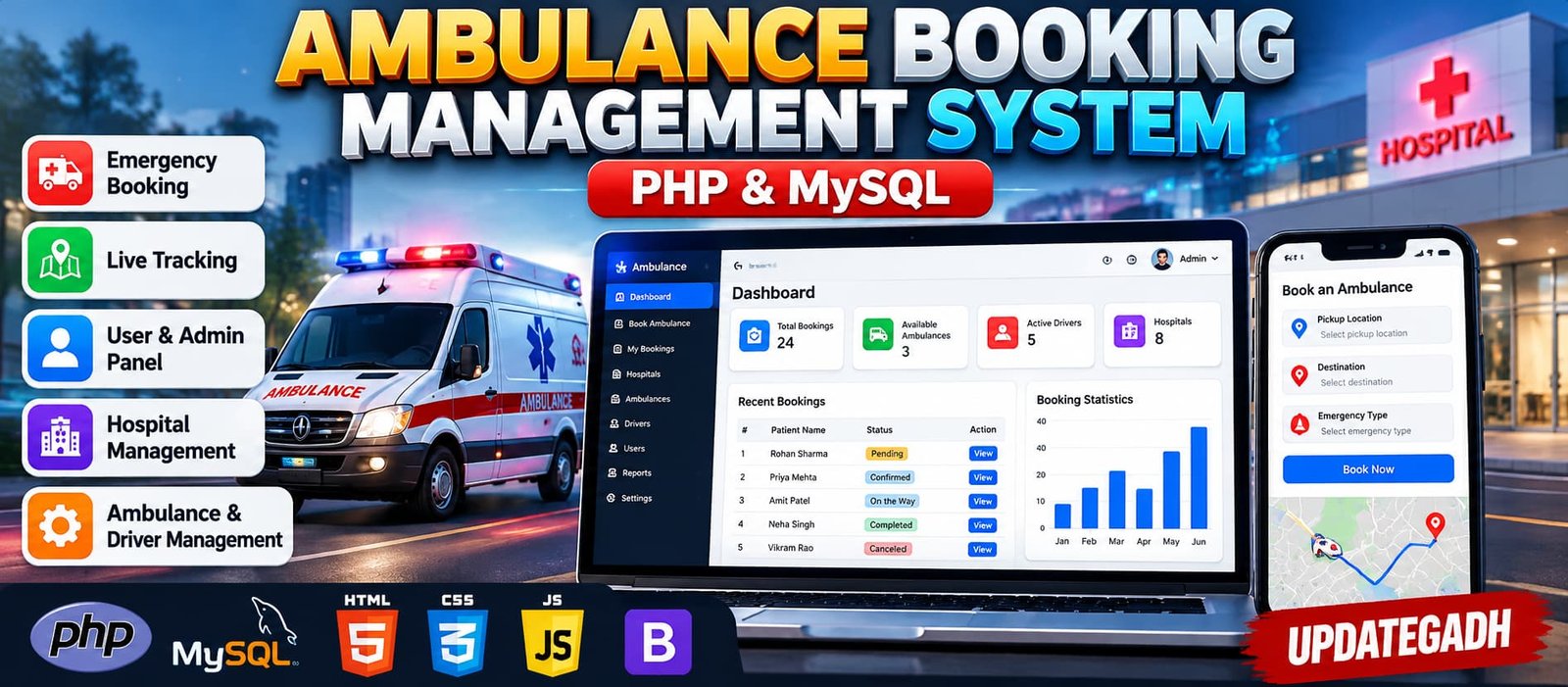
Ambulance Booking Management System Using PHP and MySQL
Advanced Ambulance Booking and Management System is a PHP and MySQL web application for managing emergency ambulance requests, patient details, drivers, hospitals, vehicle availability and booking assignments. It includes map-based location selection, booking status updates, maintenance records, printable receipts, notifications and an administrative dashboard with database-driven statistics and reports.
What You Will Get
Project Overview
The Advanced Ambulance Booking and Management System Using PHP and MySQL is a web-based application designed to organize emergency ambulance requests and related operational activities. It provides a centralized platform for managing patient information, pickup and destination details, ambulance vehicles, drivers, hospitals and booking records.
Developed using PHP, MySQL, HTML, CSS, JavaScript, AJAX and Bootstrap, the application offers separate user and administrator workspaces. Users can submit emergency booking requests and check their status, while administrators can review requests, assign suitable ambulances and drivers, maintain vehicle records and generate operational reports.
User Workspace
- User registration and login with session management.
- Profile viewing and personal information updates.
- Emergency ambulance booking with patient details.
- Emergency type and priority selection.
- Pickup address and destination entry.
- Map-based pickup and destination coordinate selection.
- Booking history with search and status filters.
- Booking status tracking through periodic AJAX updates.
- Cancellation of eligible booking requests.
- Printable booking receipts.
Administrator Workspace
- Dashboard statistics based on actual database records.
- View and manage registered users.
- Manage ambulance vehicles, types, service areas and availability.
- Manage driver information, licence numbers, duty status and service areas.
- Review emergency booking requests.
- Assign available ambulances and compatible drivers.
- Check service-area compatibility and prevent duplicate active assignments.
- Manage hospital names, addresses, contact details and service areas.
- Update booking and response statuses.
- Maintain ambulance servicing and maintenance records.
- Review booking statistics, emergency categories and service-area reports.
- Generate reports on booking completion durations.
- Manage notification records and configured email delivery.
Emergency Booking Management
Users can submit requests by entering patient information, emergency type, priority, pickup location and destination. Each booking follows a status-based workflow, beginning with a pending request. The administrator reviews the request, assigns a compatible ambulance and driver, confirms the booking and updates its status as the response progresses.
Ambulance and Driver Assignment
The assignment module checks ambulance availability and service-area compatibility before assigning resources. It also includes duplicate active-assignment checks to help prevent the same available resources from being assigned to multiple active requests.
Hospital Management
The system maintains hospital information, including names, addresses, contact details and service areas. These records help administrators manage hospital information alongside emergency booking and ambulance assignment operations.
Map-Based Location Selection
The booking form uses Leaflet with OpenStreetMap to support coordinate selection for pickup and destination locations. This helps users specify locations more accurately. Continuous ambulance GPS tracking is not included by default and requires a compatible GPS device or location-data integration.
Maintenance and Reporting
Administrators can record ambulance servicing dates, maintenance descriptions, costs and maintenance status. Reporting features provide information about booking activity, emergency categories, service areas and completion durations. Individual booking details can also be printed as receipts.
Dashboard and AJAX Updates
The administrator dashboard displays actual database statistics for bookings, customers, drivers and ambulance availability. AJAX-based status updates refresh booking information periodically without requiring the entire page to reload.
Security Features
- Password hashing and verification.
- Prepared statements for database queries.
- CSRF token validation for protected forms.
- Server-side input validation and output escaping.
- Role-based access restrictions for administrative pages.
- Database transactions and resource availability checks.
Technology Stack
- Backend: PHP 8.1 or later
- Database: MySQL or MariaDB
- Frontend: HTML, CSS and JavaScript
- UI Framework: Bootstrap
- Dynamic Updates: AJAX
- Map Library: Leaflet
- Map Data: OpenStreetMap
- Development Tools: Visual Studio Code and XAMPP
Software Requirements
- PHP 8.1 or later
- MySQL or MariaDB
- XAMPP with Apache and MySQL services
- Visual Studio Code
- A modern web browser
Project Applications
- Academic healthcare management projects.
- Ambulance booking workflow demonstrations.
- Ambulance fleet and driver management.
- Emergency request tracking and assignment.
- Hospital and service-area record management.
- Maintenance tracking and operational reporting.
Important Project Limitation
This application is intended for academic and development purposes. Email delivery requires a working mail configuration, SMS notifications require an external provider, and live ambulance tracking requires a suitable location-data integration. It is not a replacement for certified emergency dispatch services.
More Details and Full Documentation
View Advanced Ambulance Booking and Management System Details
Project Modules
2. Profile Management Module
3. Emergency Ambulance Booking Module
4. Patient Details Management Module
5. Emergency Type and Priority Module
6. Map-Based Location Selection Module
7. Booking History and Status Tracking Module
8. Ambulance Vehicle Management Module
9. Driver Management Module
10. Ambulance and Driver Assignment Module
11. Hospital Management Module
12. Booking Status Management Module
13. Ambulance Maintenance Module
14. Dashboard Statistics Module
15. Reports and Analytics Module
16. Printable Booking Receipt Module
17. Notification Management Module
18. AJAX Status Update Module
19. Security and Access Control Module
Installation Guide
1. Install XAMPP with PHP 8.1 or later and MySQL support.
2. Install Visual Studio Code.
3. Extract the project ZIP file into C:\xampp\htdocs\ambulance_booking_management.
4. Open the extracted project folder in Visual Studio Code.
5. Start Apache and MySQL from the XAMPP Control Panel.
6. Open http://localhost/phpmyadmin/ in your browser.
7. Import the SQL file located at database/ambulance_booking.sql.
8. Open config/config.php in VS Code.
9. Verify the database host, name, username and password.
10. Use the default database name ambulance_booking, host 127.0.0.1 and username root if they match your local configuration.
11. Save the database configuration after checking the connection details.
12. Open http://localhost/ambulance_booking_management/ in your browser.
13. Register a user account through the website.
14. To grant administrator access to your registered account, open phpMyAdmin and execute the following query after replacing the email address with your registered email: UPDATE users SET role = 'admin' WHERE email = 'your_registered_email@example.com';
15. Sign in again to access the administrator workspace.
16. Add ambulance vehicles, driver records and hospital information.
17. Submit a test booking and review the pending request in the administrator workspace.
18. Assign an available ambulance and compatible driver, then update the booking status.
19. Test booking history, map-based location selection, printable receipts and reporting features.
20. Configure mail settings separately if email notifications are required.
FAQ for this project coming soon.
No reviews yet. Be the first to review!
Write a Review
Related Projects
 20% OFF
Featured
20% OFF
Featured
 20% OFF
Featured
20% OFF
Featured
 70% OFF
Featured
70% OFF
Featured
 75% OFF
Featured
75% OFF
Featured