Complaint Management System in PHP and MySQL
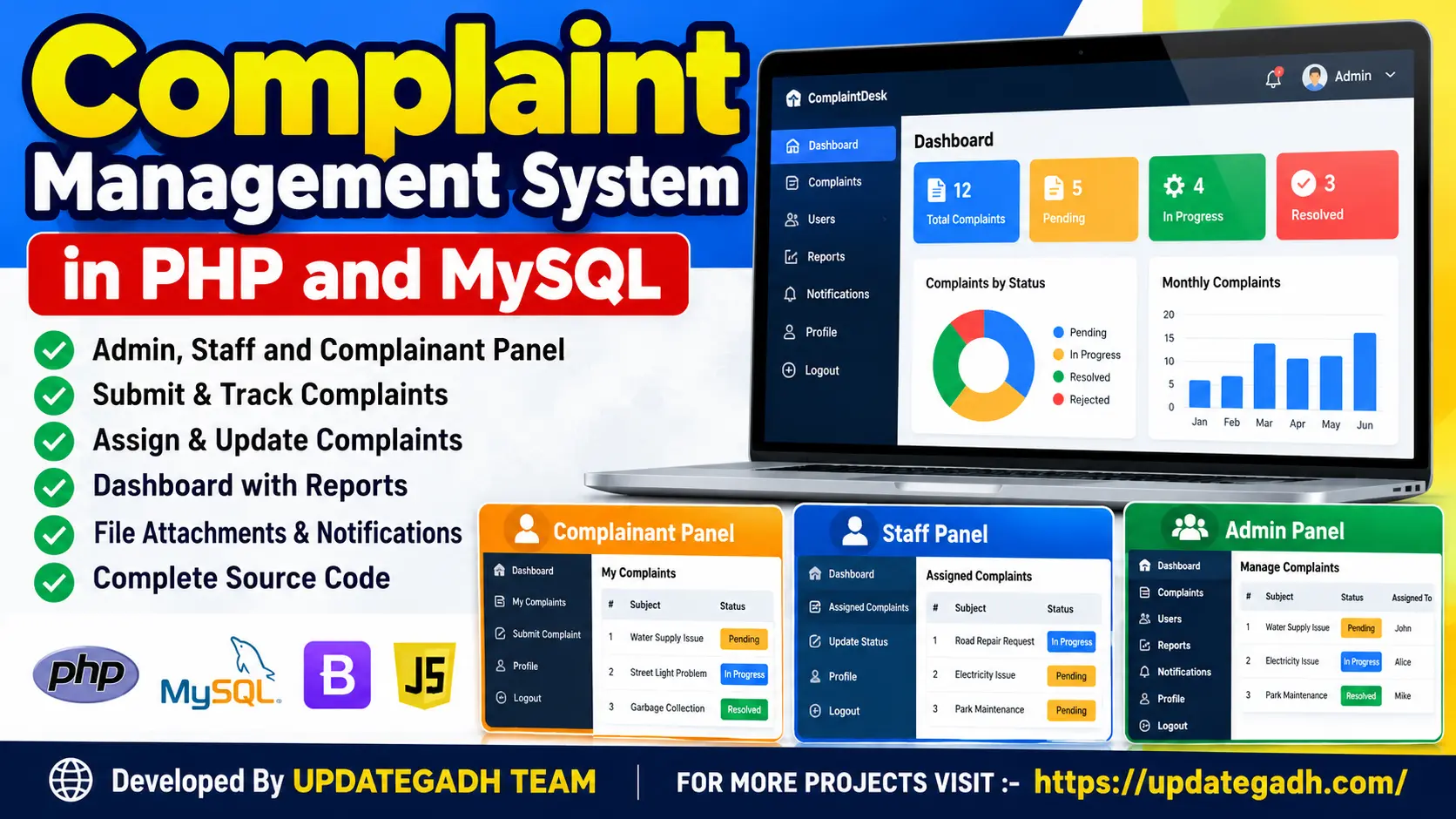
Complaint Management System in PHP and MySQL is a web-based application that helps organizations record, assign, track, and resolve complaints efficiently. It includes Admin, Staff, and Complainant modules, complaint status tracking, user management, and a centralized workflow for handling complaints.
What You Will Get
Project Overview
The Complaint Management System in PHP and MySQL is a web-based application designed to simplify the process of submitting, managing, tracking, and resolving complaints. It provides a centralized platform where complainants can report issues and monitor their progress, while staff members and administrators coordinate complaint handling.
Developed using PHP and MySQL, the project demonstrates how a database-driven web application can organize complaint records, user information, and resolution activities. It is suitable for students learning PHP development, database management, and web application workflows.
Key Features
- Complaint Submission: Allows users to submit complaints with relevant details about their issues.
- Complaint Tracking: Enables complainants to check the status and progress of submitted complaints.
- Staff Assignment: Supports assigning complaints to appropriate staff members for further handling.
- Complaint Resolution: Allows staff to review assigned complaints and update their status as they work toward resolution.
- Administrator Controls: Provides centralized management of users, staff, and complaints.
- Login System: Provides sign-in functionality for accessing the relevant system modules.
- Complaint Records: Stores complaint and user information in a MySQL database.
- Web-Based Interface: Uses standard web technologies to provide access through a browser.
Complainant Module
The complainant module enables users to submit complaints, provide issue details, and track the progress of their submissions. It helps users follow the complaint-handling process without needing to manage the internal assignment workflow.
Staff Module
The staff module supports reviewing complaints assigned to staff members and updating their status as the complaint moves toward resolution. This helps organize complaint handling and makes responsibilities easier to follow.
Administrator Module
The administrator module provides oversight of the complaint management process. Administrators can manage users and staff, assign complaints to appropriate staff members, and monitor complaint records.
Complaint Management Workflow
- The complainant submits a complaint through the web application.
- The complaint details are stored in the MySQL database.
- The administrator reviews the complaint and assigns it to the appropriate staff member.
- The assigned staff member reviews the issue and updates its status.
- The complainant tracks the complaint's progress through the system.
Technology Stack
- Backend: PHP
- Database: MySQL
- Frontend: HTML and CSS
- Interactive Components: JavaScript, jQuery, and AJAX
- Local Development Environment: XAMPP, WAMP, MAMP, or LAMP
Software Requirements
- PHP-compatible local server environment
- MySQL database server
- Visual Studio Code or another code editor
- Modern web browser
Project Applications
This project can be used as a learning example for complaint handling in educational institutions, offices, service departments, and other organizations. It demonstrates database operations, role-based workflows, complaint assignment, and status tracking in a PHP and MySQL web application.
More Details and Full Documentation
For the original project information and additional details, visit the official UPDATEGADH project page:
Project Modules
2. Complainant Module
3. Complaint Submission Module
4. Complaint Tracking Module
5. Staff Module
6. Complaint Assignment Module
7. Complaint Status Management Module
8. Complaint Resolution Module
9. Administrator Module
10. User and Staff Management Module
11. MySQL Database Management Module
Installation Guide
1. Install XAMPP on your computer.
2. Start Apache and MySQL from the XAMPP Control Panel.
3. Extract the project ZIP file.
4. Copy the extracted project folder into C:\xampp\htdocs\.
5. Open phpMyAdmin at http://localhost/phpmyadmin/.
6. Create the required MySQL database or import the SQL database file supplied with the project.
7. Open the project's database configuration file and update the database name, username, password, and host according to your local MySQL settings.
8. Save the configuration changes.
9. Open your browser and visit http://localhost/your-project-folder/.
10. Sign in through the available login page and test complaint submission, tracking, staff assignment, and complaint status updates.
No reviews yet. Be the first to review!
Write a Review
Related Projects
 17% OFF
Featured
17% OFF
Featured
 50% OFF
Hot
50% OFF
Hot
 56% OFF
Hot
56% OFF
Hot
 21% OFF
Featured
21% OFF
Featured