 20% OFF
 Restaurant Management System Using MERN Stack
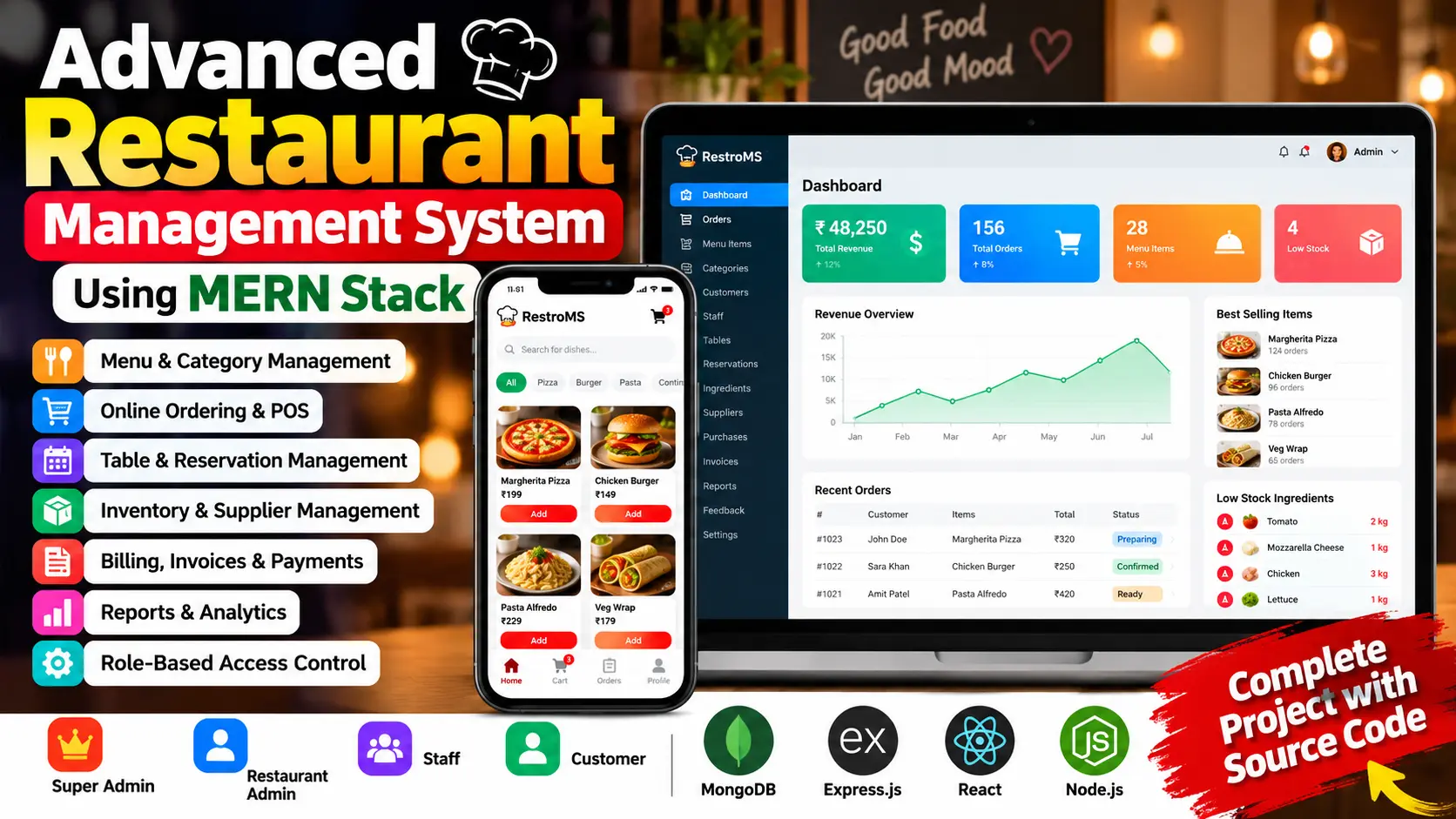
Restaurant Management System Using MERN Stack is a full-stack web application built with React, Vite, Tailwind CSS, Node.js, Express.js, and MongoDB. It includes four user panels: Super Admin, Restaurant Admin, Staff, and Customer. The system manages menus, orders, inventory, reservations, billing, and reports.
Read more- Built with
- ReactBootstrapJavaScriptNode.jsMongoDB
- You get
- Source codeDatabaseProject reportPPTSetup guide
- Delivery
- Instant download after payment
Project Overview
The Restaurant Management System Using MERN Stack is a full-stack web application designed to manage restaurant operations through a centralized dashboard. It includes menu management, online ordering, point-of-sale operations, table reservations, inventory tracking, billing, and reports.
The application is built with React, Vite, Tailwind CSS, Node.js, Express.js, and MongoDB with Mongoose. It supports four user roles: Super Admin, Restaurant Admin, Staff, and Customer. JWT authentication, password hashing, and role-based permissions control access to different modules.
Available Features
1. Super Admin Panel
- Permission Matrix
- Restaurant Settings and Tax Configuration
- Audit Logs
- Administrative Access
2. Restaurant Admin Panel
- Dashboard with Revenue, Orders, Best-Selling Dishes, Low-Stock Alerts, Charts, and Customer Feedback
- Menu Management
- Category Management
- Order Management
- Inventory Management
- Supplier and Purchase Management
- Staff Management
- Customer Management
- Table and Reservation Management
- Billing and Invoices
- Reports and Analytics with CSV Export
- Feedback Management
3. Staff Panel
- Point of Sale (POS)
- Order Processing and Status Updates
- Table Management
- Billing Access
- Profile Management
4. Customer Panel
- Menu Browsing with Search and Category Filters
- Shopping Cart
- Checkout
- Order Tracking and Order History
- Table Reservations
- Reviews and Feedback
- Profile Management
5. Inventory and Billing Controls
- Recipe-Based Stock Deduction
- Stock Validation
- Automatic Pricing for Subtotals, Discounts, Taxes, and Totals
- Table Status Updates
- Simulated Payments and Refund Workflows
Technology Stack
- Frontend: React, Vite, Tailwind CSS, React Router
- Backend: Node.js and Express.js REST API
- Database: MongoDB and Mongoose
- Authentication: JWT and bcryptjs
- Security: Helmet, CORS, Rate Limiting, and Input Sanitization
More Details and Full Documentation
- Super Admin Panel
- Restaurant Admin Panel
- Staff Panel
- Customer Panel
- Menu Management
- Category Management
- Order Management
- Inventory Management
- Supplier and Purchase Management
- Staff Management
- Customer Management
- Table and Reservation Management
- Billing and Invoices
- Reports and Analytics
- Feedback Management
- Point of Sale (POS)
- Inventory and Billing Controls
- Profile Management
- Install Node.js 18 or later, npm 9 or later, Visual Studio Code, and MongoDB 6 or later.
- Extract the project ZIP file and open the project folder in VS Code.
- Open a terminal in the server folder and run:
npm install
- Open another terminal in the client folder and run:
npm install
- In the server folder, create the environment file:
copy .env.example .env
- Configure MONGO_URI, JWT_SECRET, SUPERADMIN_EMAIL, and SUPERADMIN_PASSWORD in server/.env.
- From the server folder, initialize the database:
npm run init
- Optionally insert demonstration data:
npm run seed
- Start the backend from the server folder:
npm run dev
- Start the frontend from the client folder:
npm run dev
- Open http://localhost:5173 in your browser.
Stuck while running it? Chat with us on WhatsApp for free installation help.
No reviews yet. Be the first to review this project.