Event Management System Using MERN Stack
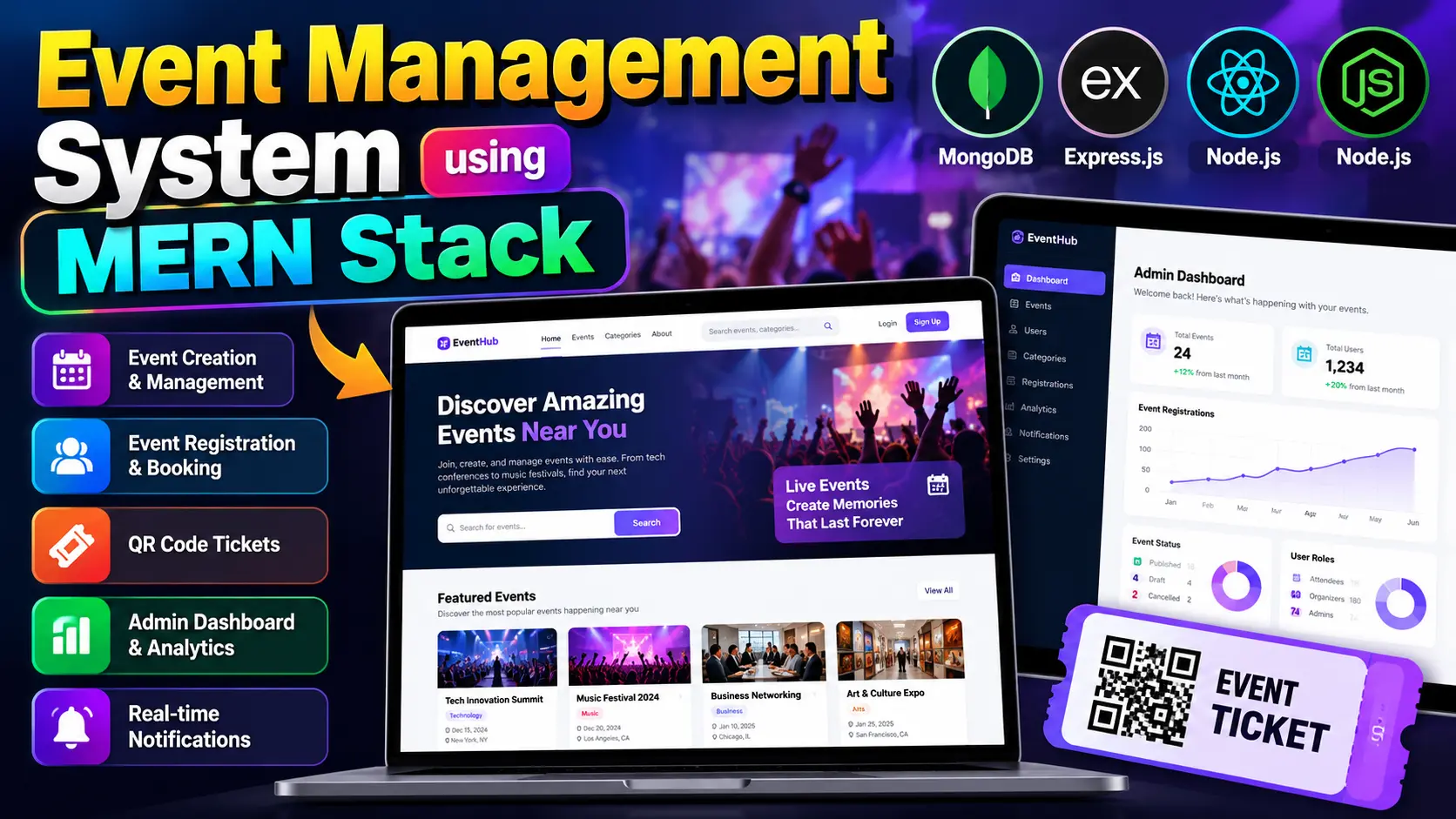
Event Management System Using MERN Stack is a full-stack event planning and registration application featuring event discovery, category and location filters, organizer event management, attendee registration, waitlists, QR-code tickets, notifications, and an interactive admin dashboard. The documented implementation uses React.js, Python Flask, SQLite, and SQLAlchemy.
What You Will Get
Project Overview
The Event Management System is a full-stack web application designed to simplify event planning, registration, ticket management, and attendee coordination. Named EventHub, it provides a centralized platform where users can discover events, organizers can publish and manage activities, and administrators can monitor platform operations.
The documented implementation combines React.js, JavaScript, and Tailwind CSS on the frontend with Python Flask, SQLAlchemy, and SQLite on the backend. It also includes session-based authentication, role-based access, real-time communication, QR-code ticket generation, and interactive dashboard charts.
Key Features
- User Registration and Authentication: Registration, login, email verification, forgot-password, and password-reset functionality.
- Event Discovery: Browse events and view details such as title, description, venue, schedule, category, tags, and registration availability.
- Search and Filtering: Search by keywords and filter events by category, location, date range, and sorting options.
- Event Creation and Management: Allow organizers to create, edit, publish, draft, and cancel event listings.
- Event Registration: Register for events and manage registrations through user accounts.
- Capacity Management: Check available event capacity and prevent registrations from exceeding configured limits.
- Waitlist Management: Allow eligible users to join a waitlist when an event is full and support promotion when a place becomes available.
- QR-Code Tickets: Generate unique ticket codes and QR-code ticket images for event registrations.
- QR Scanner Component: Include a frontend scanner component supporting digital ticket verification and event check-in workflows.
- Admin Dashboard: Display user, event, category, registration, verified-user, and organizer statistics.
- Analytics and Charts: Visualize event statuses and monthly user and registration trends using Recharts.
- Category and User Management: Manage event categories and oversee user accounts using search and role-based filtering.
- Notifications: Provide in-app notifications with unread counts, read-status updates, and deletion.
- Real-Time Communication: Use Flask-SocketIO and the Socket.IO client for notification delivery and event-related communication.
- Image Uploads: Support authenticated event image uploads with file-extension and file-signature validation and a configured 5 MB upload limit.
- Security and Validation: Implement password hashing, protected API endpoints, role-based authorization, input validation, CSRF checks for write operations, and permission checks.
Administrator Workspace
Administrators can oversee user accounts, manage event categories and event records, and monitor platform statistics. The dashboard presents event-status information, registration totals, recent events, and monthly activity trends through analytical charts.
Event Organizer Workspace
Organizers can create event listings, update event information, manage publication status, and review attendee registrations. Event forms support details such as title, description, category, location, venue, capacity, event dates, and registration deadline.
Attendee Workspace
Attendees can register for accounts, discover events, search and filter listings, register for available events, manage registrations, access QR-code tickets, and review notifications. Capacity checks and waitlist functionality help organize participation when events reach their registration limits.
Event Registration and Ticket Workflow
- Users browse and select an available event.
- They review the event information and registration availability.
- The system checks the event's configured capacity before accepting registration.
- Eligible registrations receive unique ticket codes and QR-code ticket images.
- If an event is full, eligible users can join the waitlist.
- When a place becomes available, the system includes logic to promote waitlisted attendees.
Technology Stack
- Frontend: React.js and JavaScript
- Styling: Tailwind CSS
- Backend: Python Flask
- Database: SQLite
- Database ORM: SQLAlchemy
- Authentication: Session-based authentication and role-based access
- Real-Time Communication: Flask-SocketIO and Socket.IO client
- Charts: Recharts
- Ticketing: QR-code generation libraries
Software Requirements
- Visual Studio Code
- Python compatible with the project's dependencies
- Node.js and npm compatible with the frontend dependencies
- A modern web browser
- Git, if required for version control
Project Applications
This project demonstrates event discovery, event publishing, registration capacity checks, waitlist workflows, digital ticket generation, role-based authorization, real-time notifications, and dashboard analytics. It is suitable for students exploring frontend development, Python backend APIs, database operations, and event coordination workflows.
Implementation Note
The published project documentation identifies Flask and SQLite as the backend technologies. Therefore, the documented version should not be represented as a true MERN implementation unless its backend is migrated to Node.js and Express.js and its database layer is replaced with MongoDB.
More Details and Full Documentation
For screenshots, detailed features, installation guidance, and the original project documentation, visit the official UPDATEGADH project page:
Project Modules
2. Event Discovery and Search Module
3. Category and Location Filtering Module
4. Event Creation and Management Module
5. Event Registration Module
6. Capacity Management Module
7. Waitlist Management Module
8. QR-Code Ticket Generation Module
9. Ticket Scanning and Verification Component
10. Admin Dashboard and Analytics Module
11. Category Management Module
12. User Management Module
13. Notifications Module
14. Real-Time Communication Module
15. Event Image Upload Module
16. Security and Validation Module
17. SQLite Database and SQLAlchemy Module
Installation Guide
1. Install Python, Node.js, npm, and Visual Studio Code.
2. Extract the project ZIP file and open the project folder in Visual Studio Code.
3. Open the terminal and navigate to the backend directory using: cd backend
4. Create a Python virtual environment using: python -m venv venv
5. Activate the environment on Windows using: venv\Scripts\activate
6. Install backend dependencies using: pip install -r requirements.txt, if the file is present.
7. Review the backend configuration and set the required Flask secret key, database URL, email settings, and other environment variables.
8. Initialize the SQLite database by following the migration or database initialization instructions included with the project.
9. Inspect the backend entry point and start Flask using the project's configured command. If wsgi.py exposes the expected Flask application, try: python -m flask --app wsgi run --debug
10. Open a second terminal and navigate to the frontend directory using: cd frontend
11. Install frontend dependencies using: npm install
12. Check the frontend package.json file and start the application using its configured script, such as: npm start or npm run dev
13. Open the frontend URL displayed in the terminal.
14. Confirm that the frontend is configured to communicate with the running backend.
15. Configure an email service before testing email verification and password-reset features.
16. Register an account and test event discovery, event creation, registrations, waitlists, QR-code tickets, and notifications according to your assigned role.
No reviews yet. Be the first to review!
Write a Review
Related Projects
 55% OFF
Featured
55% OFF
Featured
 32% OFF
Featured
32% OFF
Featured
 33% OFF
Featured
33% OFF
Featured
 65% OFF
Featured
65% OFF
Featured