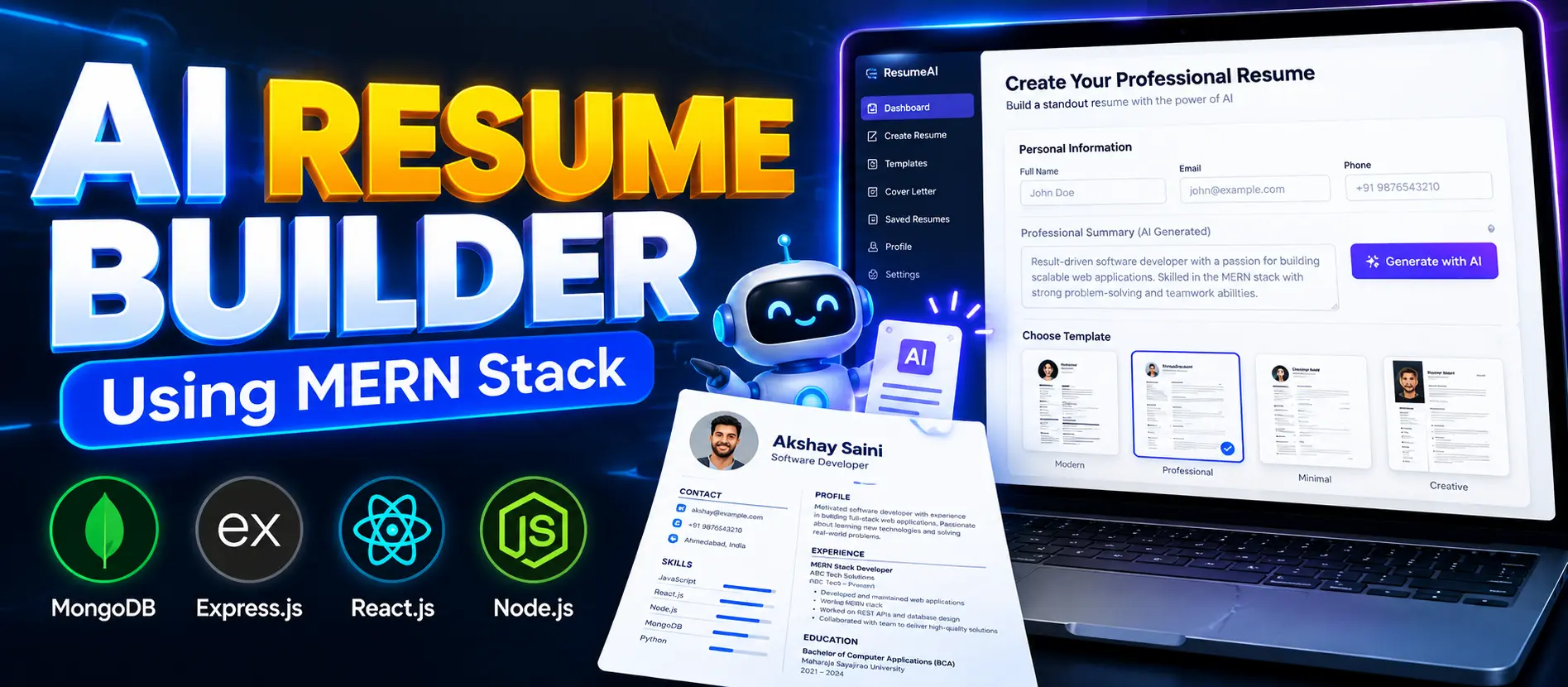
AI Resume Builder Using MERN Stack
AI Resume Builder Using MERN Stack is a full-stack web application that helps users create professional resumes with AI-generated content suggestions. Built with React.js, Node.js, Express.js, and MongoDB, it offers secure authentication, resume management, customizable templates, real-time previews, and PDF downloads.
What You Will Get
Project Overview
AI Resume Builder Using MERN Stack is a web application designed to simplify resume creation with artificial intelligence. It helps users prepare professional resumes by generating content suggestions for sections such as professional summaries, skills, education, and work experience.
The application uses the MERN stack, combining React.js, Node.js, Express.js, and MongoDB. It also integrates an AI API for content generation, JWT-based authentication for account access, and PDF generation for downloading completed resumes.
Key Features
- User Registration and Login: Create an account and securely access the resume builder.
- Resume Dashboard: Manage resumes from a centralized dashboard.
- AI-Powered Content Suggestions: Generate professional resume content using an AI service. Gemini API configuration is required for the documented AI integration.
- Personal Information: Enter the details required to build a resume.
- Education and Experience: Organize academic qualifications, work experience, and skills.
- Multiple Resume Templates: Choose from available resume designs to suit different preferences and job roles.
- Real-Time Resume Preview: Preview resume changes while editing the entered information.
- PDF Export: Generate a downloadable PDF version of the completed resume.
- JWT Authentication: Protect authenticated application access using JSON Web Tokens.
- MongoDB Integration: Store application data using MongoDB.
- Docker Support: The project page lists Docker support as an additional technology capability.
Resume Creation Workflow
- Register an account or log in to the application.
- Enter personal, educational, skills, and experience details.
- Request AI-generated suggestions to improve the resume content.
- Review and edit the suggested information.
- Select a suitable resume template.
- Preview the resume and make final changes.
- Export the completed resume as a PDF file.
User Workspace
The user workspace provides access to resume creation and management features. Users can enter their details, request AI-generated content, select templates, review the live preview, and download completed resumes. The dashboard helps organize resume-related work in one place.
AI Content Generation
The application integrates an AI API to suggest professional wording for resume sections. This feature can help users improve the presentation of their skills, education, experience, and summary. Users should review generated content and ensure that all qualifications and work experience accurately reflect their actual background.
Technology Stack
- Frontend: React.js
- Styling: Tailwind CSS
- State Management: Redux Toolkit
- Backend: Node.js and Express.js
- Database: MongoDB
- Authentication: JWT
- AI Integration: Gemini API configuration
- Document Export: PDF generation
- Deployment Support: Docker
Software Requirements
- Node.js and npm
- MongoDB or a MongoDB connection string
- Visual Studio Code or another code editor
- Git
- A modern web browser
- An AI API key for content generation
Project Applications
This project is suitable for students, fresh graduates, job seekers, and developers exploring full-stack web development. It demonstrates how authentication, database integration, AI-powered text generation, dynamic interfaces, and PDF exports can be combined into a practical resume-building application.
Important Usage Note
AI-generated resume content should be checked carefully before use. The application assists with writing and presentation; users remain responsible for the accuracy of their personal details, skills, education, and employment history.
More Details and Full Documentation
Visit the official UPDATEGADH project page for the original project overview, screenshots, and installation instructions:
Project Modules
2. User Dashboard Module
3. Resume Creation Module
4. Personal Information Module
5. Education Details Module
6. Skills and Experience Module
7. AI Content Generation Module
8. Resume Template Selection Module
9. Real-Time Resume Preview Module
10. PDF Export Module
11. Resume Management Module
12. JWT Authentication Module
13. MongoDB Data Management Module
Installation Guide
1. Install Node.js, npm, MongoDB, Git, and Visual Studio Code.
2. Extract the project ZIP file and open the project folder in Visual Studio Code.
3. Open the terminal and navigate to the backend directory.
4. Install backend dependencies using: npm install
5. Create a .env file inside the backend directory.
6. Add the following environment variables: MONGODB_URI=your_mongodb_connection, JWT_SECRET_KEY=your_secret_key, AI_API_KEY=your_gemini_api_key
7. Replace the example values with your actual MongoDB connection string, secure JWT secret, and AI API key.
8. Start the backend using: npm run dev
9. Open a second terminal and navigate to the frontend directory.
10. Install frontend dependencies using: npm install
11. Start the frontend using: npm run dev
12. Open the frontend URL displayed in the terminal.
13. Register a new account or log in with an existing account.
14. Enter your personal details, education, skills, and experience.
15. Generate AI content suggestions, choose a resume template, preview the result, and download the resume as a PDF.
No reviews yet. Be the first to review!
Write a Review
Related Projects
 63% OFF
Featured
63% OFF
Featured
 20% OFF
Featured
20% OFF
Featured
 33% OFF
Featured
33% OFF
Featured
 65% OFF
Featured
65% OFF
Featured