E-Learning Platform Using MERN Stack
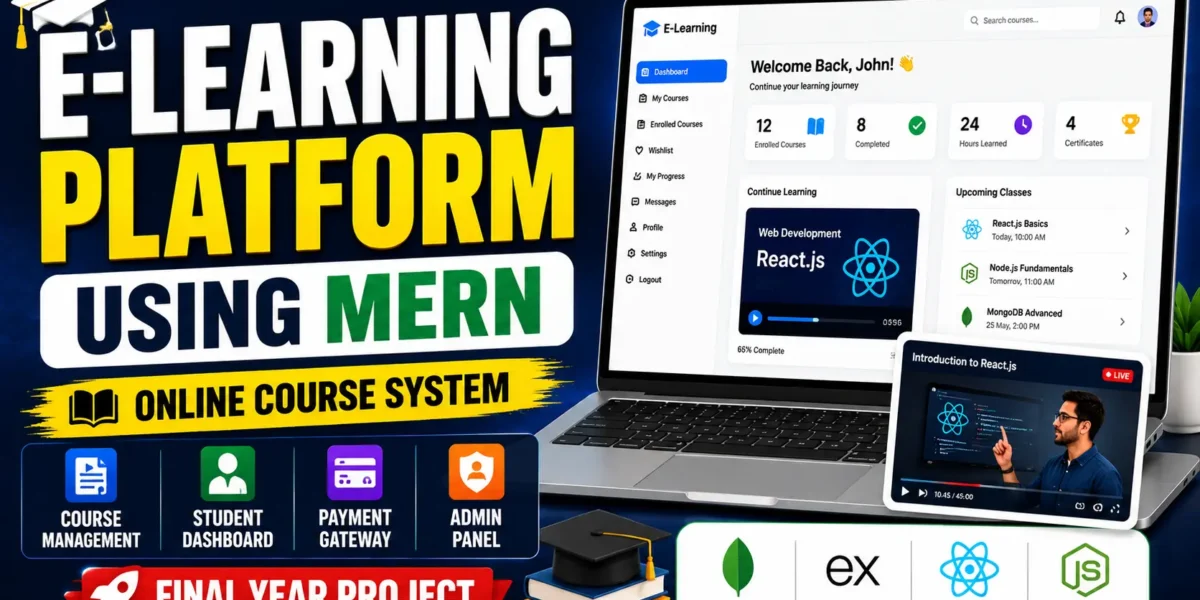
E-Learning Platform Using MERN Stack is a full-stack online learning application built with MongoDB, Express.js, React.js, and Node.js. It enables instructors to manage courses, students to enroll and track lesson progress, and administrators to oversee users, courses, and enrollments. Key features include multimedia learning materials, course discussions, JWT authentication, and integrated payment processing.
What You Will Get
Project Overview
E-Learning Platform Using MERN Stack is a full-stack web application designed to deliver online courses and organize digital learning activities. The platform provides separate workflows for students, instructors, and administrators, helping users access course content, manage learning progress, and oversee educational resources through a responsive interface.
Built with MongoDB, Express.js, React.js, and Node.js, the project combines REST APIs, JWT-based authentication, Redux state management, and Chakra UI components. It demonstrates how a modern web application can bring course management, student enrollment, discussions, and payment processing together.
Key Features
- User Registration and Login: Support account registration, login, profile management, password hashing, and JWT-based authentication with refresh-token support.
- Role-Based Access: Separate access for students, instructors, and administrators.
- Course Management: Allow instructors to create, update, and delete courses with titles, descriptions, prices, thumbnails, and lesson content.
- Student Enrollment: Enable students to enroll in courses and view their enrolled course list.
- Learning Progress Tracking: Track lesson completion and review progress from the student dashboard.
- Multimedia Course Content: Support videos, PDF documents, and quizzes as learning materials.
- Discussion Forums: Provide course-specific discussion threads where students can ask questions and instructors can respond.
- Administrator Dashboard: View registered users, courses, and total enrollments, and moderate unauthorized content.
- Payment Gateway: Support paid-course order creation, payment verification, and automatic enrollment after successful payment.
- Responsive Interface: Use Chakra UI to support desktop, tablet, and mobile layouts.
- Centralized State Management: Use Redux to manage shared application state, including user sessions, cart data, and course information.
- REST API Backend: Use Express.js routes and authorization middleware to manage application requests.
Student Workspace
Students can explore their enrolled courses, access available learning materials, review lesson progress, view recent activity, and participate in course discussion threads. The dashboard keeps course information and learning activities organized in one place.
Instructor Workspace
Instructors can create and manage their own courses, provide course descriptions and thumbnails, organize lesson content, and respond to student questions through course-specific discussions. Course management operations are handled through the backend API.
Administrator Workspace
Administrators can view registered users, monitor courses and enrollments, and remove unauthorized content. Role-based middleware restricts administrative functions to authorized accounts.
Course Enrollment and Payments
The platform includes a payment workflow for paid courses. It supports order creation, payment verification, and enrollment after successful payment verification. The payment provider's credentials and configuration must be set up according to the supplied project files before using payment functionality.
Technology Stack
- Frontend: React.js
- Backend: Node.js and Express.js
- Database: MongoDB
- State Management: Redux
- UI Library: Chakra UI
- Authentication: JSON Web Tokens (JWT)
- API Communication: Axios or Fetch
- Database Modeling: Mongoose
Software Requirements
- Node.js and npm
- MongoDB installed locally or a MongoDB Atlas connection
- Visual Studio Code or another code editor
- A modern web browser
- Payment gateway credentials if required by the supplied configuration
Project Applications
This project is suitable for students learning full-stack JavaScript development and for demonstrating online course delivery, role-based access, REST API design, NoSQL database integration, state management, and payment workflows. It can also serve as a starting point for extending an educational platform with features such as certificates or live classes.
More Details and Full Documentation
For the original project overview, screenshots, module details, and setup instructions, visit the official UPDATEGADH project page:
Project Modules
2. Role-Based Access Control Module
3. Course Management Module
4. Student Enrollment Module
5. Student Dashboard Module
6. Lesson Progress Tracking Module
7. Multimedia Learning Content Module
8. Instructor Dashboard Module
9. Admin Dashboard Module
10. Payment Gateway Module
11. Course Discussion Forum Module
12. REST API Module
13. Redux State Management Module
14. MongoDB Database Module
Installation Guide
1. Install Node.js, npm, MongoDB, and Visual Studio Code.
2. Extract the project ZIP file and open the project folder in Visual Studio Code.
3. Open a terminal in the project root and navigate to the backend directory using: cd backend
4. Install backend dependencies using: npm install
5. Create a .env file inside the backend directory.
6. Add the environment variables: MONGO_URI=mongodb://localhost:27017/elearning, JWT_SECRET=your-super-secret-key, PORT=5000
7. Replace the example JWT secret with a secure value.
8. Ensure MongoDB is running locally or configure your MongoDB Atlas connection string in MONGO_URI.
9. Start the backend from the backend directory using: node index.js
10. Open a second terminal in the project root and navigate to the frontend directory using: cd frontend
11. Install frontend dependencies using: npm install
12. Start the frontend using: npm start
13. Open the local frontend address displayed in the terminal.
14. Register or log in using a valid account.
15. Test course creation, student enrollment, lesson progress, discussion forums, and administrator features.
16. Configure any payment gateway credentials required by the supplied project files before testing paid-course purchases.
No reviews yet. Be the first to review!
Write a Review
Related Projects
 20% OFF
Featured
20% OFF
Featured
 50% OFF
Featured
50% OFF
Featured
 65% OFF
Featured
65% OFF
Featured
 65% OFF
Featured
65% OFF
Featured