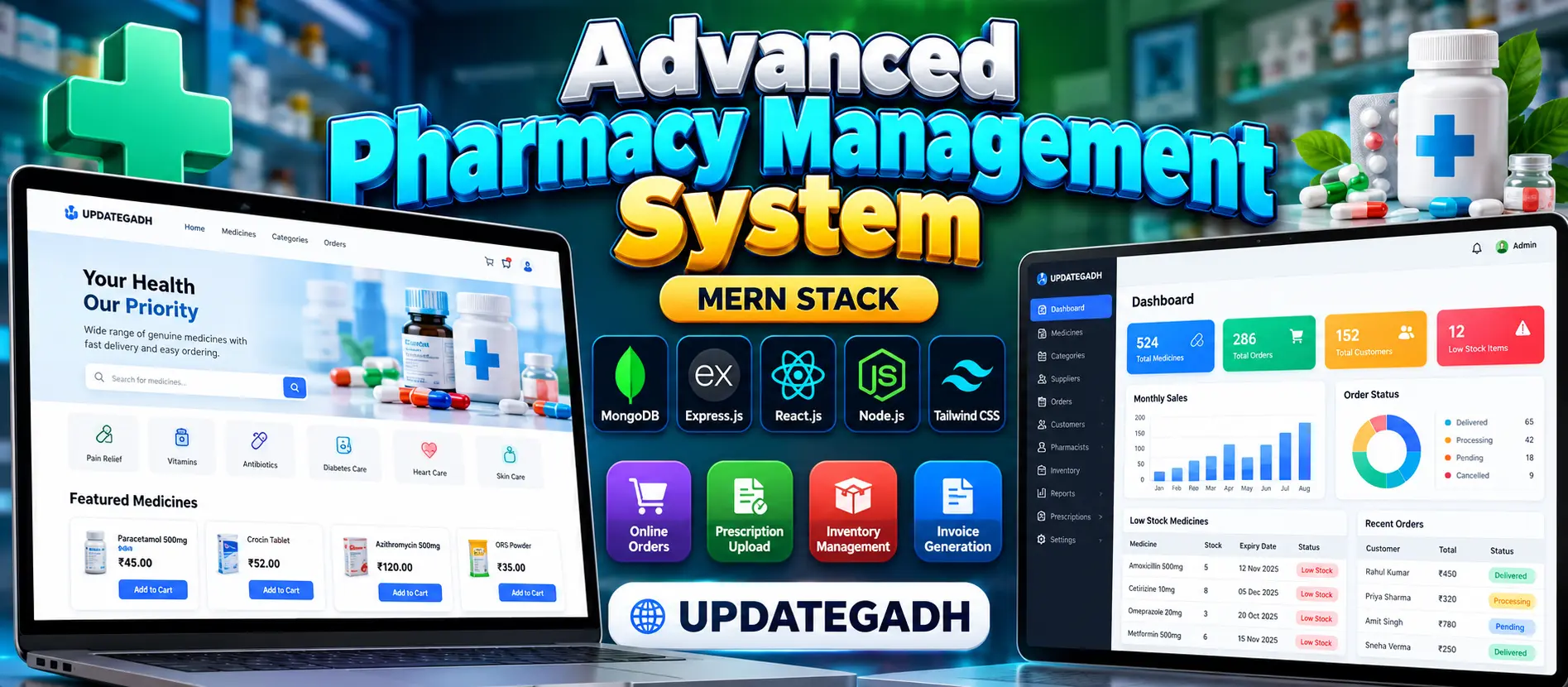
Pharmacy Management System Using MERN Stack
Advanced Pharmacy Management System Using MERN Stack is a full-stack web application for managing medicine catalogues, inventory, customer orders, suppliers, prescriptions and sales reports. Built with MongoDB, Express.js, React.js, Node.js and Tailwind CSS, it provides separate Admin, Pharmacist and Customer workspaces, batch-level stock tracking, expiry alerts, prescription reviews and PDF invoice generation.
What You Will Get
Project Overview
The Advanced Pharmacy Management System Using MERN Stack is a web-based application designed to organize pharmacy operations through a centralized digital platform. It helps manage medicine records, stock availability, customer orders, supplier information, prescription reviews and sales reports.
Developed using MongoDB, Express.js, React.js and Node.js, the application includes a responsive interface built with Tailwind CSS. It supports three user roles: Administrator, Pharmacist and Customer, with access to relevant features according to each role.
Available Features
1. User Registration and Authentication
- Customer registration and login.
- JWT-based authentication for protected API endpoints.
- Password hashing using bcrypt.
- Profile information updates.
- Role-based access for administrators, pharmacists and customers.
2. Medicine Catalogue
- Maintain medicine names, SKU codes, categories and manufacturers.
- Store medicine descriptions, prices and product images.
- Record prescription requirements.
- Search and filter medicines by category.
- Sort products by price.
3. Shopping Cart and Order Management
- Add medicines to the shopping cart.
- Update product quantities and cart totals.
- Enter shipping addresses and place orders.
- Maintain customer order history.
- Track order status.
- Download order invoices.
4. Inventory and Batch Management
- Maintain medicine batch numbers and expiry dates.
- Record stock quantities and purchase prices.
- Add medicines and update inventory records.
- Check eligible, unexpired stock before accepting orders.
- Deduct quantities from eligible batches when orders are processed.
5. Low-Stock and Expiry Alerts
The dashboard identifies medicines with low stock and displays batches approaching their expiry dates. These indicators help pharmacy staff identify inventory that requires attention.
6. Prescription Management
- Upload prescriptions for medicines that require them.
- Accept supported PDF and image formats.
- Allow authorized staff to review submitted prescriptions.
- Update prescription approval status.
7. Supplier Management
Administrators and pharmacists can maintain supplier information, including supplier names, contact persons, email addresses, phone numbers and addresses.
8. Admin Dashboard and Reports
- Display medicine and customer counts.
- Show order counts and recorded sales statistics.
- Generate monthly sales summaries.
- Review top-selling items.
- View order status totals.
- Retrieve dashboard statistics from MongoDB records.
9. PDF Invoices and Email Notifications
The system generates downloadable PDF invoices containing order details, customer information, purchased items and totals. Email notifications can be enabled by configuring SMTP settings.
Administrator Workspace
- Manage medicines, inventory and suppliers.
- Manage users and customer records.
- Review orders and monitor pharmacy activity.
- Access inventory alerts and sales reports.
Pharmacist Workspace
- Manage medicine records and stock.
- Review prescription submissions.
- Process orders and monitor stock availability.
- Maintain supplier information.
Customer Workspace
- Browse and search the medicine catalogue.
- View medicine details.
- Manage the shopping cart.
- Place orders and review order history.
- Update profile information.
- Upload prescriptions when required.
- Download available invoices.
Technology Stack
- Frontend: React.js
- Styling: Tailwind CSS
- Backend: Node.js and Express.js
- Database: MongoDB
- Authentication: JSON Web Tokens (JWT)
- Password Security: bcrypt
- API Architecture: RESTful APIs
Software and Tools Required
- Node.js and npm
- MongoDB installed locally or a MongoDB Atlas database
- Visual Studio Code
- A modern web browser
- Environment configuration for database connectivity and JWT secrets
Installation and Execution
Extract the project ZIP file and open the pharmacy-management-mern folder in Visual Studio Code. Install the backend dependencies, configure the environment variables and connect the application to MongoDB.
cd backend
npm install
Configure the MongoDB connection and a strong JWT secret in the backend .env file. Ensure MongoDB is running, then initialize the database using the supplied seed script.
npm run seed
npm run dev
Open a separate terminal for the frontend and run:
cd frontend
npm install
npm run dev
Open the frontend URL displayed in the terminal, usually http://localhost:5173. The backend API normally runs at http://localhost:5000.
Current Limitations
- Online payment gateway processing is not implemented.
- Customer email verification is not available during registration.
- Live order tracking is not included.
- A separate delivery personnel interface is not provided.
Future Enhancement Possibilities
- Integrate a secure online payment gateway.
- Add purchase-order workflows and detailed supplier transactions.
- Introduce verified profit and cost-of-goods reports.
- Add scheduled medicine expiry notifications.
- Move prescription files to secure cloud storage with controlled access.
Important Note
This project demonstrates pharmacy inventory and order-management workflows. Real-world pharmacy deployment requires appropriate prescription verification, secure handling of medical information and compliance with applicable pharmacy regulations.
More Details and Full Documentation
View Advanced Pharmacy Management System Using MERN Stack Details
Project Modules
2. Role-Based Access Control Module
3. Profile Management Module
4. Medicine Catalogue Module
5. Medicine Search and Filtering Module
6. Shopping Cart Module
7. Customer Order Management Module
8. Inventory and Batch Management Module
9. Low-Stock Alert Module
10. Medicine Expiry Monitoring Module
11. Prescription Upload and Review Module
12. Supplier Management Module
13. Administrator Dashboard Module
14. Sales Reports Module
15. PDF Invoice Generation Module
16. Email Notification Module
17. MongoDB Database Integration Module
18. REST API Module
Installation Guide
1. Install Node.js and npm on your computer.
2. Install MongoDB locally or create a MongoDB Atlas database.
3. Install Visual Studio Code.
4. Extract the project ZIP file and open the pharmacy-management-mern folder in VS Code.
5. Open a terminal and navigate to the backend folder using: cd backend
6. Install backend dependencies using: npm install
7. Copy .env.example to .env and configure the MongoDB connection.
8. Set a strong random JWT secret in the backend .env file.
9. Ensure MongoDB is running and the connection string is correct.
10. Initialize the database using: npm run seed
11. Start the backend server using: npm run dev
12. Confirm that the backend API is running, normally at http://localhost:5000.
13. Open a second terminal in VS Code.
14. Navigate to the frontend folder using: cd frontend
15. Install frontend dependencies using: npm install
16. Start the frontend using: npm run dev
17. Open the frontend URL displayed in the terminal, usually http://localhost:5173.
18. Register or sign in with an appropriate account.
19. Test medicine browsing, cart management, order placement, inventory updates and prescription workflows.
20. Verify that dashboard statistics and reports reflect the database records.
21. Configure SMTP settings if email notifications are required.
22. Remember that online payment processing and live order tracking are not included in the current implementation.
FAQ for this project coming soon.
No reviews yet. Be the first to review!