 20% OFF
 AI-Powered Habit Tracker Using React, Node.js, and Python
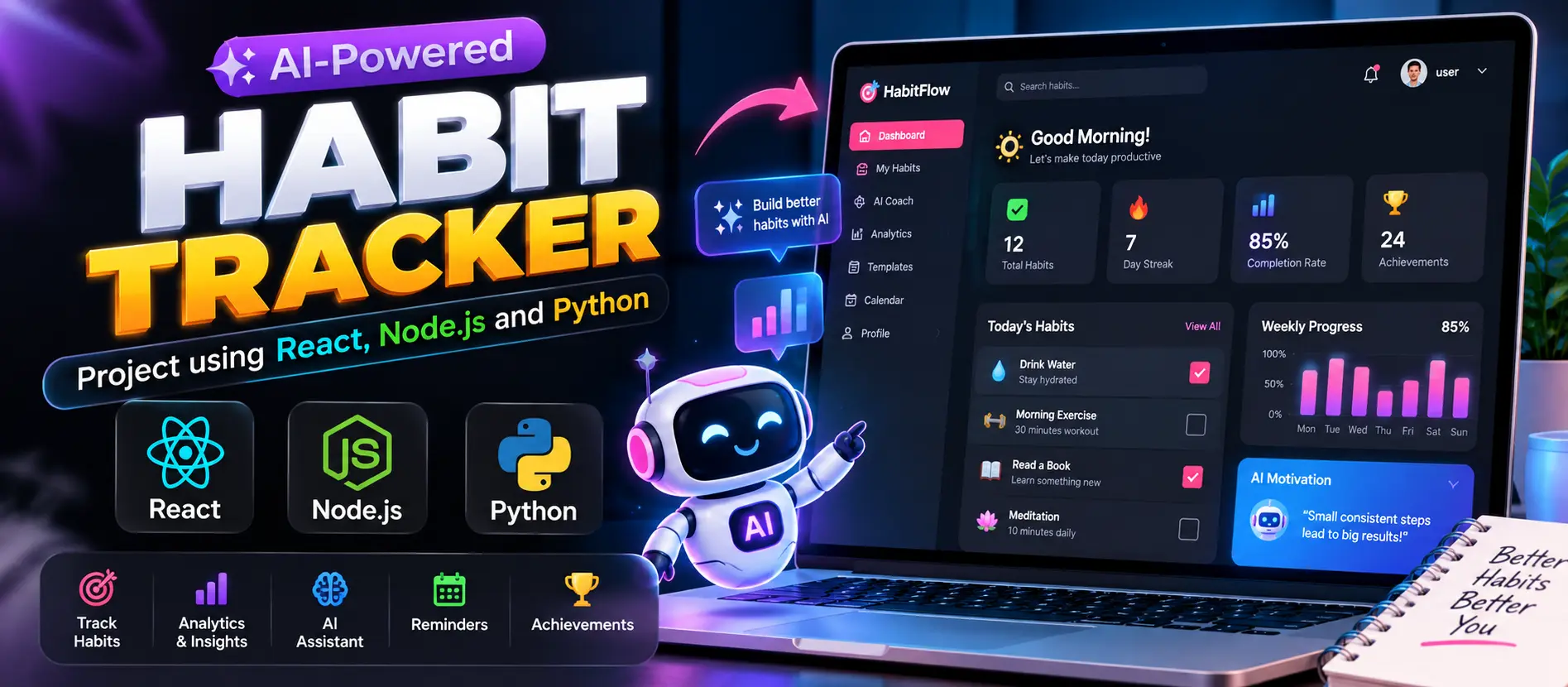
AI-Powered Habit Tracker is a full-stack web application that helps users create daily habits, record completion, monitor streaks, and visualize progress through analytics. Built with React, Node.js, Express.js, MongoDB, and a Python Flask machine learning service, it provides personalized habit suggestions, behavioral pattern analysis, and streak-break predictions.
Read more- Built with
- PythonMachine LearningReactBootstrapHTML/CSSJavaScriptNode.jsMongoDB
- You get
- Source codeDatabaseProject reportPPTSetup guide
- Delivery
- Instant download after payment
Project Overview
AI-Powered Habit Tracker is a web application designed to help users build consistent routines and monitor personal productivity. The system allows users to create habits, record daily completion, track streaks, and review their progress through an analytics dashboard.
The project combines React, Node.js, Express.js, MongoDB, and a Python Flask machine learning service. The backend manages authentication and habit records, while the AI service analyzes habit completion patterns and generates personalized suggestions.
Key Features
- User Registration and Login: Allow users to create accounts and access their personal habit data. JWT tokens are used for authenticated sessions.
- Habit Management: Create, update, and delete habits, and mark habits as completed for the day.
- Progress Tracking: Maintain habit completion history and calculate streaks to help users monitor consistency.
- Analytics Dashboard: Visualize completion rates, daily performance, weekly trends, and long-term progress.
- Smart Habit Suggestions: Analyze completion patterns to suggest suitable schedules and potential improvements.
- Behavioral Pattern Recognition: Identify trends in habit activity that may affect consistency.
- Streak Prediction: Estimate when a habit streak may be at risk and provide suggestions to help users stay consistent.
- Personalized Feedback: Generate habit improvement insights based on recorded performance.
- REST API Integration: Connect the React interface with the Node.js backend and Python AI service.
- MongoDB Storage: Store user and habit-related data in a document database.
Habit Management Workspace
Users can manage their daily routines from the application interface. They can add new habits, edit existing details, remove habits that are no longer relevant, and mark daily tasks as completed. Completion history supports streak calculations and progress analysis.
Progress and Analytics Dashboard
The analytics dashboard presents visual summaries of habit completion, daily performance, weekly trends, and longer-term progress. These insights help users identify routines they follow consistently and habits that may need additional attention.
AI-Powered Habit Insights
The Python Flask service uses machine learning and custom recommendation logic to analyze habit completion patterns. It can suggest better time slots, highlight behavioral trends, and identify situations in which a user's habit streak may be at risk. These suggestions are intended to support personal productivity rather than guarantee future behavior.
System Architecture
- Frontend Application: React provides the interactive user interface and communicates with backend APIs using Axios.
- Backend API: Node.js and Express.js manage authentication, habit records, and application requests.
- Database: MongoDB stores application data through the backend.
- AI Service: Python and Flask process habit data and return machine learning insights and recommendations.
Technology Stack
- Frontend: React 18, CSS, and Axios
- Backend: Node.js and Express.js
- Database: MongoDB
- Authentication: JSON Web Tokens (JWT)
- AI Service: Python and Flask
- Machine Learning: Scikit-learn and custom recommendation algorithms
- API Communication: REST APIs
Software and Tools Required
- Node.js version 18 or higher
- Python version 3.8 or higher
- MongoDB installed locally or a MongoDB Atlas connection
- Visual Studio Code
- A modern web browser
Project Applications
This project demonstrates full-stack web development, REST API integration, database management, authentication, data visualization, and machine learning integration. It is suitable for students exploring React, Node.js, Python, and practical AI-powered productivity applications.
More Details and Full Documentation
For the original project overview, feature descriptions, architecture, and installation information, visit the official UPDATEGADH project page:
- User Registration and Login Module
- Authentication and JWT Module
- Habit Creation Module
- Habit Update and Deletion Module
- Daily Habit Completion Module
- Habit History and Streak Tracking Module
- Analytics Dashboard Module
- Habit Completion Trend Analysis Module
- AI Recommendation Module
- Behavioral Pattern Recognition Module
- Streak Prediction Module
- Node.js and Express API Module
- MongoDB Data Management Module
- Python Flask AI Service Module
- Install Node.js version 18 or higher, Python version 3.8 or higher, MongoDB, and Visual Studio Code.
- Extract the project ZIP file and open the project folder in Visual Studio Code.
- Open a terminal and navigate to the server directory using: cd server
- Install backend dependencies using: npm install
- Configure the MongoDB connection and JWT authentication settings according to the server configuration files.
- Start the Node.js backend using: node index.js
- Open a second terminal and navigate to the AI service directory from the project root using: cd ai-service
- Create a Python virtual environment using: python -m venv venv
- Activate the environment on Windows using: venv\Scripts\activate
- Install AI service dependencies using: pip install -r requirements.txt
- Start the Python AI service using: python app.py
- Open a third terminal and navigate to the frontend directory from the project root using: cd client
- Install frontend dependencies using: npm install
- Start the frontend using: npm start
- Open the frontend URL displayed in the terminal.
- Register or log in, create habits, mark daily completion, review streaks, and explore analytics and AI recommendations.
Stuck while running it? Chat with us on WhatsApp for free installation help.
No reviews yet. Be the first to review this project.