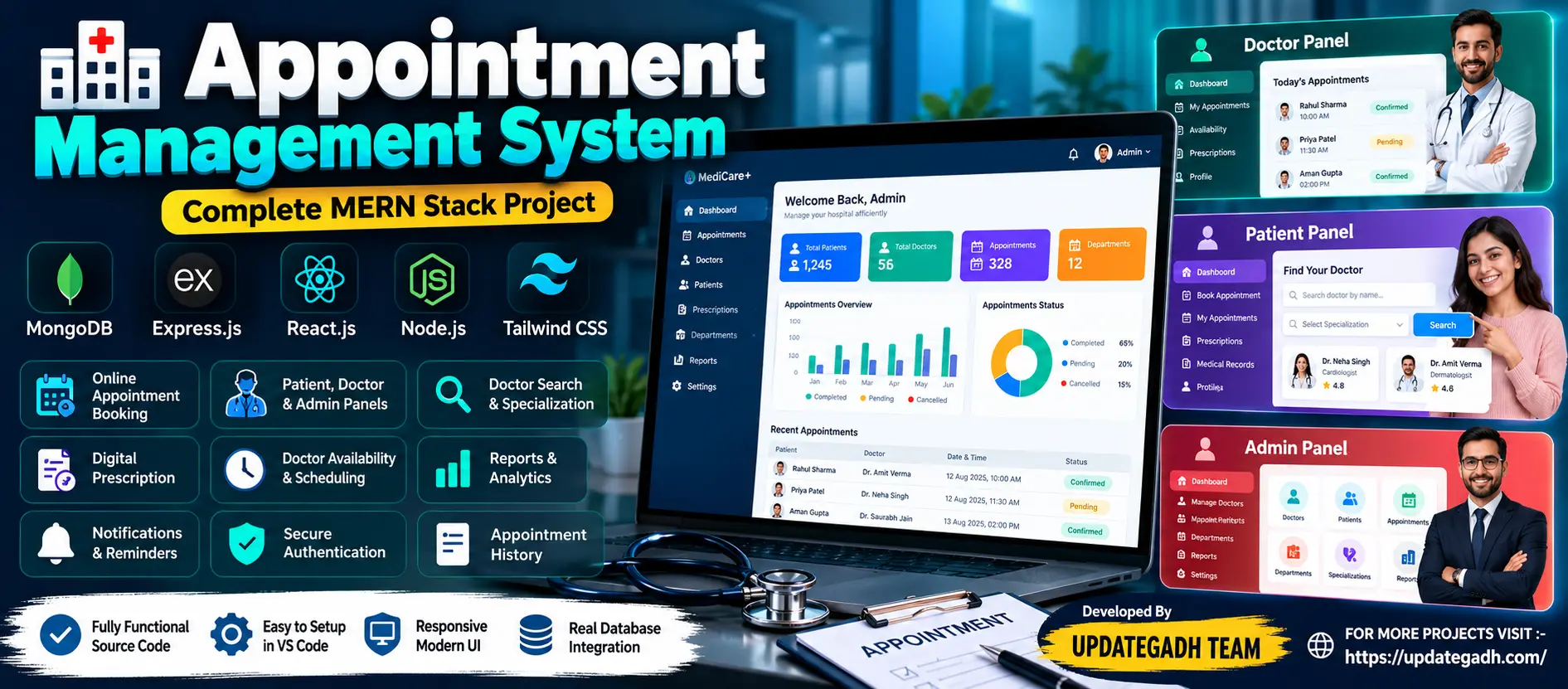
Appointment Management System Using MERN Stack
Appointment Management System Using MERN Stack is a full-stack web application designed to organize appointment scheduling, user records, service availability and booking management. Built with MongoDB, Express.js, React.js and Node.js, it provides a structured platform for submitting appointment requests, reviewing bookings and managing appointment information through a responsive interface.
What You Will Get
Project Overview
The Appointment Management System Using MERN Stack is a web-based application designed to simplify appointment scheduling and record management. It provides a centralized interface for organizing appointment requests, maintaining user information and managing booking details.
The project uses the MERN stack, which consists of MongoDB, Express.js, React.js and Node.js. React.js provides the frontend interface, Express.js and Node.js handle server-side operations, and MongoDB stores application data.
The system is suitable for learning full-stack JavaScript development, REST API integration, database operations, form handling and appointment workflow management.
Available Features
Appointment Booking
Provides an interface for users to submit appointment requests by entering the information required by the application. Appointment details can be stored and reviewed through the system.
Appointment Record Management
Organizes submitted appointment information in a centralized application. Authorized users can review and manage booking records according to the functionality implemented in the project.
User Information Management
Supports the management of user-related information required for appointment handling. The available operations depend on the implemented registration and account-management workflow.
Appointment Status Management
Allows appointment records to be organized according to the status options implemented in the application. Status management helps users and administrators understand the current state of a booking.
Responsive User Interface
The React-based frontend provides a web interface for interacting with the appointment system. Its layout can be used across supported desktop and mobile browser sizes according to the supplied styling.
Backend API Integration
Express.js and Node.js provide the backend layer for processing application requests and connecting the frontend with MongoDB.
Database Management
MongoDB stores structured application records, allowing the backend to create, retrieve, update and delete data through the implemented API endpoints.
Appointment Management Workflow
- Open the application in a web browser.
- Enter the information requested by the appointment form.
- Submit the appointment request.
- The backend processes the request and stores the relevant record in MongoDB.
- Authorized users review and manage the appointment according to the available application functionality.
- Check the appointment record and its current status through the interface where supported.
Technology Stack
- Frontend: React.js
- Backend Runtime: Node.js
- Backend Framework: Express.js
- Database: MongoDB
- Database Integration: MongoDB driver or Mongoose, depending on the supplied implementation
- API Communication: HTTP and REST-style endpoints, where implemented
- Development Environment: Visual Studio Code
Software and Tools Required
- Node.js and npm
- MongoDB installed locally or a configured MongoDB Atlas database
- Visual Studio Code
- A modern web browser
- Backend and frontend dependencies specified in the project package files
Project Applications
- Appointment scheduling demonstrations.
- Service booking and record management.
- Full-stack JavaScript development practice.
- React frontend and Express backend integration.
- MongoDB CRUD operations and data handling.
- Academic projects focused on web application development.
Installation and Execution
Extract the project files and open the project folder in Visual Studio Code. If the project contains separate backend and frontend folders, install the dependencies in each directory using npm. Configure the MongoDB connection using the environment variables and settings expected by the supplied source code.
Start the backend using the command defined in the backend package.json file. Then start the frontend using its configured development command and open the local URL displayed in the terminal.
More Details and Full Documentation
Project Modules
2. Appointment Booking Form Module
3. Appointment Record Management Module
4. User Information Management Module
5. Appointment Status Management Module
6. React Frontend Module
7. Express.js API Module
8. Node.js Backend Module
9. MongoDB Database Integration Module
10. Data Validation Module, where implemented
11. Appointment Search and Filtering Module, where implemented
12. Responsive Interface Module
Installation Guide
1. Install Node.js and npm on your computer.
2. Install MongoDB locally or configure a MongoDB Atlas database.
3. Install Visual Studio Code.
4. Extract the project ZIP file and open the project folder in VS Code.
5. Identify the backend and frontend directories from the supplied project files.
6. Open a terminal in the backend directory.
7. Install backend dependencies using: npm install
8. Configure the MongoDB connection and other required environment variables according to the supplied configuration files.
9. Start MongoDB if you are using a local database installation.
10. Start the backend using the command specified in the backend package.json file.
11. Open another terminal in the frontend directory.
12. Install frontend dependencies using: npm install
13. Configure the frontend API URL if the project requires it.
14. Start the frontend using the development command specified in its package.json file.
15. Open the local frontend URL displayed in the terminal.
16. Submit a test appointment request through the available interface.
17. Verify that the backend processes the request and that the record is stored in MongoDB.
18. Test the available appointment management operations.
19. If the project uses a different folder structure or startup command, follow the supplied project files and documentation.
FAQ for this project coming soon.
No reviews yet. Be the first to review!
Write a Review
Related Projects
 63% OFF
Featured
63% OFF
Featured
 55% OFF
Featured
55% OFF
Featured
 65% OFF
Featured
65% OFF
Featured