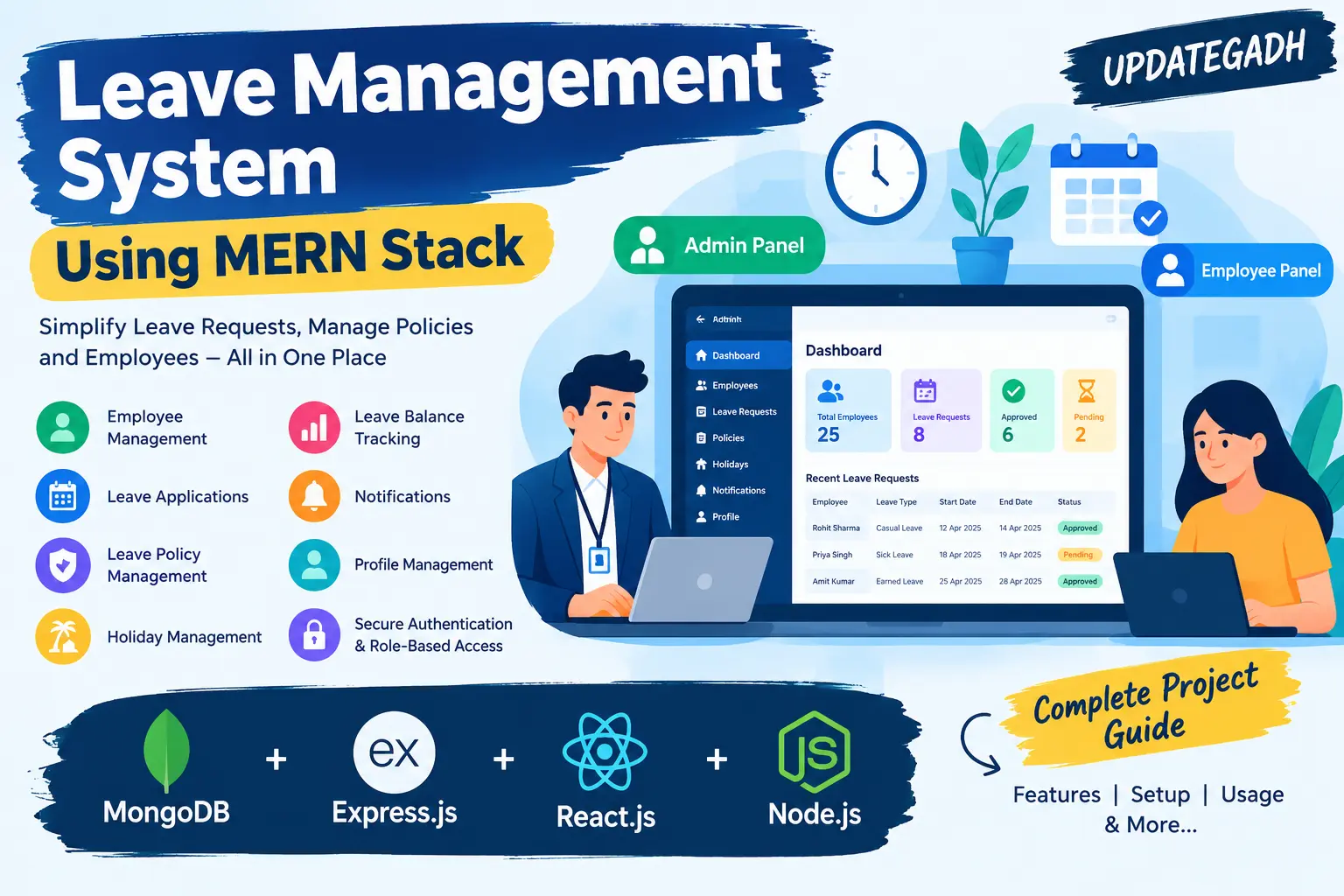
Leave Management System Using MERN Stack
Leave Management System Using MERN Stack is a full-stack employee leave management application built with MongoDB, Express.js, React.js, and Node.js. It provides separate Admin and Employee panels for employee record management, leave applications, approval workflows, leave policies, leave balance tracking, holiday information, notifications, and profile management.
What You Will Get
Project Overview
Leave Management System Using MERN Stack is a full-stack web application designed to simplify employee leave requests, approvals, employee records, and leave policy management. It provides separate Admin and Employee panels for handling leave-related activities through a centralized platform.
Developed using MongoDB, Express.js, React.js, and Node.js, the project demonstrates frontend development, backend API integration, database operations, authentication, and role-based access control. It is suitable for students learning full-stack web development and understanding employee leave management workflows.
Key Features
- Authentication and Role-Based Access: Provide separate access for Admin and Employee roles, with protected routes for relevant modules.
- Admin Dashboard: Offer centralized access to employee records, leave requests, policies, and other available management functions.
- Employee Management: Allow administrators to maintain employee records and associate leave applications with the correct users.
- Leave Application Management: Enable employees to submit leave requests and administrators to review requests and manage their status through an approval workflow.
- Leave Policy Management: Configure leave categories and limits, including Casual Leave, Sick Leave, Earned Leave, and Unpaid Leave, according to available policy settings.
- Leave Balance Tracking: Display employee leave balance information based on configured policy settings and relevant leave records.
- Holiday Management: Maintain holiday information through the available policy module.
- Notifications: Provide a notification module for leave-related updates according to the implemented workflow.
- Profile Management: Support profile-related functionality in the relevant user panels where available.
- Database Integration: Store employee accounts, leave requests, policies, notifications, and related records in MongoDB.
Administrator Workspace
The administrator workspace provides tools for managing employee records, reviewing leave requests, configuring leave categories and limits, and maintaining holiday information. It helps centralize the leave approval process and organize employee-related records.
Employee Workspace
Employees can access their panel to submit leave applications, review request status, and check their leave balance according to the configured application functionality. Role-based access helps restrict employee operations to the relevant modules.
Leave Application Workflow
- An employee signs in and submits a leave application.
- The application records the leave request and associates it with the employee.
- An administrator reviews the submitted request.
- The administrator updates the request status through the approval workflow.
- The employee checks the request status and available leave balance in the employee panel.
Leave Policy and Balance Management
The policy module supports leave categories such as Casual Leave, Sick Leave, Earned Leave, and Unpaid Leave, along with configurable limits. Leave balance calculations depend on consistent use of the configured policy values and relevant leave records. Holiday information is also supported by the policy module.
Technology Stack
- Frontend: React.js
- Backend: Node.js and Express.js
- Database: MongoDB
- Programming Language: JavaScript
- Architecture: Full-stack web application with backend APIs
Software and Tools Required
- Visual Studio Code
- Node.js and npm
- MongoDB or a configured MongoDB connection
- A modern web browser
- The extracted project source code
Project Applications
This project demonstrates full-stack JavaScript development, REST API integration, MongoDB database operations, authentication, role-based access, and leave approval workflows. It can be used as a learning project for employee management applications in offices and organizations.
More Details and Full Documentation
For the original project overview, screenshots, features, and installation instructions, visit the official UPDATEGADH project page:
Project Modules
2. Admin Dashboard Module
3. Employee Management Module
4. Leave Application Module
5. Leave Approval and Status Management Module
6. Leave Policy Management Module
7. Leave Balance Tracking Module
8. Holiday Management Module
9. Notifications Module
10. Profile Management Module
11. Backend API Module
12. MongoDB Database Module
Installation Guide
1. Install Node.js, npm, MongoDB, and Visual Studio Code.
2. Extract the project ZIP file and open the project folder in Visual Studio Code.
3. Open the terminal in the project root and navigate to the backend directory using: cd backend
4. Install backend dependencies using: npm install
5. Locate the backend database configuration or environment file.
6. Configure a valid MongoDB connection string in the location expected by the application.
7. Save the configuration and ensure the MongoDB server or Atlas connection is available.
8. Open a second terminal and navigate to the frontend directory from the project root using: cd frontend
9. Install frontend dependencies using: npm install
10. Check the backend package.json file for the available startup scripts.
11. Start the backend using its configured command. If a dev script exists, run: npm run dev
12. Check the frontend package.json file for the available startup scripts.
13. Start the frontend using its configured command. If a dev script exists, run: npm run dev
14. Open the frontend URL displayed in the terminal.
15. Sign in using a valid account and test employee management, leave applications, approval workflows, policy settings, and leave balance tracking.
No reviews yet. Be the first to review!
Write a Review
Related Projects
 20% OFF
Featured
20% OFF
Featured
 50% OFF
Featured
50% OFF
Featured
 33% OFF
Featured
33% OFF
Featured
 55% OFF
Featured
55% OFF
Featured