E-Furniture Using MERN Stack
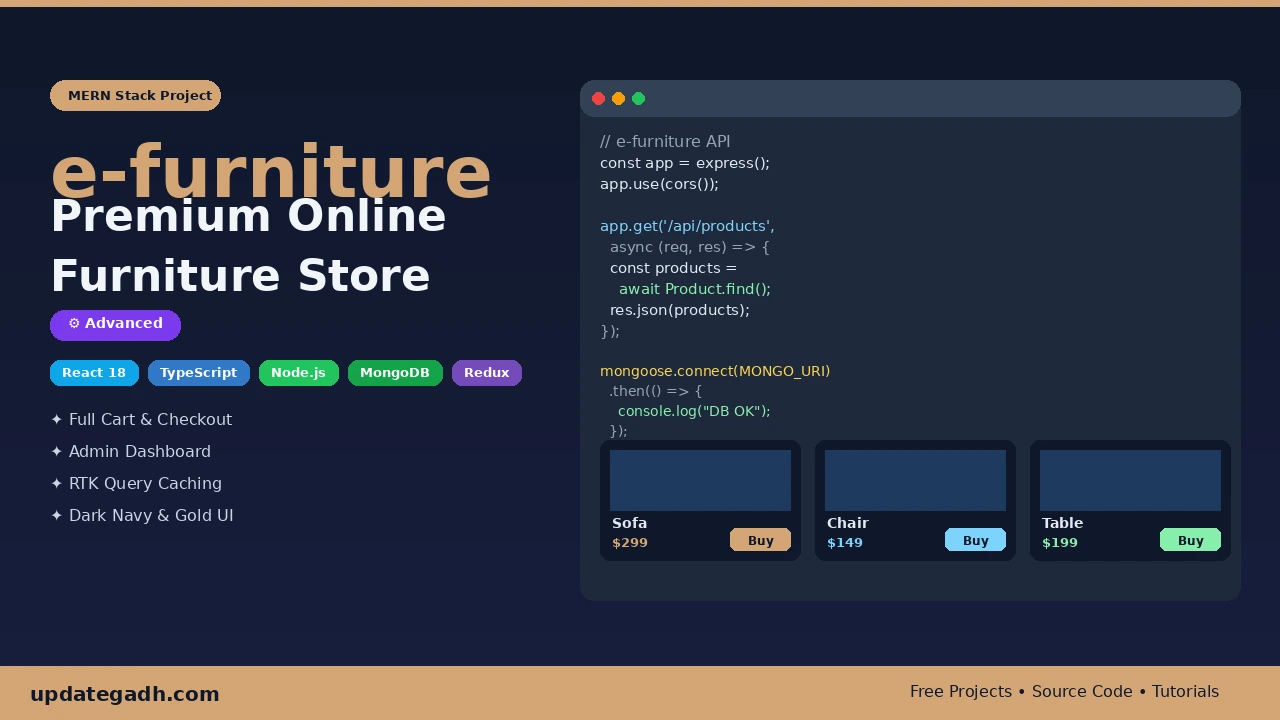
E-Furniture Using MERN Stack is a full-stack furniture e-commerce application built with React 18, TypeScript, Node.js, Express.js, and MongoDB. It includes product browsing, category filters, shopping cart, wishlist, multi-step checkout, order management, secure authentication, and an admin dashboard with sales statistics and revenue charts.
What You Will Get
Project Overview
E-Furniture Using MERN Stack is a full-stack e-commerce web application designed for selling furniture online. It provides customers with a convenient way to browse furniture products, explore categories, add items to a shopping cart, save favorites, and place orders through a multi-step checkout process.
The application uses React 18 and TypeScript on the frontend, with Node.js, Express.js, and MongoDB powering the backend. Redux Toolkit and RTK Query manage application state and API requests, while Material UI provides a consistent dark navy and warm gold interface.
Key Features
- Product Browsing: Browse available furniture products and explore product details.
- Category Filters and Search: Find products using category filters and search functionality.
- Product Quick View: Open a quick-view modal to inspect product information.
- Shopping Cart: Add products, adjust quantities, and manage cart items.
- Wishlist: Save favorite furniture products for later.
- Multi-Step Checkout: Review shipping details, payment method, and order summary before placing an order.
- User Authentication: Register and sign in using email and password, with bcrypt password hashing and protected routes.
- Order Management: Place orders, review order history, and manage order statuses.
- Admin Dashboard: View sales statistics and revenue charts while managing products, users, and orders.
- Product Management: Create, update, and delete product records through administrator functions.
- User Management: View user records, inspect profiles, update account details, and manage user accounts.
- Persistent Cart and Wishlist: Preserve cart and wishlist state across browser sessions using Redux Persist.
- Responsive Design: Adapt the interface for desktop, tablet, and mobile screens.
- Interior Design Blog: Display interior design articles through the blog section.
- About Page: Present company information through a dedicated page.
- Notifications: Display success messages, errors, and cart feedback using snackbar notifications.
Customer Workspace
Customers can browse furniture, filter product categories, view product details, maintain a shopping cart, save wishlist items, enter shipping information, select a payment method, and confirm orders. Their profile area also provides access to order history and account information.
Administrator Workspace
The administrator dashboard supports product CRUD operations, user management, and order monitoring. It displays sales statistics and revenue charts using data retrieved through the application API. Administrators can update order statuses and manage product records from the protected administration area.
Shopping Cart and Checkout
The cart supports quantity adjustments and persistent storage of cart state. During checkout, customers review shipping details, payment information, and the order summary. After order confirmation, the backend saves the order in MongoDB with an initial Pending status and the application displays an order confirmation screen.
Technology Stack
- Frontend: React 18 and TypeScript 5
- UI Library: Material UI v5
- State Management: Redux Toolkit and Redux Persist
- API Data Fetching: RTK Query
- Routing: React Router v6
- Carousels: Swiper.js
- Notifications: Notistack
- SEO: React Helmet
- Backend: Node.js and Express.js
- Database: MongoDB
- Object Modeling: Mongoose
- Password Security: bcrypt
- Environment Configuration: dotenv
Software and Tools Required
- Node.js version 18 or higher
- npm version 9 or higher
- MongoDB Community Server or a compatible MongoDB connection
- Visual Studio Code
- A modern web browser
Demo Login Credentials
The project documentation lists the following development accounts:
- Admin: super.admin@gmail.com
- Admin Password: @super123
- User: john@gmail.com or jane@gmail.com
- User Password: user123
These are sample development credentials. Change default passwords and review authentication settings before deploying the application publicly.
Project Applications
This project demonstrates full-stack e-commerce development, product catalog management, cart persistence, checkout workflows, user authentication, REST API integration, and database-backed administration. It is suitable for students who want practical experience with the MERN stack and TypeScript.
More Details and Full Documentation
For the original project overview, screenshots, setup instructions, API endpoints, and documentation, visit the official UPDATEGADH project page:
Project Modules
2. Product Browsing and Search Module
3. Product Category Filter Module
4. Product Quick-View Module
5. Shopping Cart Module
6. Wishlist Module
7. Checkout and Shipping Module
8. Order Placement Module
9. Order History Module
10. Admin Dashboard Module
11. Product Management Module
12. User Management Module
13. Order Status Management Module
14. Sales Statistics and Revenue Charts Module
15. Interior Design Blog Module
16. About Page Module
17. Redux State Management Module
18. REST API and MongoDB Module
Installation Guide
1. Install Node.js version 18 or higher, npm version 9 or higher, MongoDB, and Visual Studio Code.
2. Extract the project ZIP file and open the project folder in Visual Studio Code.
3. Create a .env.local file in the project root.
4. Configure REACT_APP_BASE_URL in .env.local with the backend API base URL expected by the frontend.
5. Open a terminal in the project root and navigate to the backend directory using: cd server
6. Create a .env file inside the server directory.
7. Add the following backend configuration: PORT=5000 and MONGO_URI=mongodb://127.0.0.1:27017/e-furniture
8. Start MongoDB and ensure the configured database connection is available.
9. Install backend dependencies using: npm install
10. Return to the project root using: cd ..
11. Install frontend dependencies using: npm install --legacy-peer-deps
12. Open a terminal in the server directory and seed the database using: node seed.js
13. Start the backend using: node index.js
14. Open another terminal in the frontend project directory and run: npm start
15. Open the frontend address displayed in the terminal.
16. Sign in with the documented development account: super.admin@gmail.com / @super123.
17. Test product browsing, category filtering, cart, wishlist, checkout, order management, and administrator features.
18. Change the sample credentials before using the application in a public or production environment.
No reviews yet. Be the first to review!
Write a Review
Related Projects
 65% OFF
Featured
65% OFF
Featured
 50% OFF
Featured
50% OFF
Featured
 65% OFF
Featured
65% OFF
Featured
 20% OFF
Featured
20% OFF
Featured